ScalewitAI.com
  • Home
  • AI SEO Tools
    • AI Writing Tools
  • About Us
  • Newsletters
Subscribe
ScalewitAI.com
ScalewitAI.com
  • Home
  • AI SEO Tools
    • AI Writing Tools
  • About Us
  • Newsletters

Surfer SEO vs Page Optimizer Pro 2026: Broader Workflow or On-Page Control?

  • The ScalewitAI Team
  • July 31, 2026
  • 10 minute read
Add ScalewitAI as a Preferred Source Google Preferred Sources lets you personalize your search results. Adding ScalewitAI tells Google to prioritize our content, so our data-backed AI and SaaS reviews are more likely to reach you first. Unlike most review sites, we buy and test AI products and SaaS ourselves and track the real performance, pricing, and limits since 2024 — with no sponsored verdicts.
Total
0
Shares
0
0
0

Surfer SEO is the stronger fit for teams that want content optimization connected to domain auditing, topical planning, integrations, collaboration, and plan-based AI visibility tracking. Page Optimizer Pro is the stronger fit for on-page specialists who value granular POP reports, E-E-A-T and NLP guidance, credit-based AI tools, Watchdog monitoring, and a lower displayed monthly entry point. Neither product's proprietary score, recommendation, or AI visibility metric guarantees rankings, traffic, mentions, or citations.

At a glanceSurfer SEOPage Optimizer Pro
Public starting price checked August 10, 2026Discovery: $49/month, billed yearlyBasic: $40/month, billed monthly
First scaled optimization tierStandard: $99/month billed yearly; 360 documents and 25 weekly AI promptsUnlimited: $62/month billed yearly; unlimited POP and Watchdog reports under fair use, plus 50 monthly credits
Public evaluation pathPricing page says Start for Free; reviewed page does not state a durationFree on-page checker without signup; paid plans carry a 7-day refund guarantee, not a documented free product trial
Core optimization modelContent Editor with real-time Content Score, outlines, entity guidance, and integrationsRank Engine reports, POP Content Editor, NLP, E-E-A-T, schema, and report-based recommendations
Existing-page maintenanceContent Audit connects GSC data, opportunities, ranking changes, and weekly recommendationsPOP Watchdog checks competitor and page-factor changes and returns alerts with action items
AI visibilityAI Tracker prompt allowances and refresh cadence vary by Surfer planAI Visibility Tracker is included across POP plans and consumes 3 credits per run plus 1 per question
Best starting fitTeams consolidating optimization, planning, auditing, publishing handoffs, and AI visibilitySEOs prioritizing detailed on-page control, reports, maintenance alerts, and flexible credit use
Surfer plan evaluationEvaluate Surfer's current eligible plansNot applicable

The pricing units are not interchangeable. Surfer meters documents, tracked pages, AI prompts, workspaces, seats, and plan-gated capabilities. POP meters reports, shared monthly credits, questions per AI visibility run, Watchdog runs, and team sub-accounts.

Quick Verdict: Should You Choose Surfer SEO or Page Optimizer Pro?

Choose Surfer SEO when a connected content-operations workflow matters more than the lowest displayed entry price; choose Page Optimizer Pro when deep on-page reports, POP-specific E-E-A-T and NLP checks, Watchdog maintenance, and credit control matter more. The deciding question is which workflow stage and usage unit your team will exhaust first.

If your primary condition is...Better starting pointWhy
Lowest displayed monthly entry pricePage Optimizer ProBasic is displayed at $40 monthly, while Surfer Discovery is $49 monthly billed yearly.
Domain auditing plus topical planning in the same product familySurfer SEOContent Audit and Topical Map sit alongside Content Editor and Sites.
Unlimited optimization reports under fair usePage Optimizer Pro UnlimitedThe annual card lists unlimited POP and Watchdog reports, while other POP tools still use 50 monthly credits.
A broad public integration catalogSurfer SEOSurfer documents WordPress, Google Docs, Contentful, Zapier, ChatGPT, and additional workflow connections.
A maintenance alert tied to changing on-page factorsPage Optimizer ProWatchdog reports competitor and page-factor changes and supplies recommended tasks.
Predictable plan-based AI prompt allowancesSurfer SEOStandard and higher plans list prompt counts and weekly or daily refresh cadence.
Flexible AI visibility questions paid from shared creditsPage Optimizer ProEach tracker run costs 3 credits plus 1 credit per question, with cost shown before running.

If Surfer's wider workflow matches your operating model, review its current eligible plans before converting an annual-equivalent price into a workload budget.

What Is Surfer SEO?

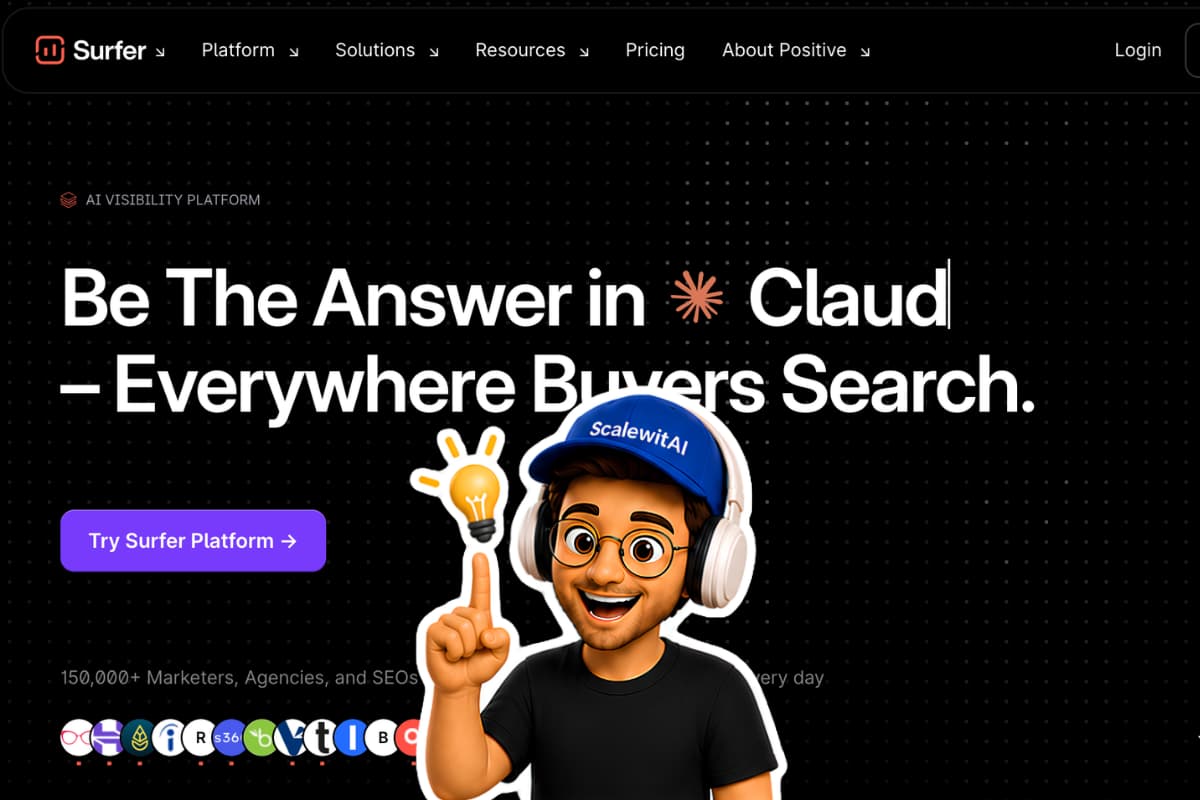
Surfer SEO is a vendor-described AI SEO and content-intelligence platform that connects live content optimization with existing-page auditing, topical planning, integrations, collaboration, and AI visibility monitoring. Its homepage positions the platform for Google and AI answer systems such as ChatGPT, Claude, Gemini, Perplexity, and Google AI Overviews.
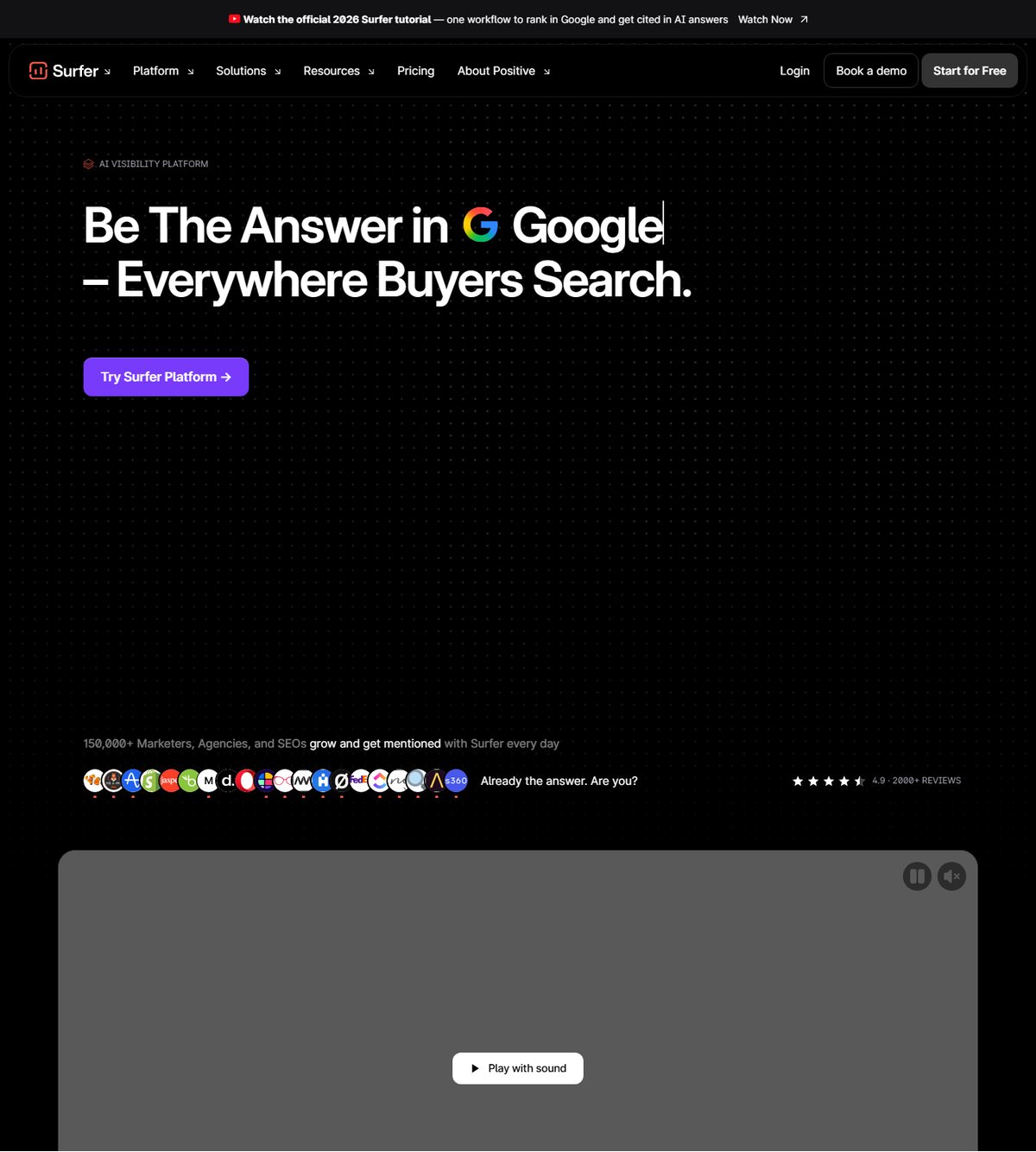
Surfer SEO homepage showing its connected Google and AI search workflow
Surfer's homepage presents optimization, existing-page work, topic discovery, site analysis, and AI visibility as parts of one operating system, which suits teams trying to reduce handoffs between separate tools.

Surfer's Content Editor documents a responsive Content Score, competitor-informed guidelines, entity and topic coverage, outline support, shareable editing, and publishing integrations. Its Content Audit adds GSC-connected performance review and opportunity prioritization, while Topical Map supports cluster research and coverage planning. These are documented capabilities, not proof that following every recommendation will improve a particular page.

What Is Page Optimizer Pro?

Page Optimizer Pro, usually called POP, is a vendor-described on-page SEO suite built around Rank Engine reports, content briefs, NLP and E-E-A-T guidance, a content editor, AI-assisted writing, schema, keyword tools, Watchdog maintenance, and AI visibility tracking. Its homepage emphasizes on-page optimization across Google and LLM discovery rather than positioning itself as a broad technical SEO platform.

POP's public workflow asks for project and page information, runs its proprietary analysis, then returns recommendations across the page. The product family extends that report into the Content Editor, AI Writer, Watchdog, Chrome extension, keyword tools, E-E-A-T and NLP modules, schema assistance, and an AI Visibility Tracker. The breadth is meaningful, but it remains anchored in on-page execution and shared credits rather than Surfer's document, workspace, and prompt model.

How Do Their Content-Optimization Workflows Differ?

Surfer organizes optimization around a collaborative editor connected to planning and site-level modules, while POP starts with page reports and carries their recommendations into editing, writing, monitoring, and browser-based execution. Both use competitor-informed guidance, but the unit of work and the surrounding handoffs differ.

<div class="scalewitai-table-scroll" role="region" aria-label="Surfer SEO versus Page Optimizer Pro comparison data table” style=”max-width:100%”>
Workflow attributeSurfer SEOPage Optimizer ProBuyer interpretation
Initial analysisContent Editor selects relevant organic competitors and generates live guidelinesRank Engine generates a POP report from page and keyword inputsReview competitor selection before treating either score as authoritative.
EditingContent Editor updates score, terms, outline, entities, and topic coveragePOP Content Editor shows recommendations, scores, and term counts in near real timeBoth support iterative editing, but POP is more report-centric.
BriefingOutline Builder and Content Editor support headings and questionsPOP Content Brief, NLP, E-E-A-T, and report recommendations guide the writerCompare brief export, sharing, and client-delivery needs.
AI writingSurfy, Surfer AI, Auto-Optimize, and Humanizer support plan-dependent creation and revisionPOP AI Writer offers Auto and Guided modes and consumes shared creditsVerify model, credit, and human-review controls before scaling.
Existing pagesContent Audit identifies domain opportunities and ranking changesWatchdog monitors selected pages and factor changesSurfer is broader at domain prioritization; POP is more explicit about page alerts.
Publishing handoffWordPress, Google Docs, Contentful, and other integrationsContent Editor export, private sharing links, and Chrome extension workflowsSurfer publishes a wider named integration set; POP favors direct page and browser workflows.

How Does Surfer's Content Editor Work?

Surfer's documented editor combines a live score, competitor-informed term and entity guidance, outline tools, collaboration, and publishing connections in one writing surface. It can be shared with external writers, supports comments and history according to plan, and can overlay guidelines in WordPress, Google Docs, or Contentful through documented integrations.

Surfer Content Editor showing score and content optimization guidance
Surfer's editor is designed as a shared production workspace rather than only a report viewer, which matters when strategists, writers, and editors have separate responsibilities.

A higher Content Score is still a proprietary assessment. It does not establish that a page meets search intent, contains accurate information, earns links, or will be selected by an AI answer engine. Teams need editorial standards that can override a term suggestion when it weakens clarity or evidence.

How Does POP's Report-to-Editor Workflow Work?

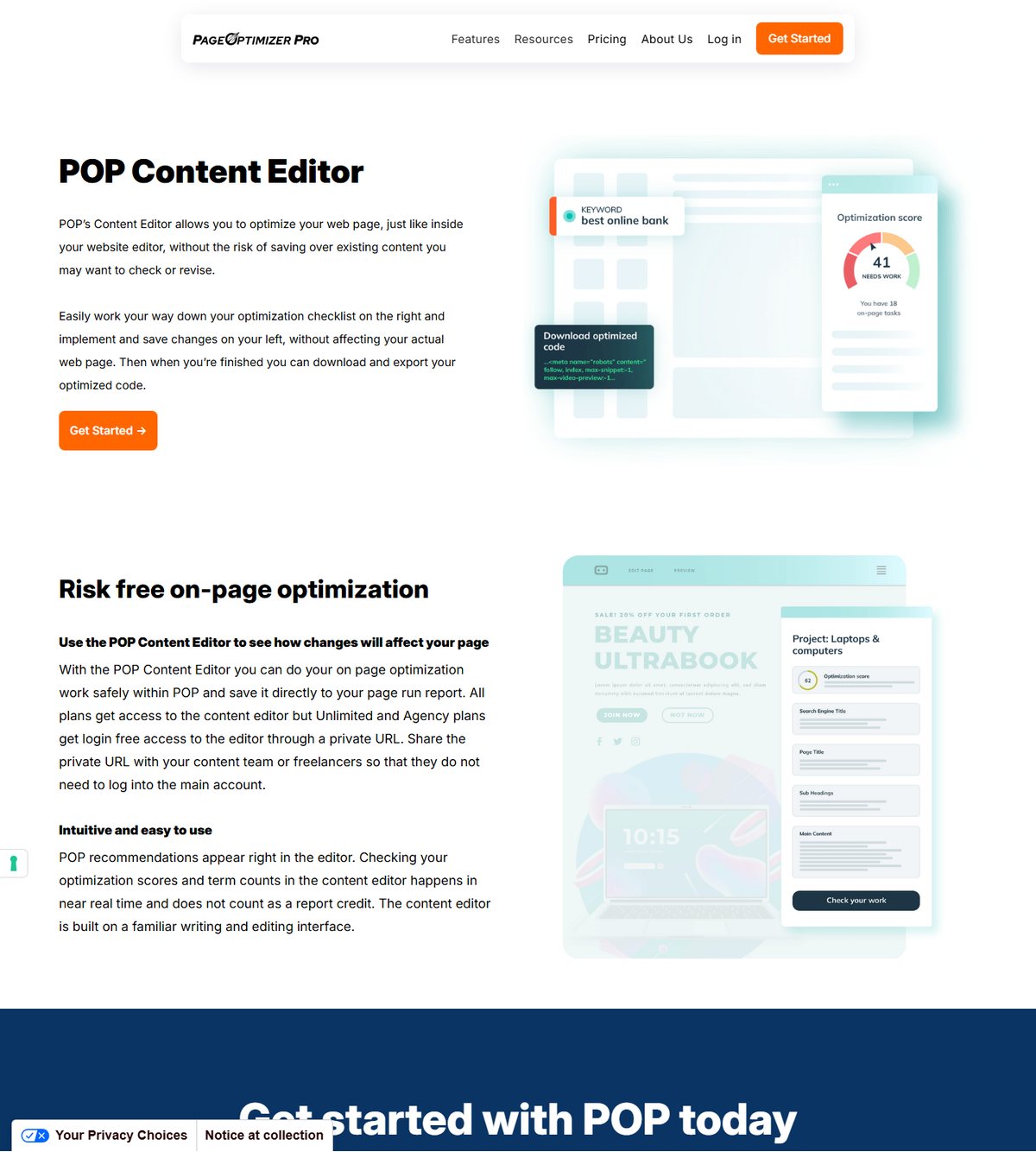
POP's documented workflow creates an optimization report first, then lets the writer apply its checklist in a separate editor without overwriting the live page. The POP Content Editor shows recommendations, term counts, and scores in near real time; checking changes inside the editor does not consume a report credit.

Page Optimizer Pro Content Editor showing on-page recommendations
POP's editor keeps recommendations next to a familiar writing surface and saves changes back to the page-run report, a useful pattern for specialists who want a controlled optimization pass before deployment.

The page says all plans can access the editor and that higher plans support login-free private links for writers or freelancers. It also says optimized code can be downloaded and exported. Buyers should verify current plan labels in the account because some feature pages use older names such as Agency or Premium while the current pricing page emphasizes Basic, Unlimited, and Teams.

Which Tool Handles AI Visibility Better?

Surfer is easier to budget when a fixed plan includes a defined prompt allowance and refresh cadence, while POP is more flexible when teams want to choose the number of questions per run and pay from shared credits. Neither tracker represents every answer shown to every user.

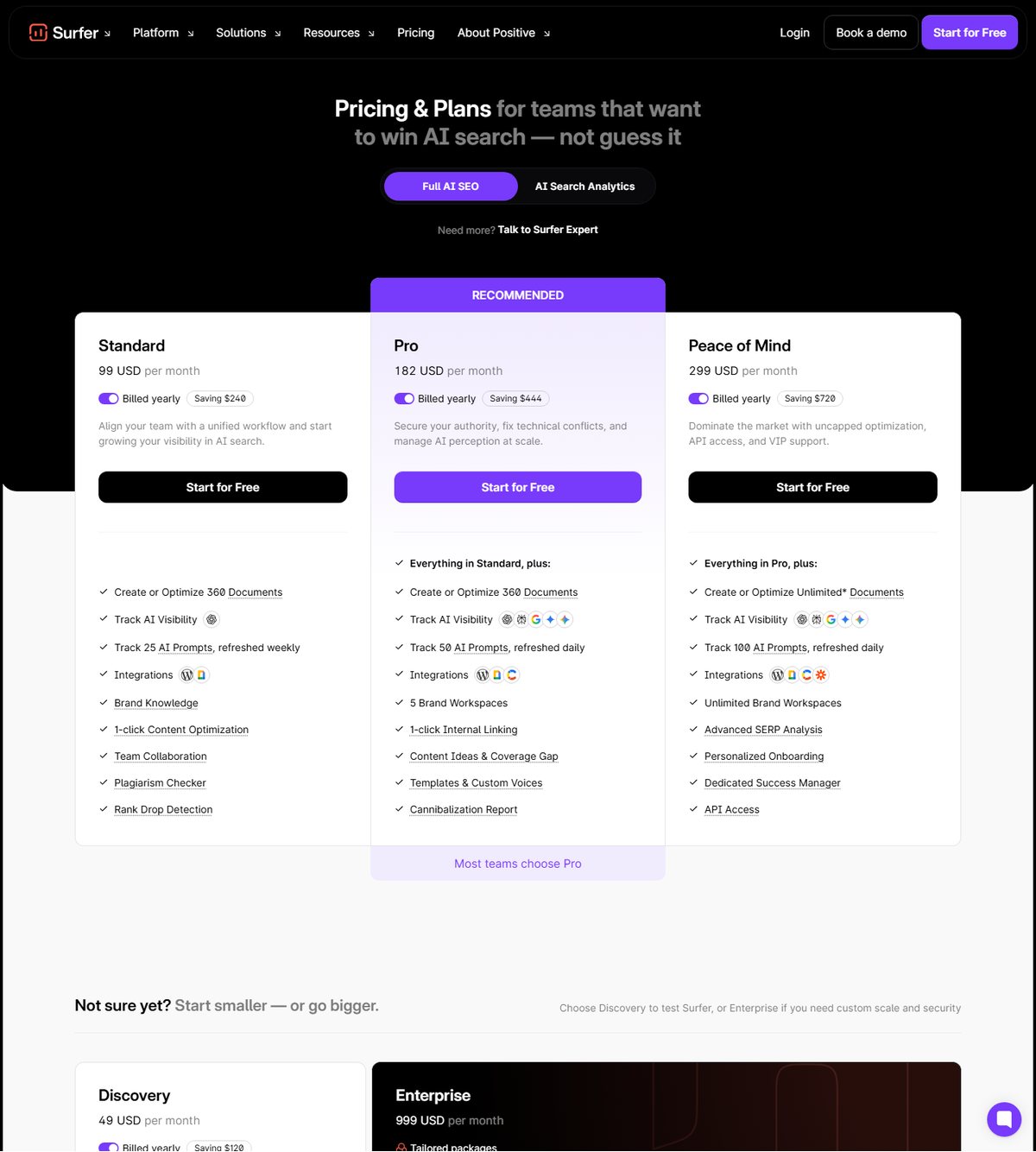
Surfer Standard lists 25 prompts refreshed weekly, Pro lists 50 prompts refreshed daily, and Peace of Mind lists 100 prompts refreshed daily. The separate AI Search Analytics offer lists 100 prompts and daily refresh at its displayed configuration. Surfer also documents visibility score, share of voice, mention gaps, sentiment, brand workspaces, and CSV exports on applicable plans.

POP says its AI Visibility Tracker is included in every paid plan, beginning with Basic at $40 monthly. A run costs 3 POP Credits plus 1 per tracked question, so a ten-question run costs 13 credits. The page lists ChatGPT, Google AI, Gemini, Claude, and Perplexity and lets buyers run once, weekly, or monthly. Because POP credits also power other modules, visibility monitoring competes with writing, E-E-A-T, NLP, and report usage for the same allowance.

AI visibility results are samples from selected questions, models, run times, and vendor methodology. They can change with retrieval state, model updates, geography, personalization, and prompt wording. Use either tool to create an investigation queue, not as proof of total market visibility.

How Do Pricing, Reports, and Credits Compare?

POP offers the lower displayed monthly entry and an Unlimited tier centered on report volume, while Surfer's higher tiers bundle broader content operations and fixed AI prompt allowances. A direct dollar comparison without workload units is misleading.

Plan snapshot, August 10, 2026Displayed priceCore allowanceImportant boundary
Surfer Discovery$49/month billed yearly120 documents; 10 tracked pagesNo listed AI prompt allowance on the Discovery card
Surfer Standard$99/month billed yearly360 documents; 25 AI prompts refreshed weeklyAdds integrations, collaboration, optimization, and visibility features
Surfer Pro$182/month billed yearly360 documents; 50 AI prompts refreshed daily; 5 brand workspacesAdds internal linking, content ideas, gap tools, and cannibalization reporting
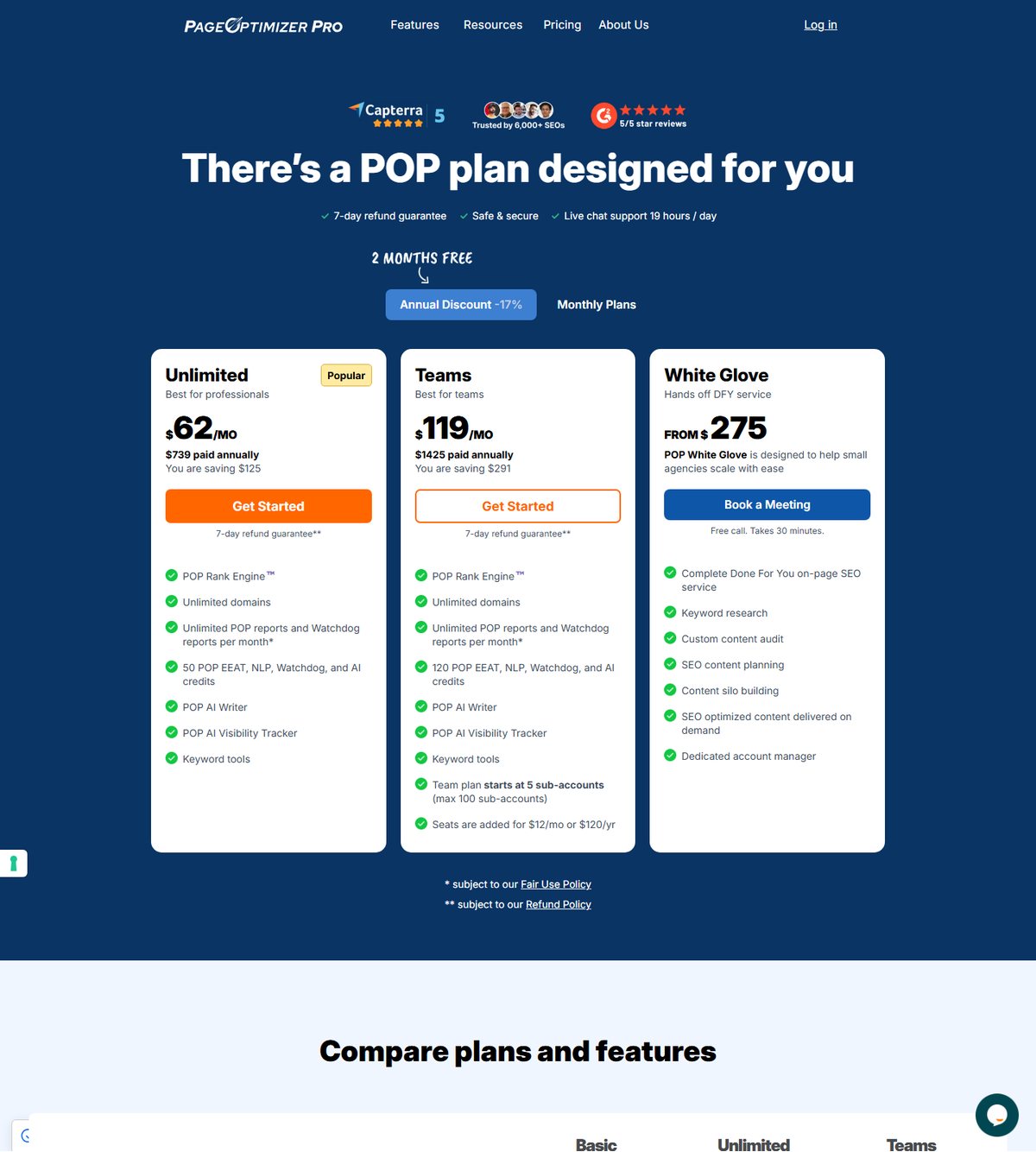
POP Basic$40/month billed monthlyUnlimited domains; 20 monthly POP creditsReports, Watchdog, AI writing, NLP, and other actions draw from credits
POP Unlimited$62/month billed yearly or $72 monthlyUnlimited POP and Watchdog reports under fair use; 50 monthly creditsOther POP tools remain credit-limited
POP Teams$119/month billed yearly or $143 monthlyUnlimited reports under fair use; 120 credits; starts with 5 sub-accountsExtra seats displayed at $12/month or $120/year
Surfer SEO pricing showing Discovery, Standard, Pro, and Peace of Mind plans
Surfer's pricing organizes capacity around documents, prompts, seats, history, workspaces, and feature gates, so buyers should model annual usage before choosing an annual-billing tier.
Page Optimizer Pro pricing showing Basic, Unlimited, and Teams allowances
POP combines unlimited-report language on higher plans with a shared credit wallet for other modules; unlimited reports do not mean unlimited AI writing, E-E-A-T, NLP, or AI visibility usage.

POP's pricing page says purchased credit bundles do not expire and lists per-action costs, but its AI Writer page shows conflicting exchange-rate language in different sections. Treat the current in-account calculator as the authority before estimating generation cost. Surfer annual credits reset yearly according to its pricing FAQ, so its displayed monthly number should not be treated as month-to-month cash flow.

POP provides a 7-day refund guarantee subject to its refund policy. Its free on-page checker and no-signup AI Writer preview are evaluation paths, but they do not establish a seven-day free subscription trial. Surfer says Start for Free, but the reviewed pricing page does not state a trial duration. Verify checkout terms for both products before purchase.

How Do Planning, Monitoring, Integrations, and Team Workflows Compare?

Surfer has the stronger documented planning and named-integration layer, while POP offers more specialized page monitoring and a team model built around sub-accounts, private editor links, and browser execution. Agencies should map client isolation and approvals before focusing on feature count.

Operating needSurfer SEOPage Optimizer Pro
Topic discoveryTopical Map and Sites organize gaps, clusters, and domain coverageKeyword Strategy tools generate, filter, and cluster keyword lists
Existing-page prioritizationContent Audit connects GSC, evaluates a domain, and highlights opportunitiesWatchdog monitors configured pages and returns factor-change alerts and tasks
Publishing workflowWordPress, Google Docs, Contentful, Zapier, and additional integrations are listedChrome extension, editor export, private links, and web-builder workflows are emphasized
CollaborationSeats, live collaboration, comments, folders, history, and external links vary by planTeams starts with 5 sub-accounts; extra seats are separately priced
AutomationAPI access appears on Peace of Mind and enterprise optionsPOP markets an API for custom apps and dashboards; confirm plan and credit terms
Enterprise controlsEnterprise card lists SSO, enterprise security, advisory, onboarding, and custom limitsPublic evidence emphasizes Teams, API, White Glove service, and up to 100 sub-accounts

POP Watchdog is not the same as a general rank tracker. The vendor says it checks page and competitor factors, then sends alerts and action items. Basic and Unlimited access monthly or quarterly reports, while Teams also supports weekly frequency. One run costs one credit on credit-based plans, and Unlimited or Teams can run Watchdog without report-count limits under the stated fair-use policy.

Surfer's Content Audit is broader at domain-level prioritization because it connects GSC, identifies opportunities, tracks ranking changes, and feeds pages back into Content Editor. Its Topical Map extends the workflow upstream. Buyers that already use separate keyword, audit, and publishing systems may not value this consolidation enough to justify the higher tier.

Who Should Choose Surfer SEO?

Surfer SEO fits teams that want a connected content operating layer spanning planning, production, maintenance, integrations, and AI visibility. It is most defensible when several roles will use the same workflow and the annual commitment replaces other handoffs.

  • Content teams that need shareable editors, comments, history, and external writer links.
  • Agencies that rely on WordPress, Google Docs, Contentful, or Zapier handoffs.
  • SEO leaders that want GSC-connected Content Audit and Topical Map beside the editor.
  • Brand teams that prefer fixed AI prompt allowances and plan-defined refresh cadence.
  • Enterprise buyers that require SSO, custom limits, onboarding, security controls, API access, or advisory services.

Discovery is not a miniature version of every Surfer feature. If AI tracking, integrations, collaboration, or advanced optimization matters, model Standard or higher rather than comparing POP against the $49 card alone.

Who Should Choose Page Optimizer Pro?

Page Optimizer Pro fits on-page specialists, consultants, and agencies that want detailed page reports, flexible credit use, maintenance alerts, and team sub-accounts without buying Surfer's broader workflow. POP Unlimited is especially relevant when report volume matters more than bundled prompt allowances.

  • Consultants who build deliverable POP reports and briefs for selected pages.
  • Teams that want unlimited POP and Watchdog reports under fair use on higher plans.
  • Agencies that need private writer links or five-plus sub-accounts.
  • SEOs that prefer Chrome-based implementation across different web builders.
  • Teams that want to allocate one credit wallet across AI visibility, writing, NLP, E-E-A-T, schema, and other actions.
  • Buyers that value Watchdog's factor-change alerts and recommended tasks for maintained pages.

POP can become less predictable when several modules compete for credits. Estimate visibility runs, AI generation, NLP, E-E-A-T, schema, and report reruns separately, then compare the total against included and purchased credits.

What Are the Main Pros and Cons?

Surfer provides broader workflow consolidation, while POP provides more focused on-page control and credit flexibility; each advantage introduces a corresponding cost or complexity trade-off. These are evidence-based buyer assessments, not hands-on product ratings.

Surfer SEO Pros and Cons

Surfer's main advantage is workflow breadth, while its main drawback is the higher annual-billing baseline for the tiers that unlock the strongest team and AI visibility capabilities.

Pros

  • Content Editor, Content Audit, Topical Map, Sites, integrations, and AI Tracker form a connected product family.
  • Standard and higher cards display prompt counts and refresh cadence.
  • Collaboration and publishing connections support multi-role content operations.
  • Enterprise card documents SSO, security, onboarding, custom limits, and advisory support.

Cons

  • Discovery lacks several capabilities highlighted on higher cards.
  • Annual-equivalent pricing requires upfront yearly payment according to the FAQ.
  • Documents and annual credits are not comparable with POP's report and monthly-credit model.
  • A proprietary Content Score cannot validate search intent, accuracy, authority, or outcomes.

Page Optimizer Pro Pros and Cons

POP's main advantage is a focused report-to-action workflow with lower displayed entry pricing, while its main drawback is the need to understand shared credits, fair-use language, and inconsistent legacy plan labels across public pages.

Pros

  • Basic is displayed at $40 monthly with unlimited domains and 20 monthly credits.
  • Unlimited and Teams list unlimited POP and Watchdog reports under fair use.
  • Content Editor changes and term checks do not consume a report credit.
  • Watchdog links page-factor changes to action items rather than only reporting a position change.
  • AI Visibility Tracker exposes a clear 3-plus-questions credit formula.

Cons

  • AI visibility, AI writing, NLP, E-E-A-T, and other tools compete for shared credits.
  • Some feature pages use plan labels that differ from the current pricing cards.
  • AI Writer pages contain inconsistent exchange-rate wording, so cost estimates require in-account confirmation.
  • POP's public named-integration layer is narrower than Surfer's.
  • Unlimited report language remains subject to a fair-use policy.

What Should You Verify Before Switching?

Verify billing basis, plan gates, usage equations, collaboration boundaries, and the exact AI visibility workflow before migrating content production. A feature checklist cannot reveal whether your team will hit a document, prompt, report, credit, seat, or review bottleneck.

Verification testWhy it mattersEvidence to collect during evaluation
Run one new-page and one refresh workflowTools may differ between creation and maintenanceSetup time, competitor selection, revisions, and handoff steps
Reconcile pricing unitsDocument, report, prompt, and credit allowances are not equivalentMonthly production forecast plus annual cash commitment
Test a representative AI visibility setPrompt and question economics differModels, questions, cadence, export, and credit or prompt consumption
Check writer and client accessSeats, sub-accounts, private links, and external collaboration differPermission matrix and client separation plan
Test your CMS workflowNamed integrations and Chrome execution are not the sameDraft transfer, formatting, images, comments, approvals, and rollback
Validate recommendations editoriallyBoth scores can encourage irrelevant optimizationSearch-intent review, factual checks, expert sign-off, and style QA
Confirm current POP exchange ratesPublic AI Writer sections conflictIn-account cost preview and support confirmation
Confirm cancellation and refund termsA refund guarantee is not a free trialCheckout terms, billing date, refund scope, and support record

Use the same article, target query, location, brief, editorial rubric, and human reviewer in both evaluations. Compare the number of accepted changes and the total operating cost, not just the highest score shown by either vendor.

Which Tool Is Better for Your Team?

Surfer SEO is the better choice for teams buying a connected planning-to-publishing and maintenance workflow; Page Optimizer Pro is the better choice for teams buying focused on-page analysis, unlimited higher-tier reports, Watchdog alerts, and flexible credit use. Neither is universally better because they package scale differently.

Choose Surfer if Content Audit, Topical Map, named integrations, collaboration, enterprise controls, and fixed AI prompt allowances can replace multiple handoffs. Choose POP if your process begins with selected pages, your team values detailed report-driven execution, and you can forecast shared credits across AI visibility and content tools.

For many agencies, the deciding test is operational: Surfer asks whether a broader shared platform justifies its higher annual commitment; POP asks whether lower entry pricing and unlimited report language remain economical after credit-consuming modules and team seats are modeled. Run both against one real client workflow before committing production standards to a proprietary score.

FAQ

Is Page Optimizer Pro cheaper than Surfer SEO?

POP has the lower displayed entry price, but it is not universally cheaper. POP Basic is $40 monthly, while Surfer Discovery is $49 monthly billed yearly. POP Unlimited is $62 monthly billed yearly and Surfer Standard is $99 monthly billed yearly, but their report, credit, document, prompt, seat, and feature allowances are not equivalent.

Does Page Optimizer Pro offer a free trial?

The reviewed public pages document free evaluation tools and a 7-day refund guarantee, not a seven-day free subscription trial. POP offers a free on-page checker and no-signup AI Writer preview, while paid plans are covered by refund terms. Read the checkout and refund policy before purchase.

Which tool is better for on-page SEO reports?

POP is the more report-centered choice, while Surfer is the more editor-and-workflow-centered choice. POP Unlimited and Teams emphasize unlimited POP reports under fair use; Surfer emphasizes documents, live Content Editor guidance, and connected audit and planning modules.

Which tool is better for AI visibility tracking?

Surfer is easier to budget through fixed plan prompt allowances, while POP is more flexible through question-based credit use. POP charges 3 credits per run plus 1 per question; Surfer lists prompt counts and refresh cadence on qualifying plans. Neither measures every possible AI answer.

Can POP and Surfer optimize existing content?

Both vendors document existing-content workflows, but the scope differs. Surfer Content Audit prioritizes opportunities across a connected domain and sends pages into Content Editor. POP can rerun reports, edit existing pages, and monitor selected pages through Watchdog.

Which tool is better for agencies and enterprise teams?

Surfer documents the stronger enterprise-control package, while POP offers a practical agency team model. Surfer Enterprise lists SSO, security, advisory, onboarding, and custom limits. POP Teams begins with five sub-accounts, supports additional seats, and markets API and White Glove options; verify exact governance requirements before selection.

ChatGPTGoogle AIPerplexityGrokClaude
The ScalewitAI Team

The ScalewitAI Team is the group of editors, researchers, and testers behind scalewitai.com: we pick topics together, test with one transparent methodology, and review every article as a team before publication - accountable to readers as a group, not as individuals

Previous Article

Surfer SEO vs NeuronWriter 2026: Broader AI SEO Workflow or Lower-Cost Content Optimization?

  • The ScalewitAI Team
  • July 30, 2026
Read More
Next Article

Surfer SEO AI Content Detector 2026: How to Use Its Score Without Treating It as Proof

  • The ScalewitAI Team
  • August 1, 2026
Read More
You May Also Like
Read More

Surfer SEO Content Planner Guide: Build and Manage a Content Calendar

  • The ScalewitAI Team
  • August 10, 2026
Read More

How Does Surfer SEO Work? Platform, Scoring, and Workflow

  • The ScalewitAI Team
  • August 9, 2026
Read More

Surfer SEO Keyword Research Guide: Find, Compare, and Prioritize Keywords

  • The ScalewitAI Team
  • August 8, 2026
Read More

Surfer SEO Topical Map Guide: Plan Content Clusters and Build Authority

  • The ScalewitAI Team
  • August 7, 2026
Read More

Surfer SEO WordPress Plugin Guide: Install, Connect, and Export Content

  • The ScalewitAI Team
  • August 6, 2026
Read More

Surfer SEO NLP Guide: How Terms, Entities, and Scoring Work

  • The ScalewitAI Team
  • August 5, 2026
Read More

Surfer SEO Discount Guide: Current Plans, Coupons, and Savings

  • The ScalewitAI Team
  • August 4, 2026
Read More

Surfer SEO Content Editor Guide: Create, Score, and Optimize Content

  • The ScalewitAI Team
  • August 3, 2026
Read More

Surfer SEO Extension Guide: Choose, Install, and Use the Right Chrome Tool

  • The ScalewitAI Team
  • August 2, 2026
Read More

Surfer SEO AI Content Detector 2026: How to Use Its Score Without Treating It as Proof

  • The ScalewitAI Team
  • August 1, 2026
Read More

Surfer SEO vs NeuronWriter 2026: Broader AI SEO Workflow or Lower-Cost Content Optimization?

  • The ScalewitAI Team
  • July 30, 2026
Read More

Surfer SEO vs Clearscope 2026: Lower-Cost AI SEO Stack or Premium Content Operations?

  • The ScalewitAI Team
  • July 29, 2026

Leave a Reply Cancel reply

Your email address will not be published. Required fields are marked *

Contents
  1. Quick Verdict: Should You Choose Surfer SEO or Page Optimizer Pro?
  2. What Is Surfer SEO?
  3. What Is Page Optimizer Pro?
  4. How Do Their Content-Optimization Workflows Differ?
  5. Which Tool Handles AI Visibility Better?
  6. How Do Pricing, Reports, and Credits Compare?
  7. How Do Planning, Monitoring, Integrations, and Team Workflows Compare?
  8. Who Should Choose Surfer SEO?
  9. Who Should Choose Page Optimizer Pro?
  10. What Are the Main Pros and Cons?
  11. What Should You Verify Before Switching?
  12. Which Tool Is Better for Your Team?
  13. FAQ

Subscribe

Subscribe now to our newsletter

ScalewitAI.com
  • About Us
  • Contact
  • Terms of Service
  • Privacy Policy
AI SaaS Reviews, AI Tool Comparisons, and Content Software Guides

Input your search keywords and press Enter.