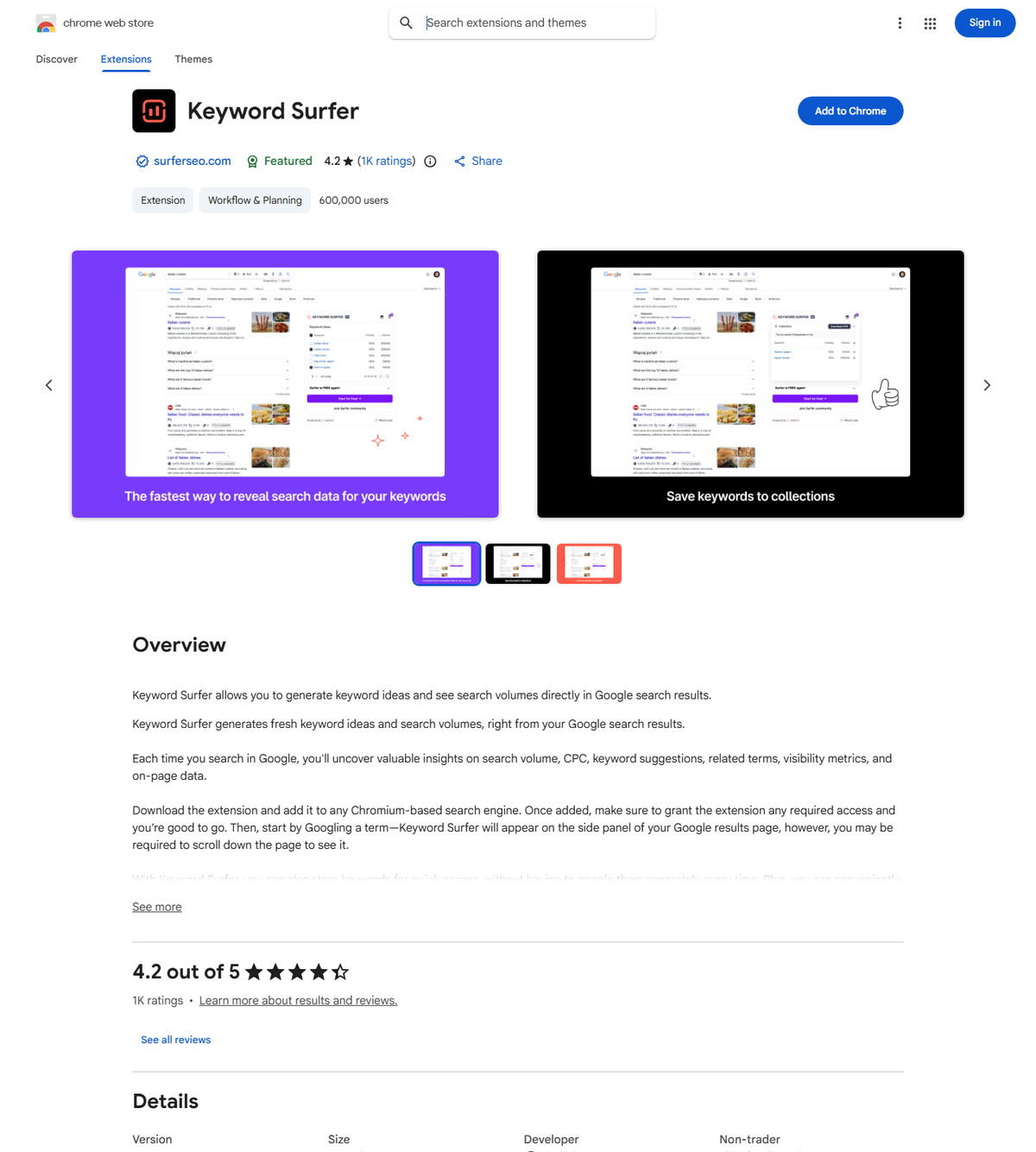
The term Surfer SEO extension does not describe one product. Surfer publishes Keyword Surfer for research in Google Search and ChatGPT, plus Surfer for Google Docs and ChatGPT for Content Editor guidelines in writing surfaces. Choose the first for keyword discovery and the second for guided drafting. Neither replaces Surfer's separate WordPress plugin.
| At-a-glance | Details |
|---|---|
| Official browser tools | Keyword Surfer; Surfer for Google Docs and ChatGPT |
| Primary jobs | SERP and keyword research; Content Editor guidance while drafting |
| Main surfaces | Google Search, ChatGPT, Google Docs, and the Surfer app |
| Basic access | Keyword Surfer research needs no Surfer account; Content Editor workflows require Surfer access |
| Recommended browser | Google Chrome; other Chromium browsers have narrower support assurances |
| Best next step | Match the extension to the task before approving permissions or deploying it to a team |
Quick Answer: Which Surfer SEO Extension Should You Install?
Install Keyword Surfer for research, or install Surfer for Google Docs and ChatGPT for Content Editor guidance while writing. The correct choice depends on the surface and task, not on which icon appears first in the Chrome Web Store.
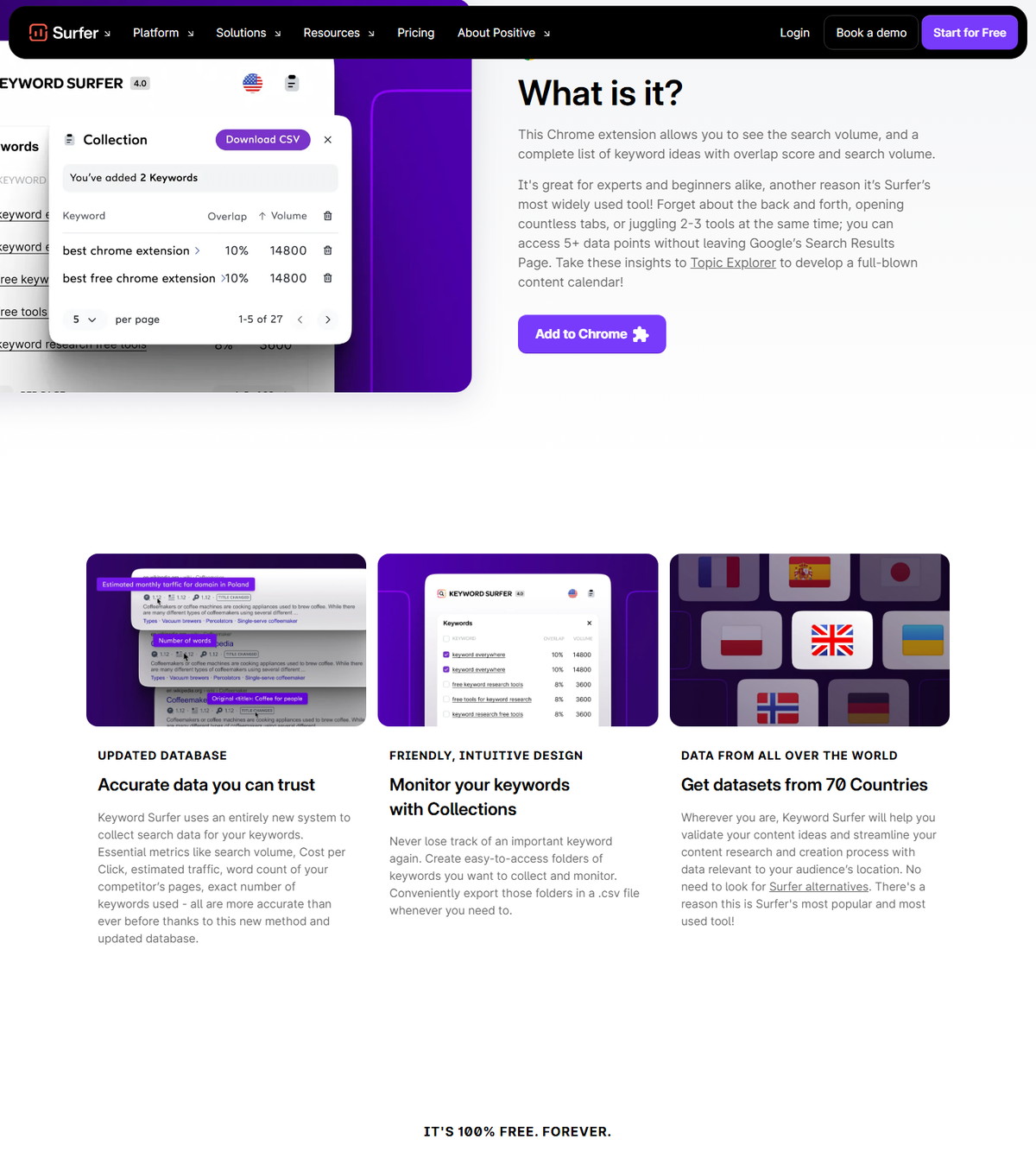
- Choose Keyword Surfer when you want search volume, related keyword ideas, overlap data, page-level metrics, saved collections, or CSV export beside Google results. Its current listing also describes ChatGPT features.
- Choose Surfer for Google Docs and ChatGPT when a writer needs Surfer Content Editor guidelines in a Google document or a supported ChatGPT surface.
- Choose the Surfer WordPress plugin instead when the workflow must connect Content Editor with a WordPress post or page.
If the Content Editor workflow matches your team, check Surfer's current access options before creating queries or assigning writers.
What Is the Surfer SEO Extension?
A Surfer SEO extension is a Chrome add-on that brings a specific Surfer workflow into another browser surface. It is not the complete Surfer platform, and the two official extensions do not perform the same job.
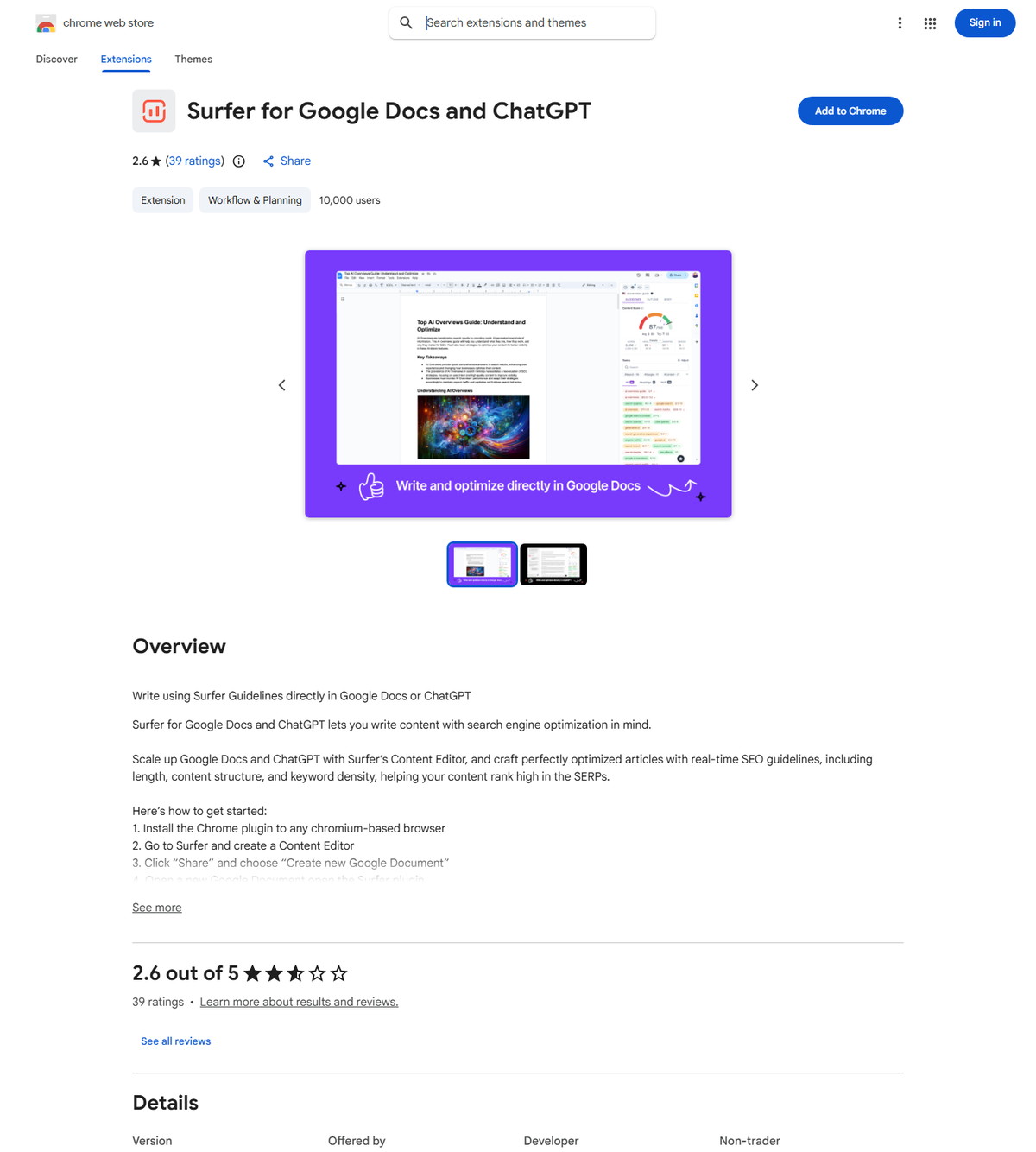
Keyword Surfer's official help page describes a free keyword research tool that enhances Google results with search data and related terms. The separate Google Docs extension guide describes a bridge from Content Editor guidelines to a Google document.
That distinction matters because the icons are similar. Surfer's troubleshooting documentation explicitly warns that users can click the wrong extension. It also matters for access: basic Keyword Surfer research requires no Surfer account, while a Google Docs workflow starts from or connects to a Content Editor query.
How Do Keyword Surfer and the Google Docs Extension Differ?
Keyword Surfer supports discovery, while Surfer for Google Docs and ChatGPT supports guided drafting. They overlap on the Surfer brand and some browser surfaces, but their inputs, outputs, and account requirements are different.
<div class="scalewitai-table-scroll" role="region" aria-label="Surfer SEO Extension guide data table” style=”max-width:100%”>| Attribute | Keyword Surfer | Surfer for Google Docs and ChatGPT |
|---|---|---|
| Primary intent | Keyword and SERP research | Write with Content Editor guidelines |
| Core Google surface | Google Search results | Google Docs document editor |
| ChatGPT positioning | Humanizer, human-like detection signal, and documented fan-out research features | Current listing says Content Editor guidance is available in ChatGPT |
| Surfer account | Not required for basic keyword research | Needed to create or select a Content Editor; collaborators can view shared guidelines without their own account |
| Main output | Metrics, related terms, collections, and CSV export | Guidelines for length, structure, terms, and Content Score context |
| Content synchronization | Not a document synchronization tool | Guidelines transfer to Google Docs, but article text does not sync both ways |
| WordPress publishing | Not included | Not included; use the separate WordPress plugin |
The safest team rule is to name the extension in every SOP. Write “Keyword Surfer” or “Surfer for Google Docs and ChatGPT,” not simply “the Surfer extension.”
Is the Surfer SEO Extension Free?
Both Chrome extensions can be installed without a Chrome Web Store purchase, but their useful feature access is not identical. Free installation does not mean every connected Surfer capability is available without a plan.
Surfer says basic Keyword Surfer research is free, available without a Surfer account, and provides search volume, keyword ideas, collections, and CSV export. Its help article separately says the Humanizer feature requires an active Surfer plan.
The Google Docs extension also installs from the Chrome Web Store, but it relies on Content Editor. Connecting an existing Content Editor uses a query you already have. Creating a fresh query from a Google document counts toward the subscription limit, according to Surfer's documentation. A writer who receives a shared Google Doc does not need a separate Surfer account, but that writer must install the extension to see the guidelines.
How Do You Install a Surfer SEO Chrome Extension?
Install the exact official listing, review the access request, and verify the extension only on the intended sites. Google says extensions cannot be added while browsing as a guest or in Incognito mode, and a managed work or school browser may block installation.
Step 1: Select the Correct Official Listing
Open the listing that matches the task before selecting Add to Chrome. Use Keyword Surfer for Google Search research, or use Surfer for Google Docs and ChatGPT for Content Editor guidance.
Check the extension name, publisher relationship, destination sites, and current privacy disclosure. Similar icons are not enough to establish identity.
Step 2: Approve Only the Access Your Workflow Requires
Read Chrome's permission dialog before selecting Add extension. Google's extension installation guidance advises users to approve only extensions they trust and explains that site access can be reviewed later under Manage extensions.
For an agency or enterprise deployment, record the extension ID as well as its name:
- Keyword Surfer:
bafijghppfhdpldihckdcadbcobikaca - Surfer for Google Docs and ChatGPT:
faapilcgnafanfcdhlkjijhoimmlhmjn
Step 3: Pin, Test, and Document the Extension
Pin the correct icon and test it on one approved document or research query before wider rollout. If the icon is hidden, Chrome lets you pin it from the Extensions menu. If a managed browser blocks it, do not bypass policy; ask the administrator to review the listing, extension ID, host access, and business purpose.
How Do You Use Keyword Surfer for Google Search?
Run a Google search, review the side-panel data as research signals, and export only the terms that fit the page's search intent. Keyword Surfer is useful for fast discovery, but its metrics do not replace Search Console data, a full keyword model, or editorial judgment.
Start With a Seed Query and Location
Search a topic in Google and confirm that the selected location matches the target market. Surfer documents support for 70 countries, including the United States. The extension can show monthly search volume and related terms for the query.
A seed query should describe the reader's task. For this article, “surfer seo extension” is more useful than the broad term “surfer” because it narrows the result set to browser tools and setup intent.
Read Search and Page Metrics as Directional Signals
Use search volume, CPC, related terms, overlap, word counts, and page data to form hypotheses, not conclusions. A similarity or overlap signal can reveal terms whose result sets share pages. It does not prove that one page should target every related term.
Keyword Surfer's privacy policy says search traffic comes from Surfer's database. It also says the service calculates numerical word and keyword counts for result pages and does not store the search results. Teams should still apply their own data-classification rules before using any browser extension on confidential work.
Save a Focused Collection and Export It
Save only terms that belong to the same task, audience, and content object, then export the collection as CSV. Separate discovery from final targeting. A broad collection can include useful research, but the content brief should retain one macro-context and a clear primary intent.
Keyword Surfer can accelerate the first pass. A strategist should still remove brand noise, unrelated product classes, duplicate variants, and terms that would force the page away from its central question.
What Can Keyword Surfer Do in ChatGPT?
Keyword Surfer's current listing describes ChatGPT support for humanization and a human-like detection signal, while a Surfer update also documents fan-out query research. Treat these as vendor-documented capabilities whose interface and model coverage can change.
The July 2025 fan-out update describes exposing subqueries used behind an answer and suggests using them for topic clusters and content briefs. Its named model support is dated and should not be treated as a current compatibility list.
There is also a documentation gap: the help link currently embedded in Keyword Surfer's Chrome listing resolves to a “Not found” page. The listing and current extension manifest support chatgpt.com, but the public help center does not provide a current detailed procedure. Verify the live interface, plan gate, and allowed ChatGPT workspace before adding the feature to an agency SOP.
How Do You Use Surfer Guidelines in Google Docs?
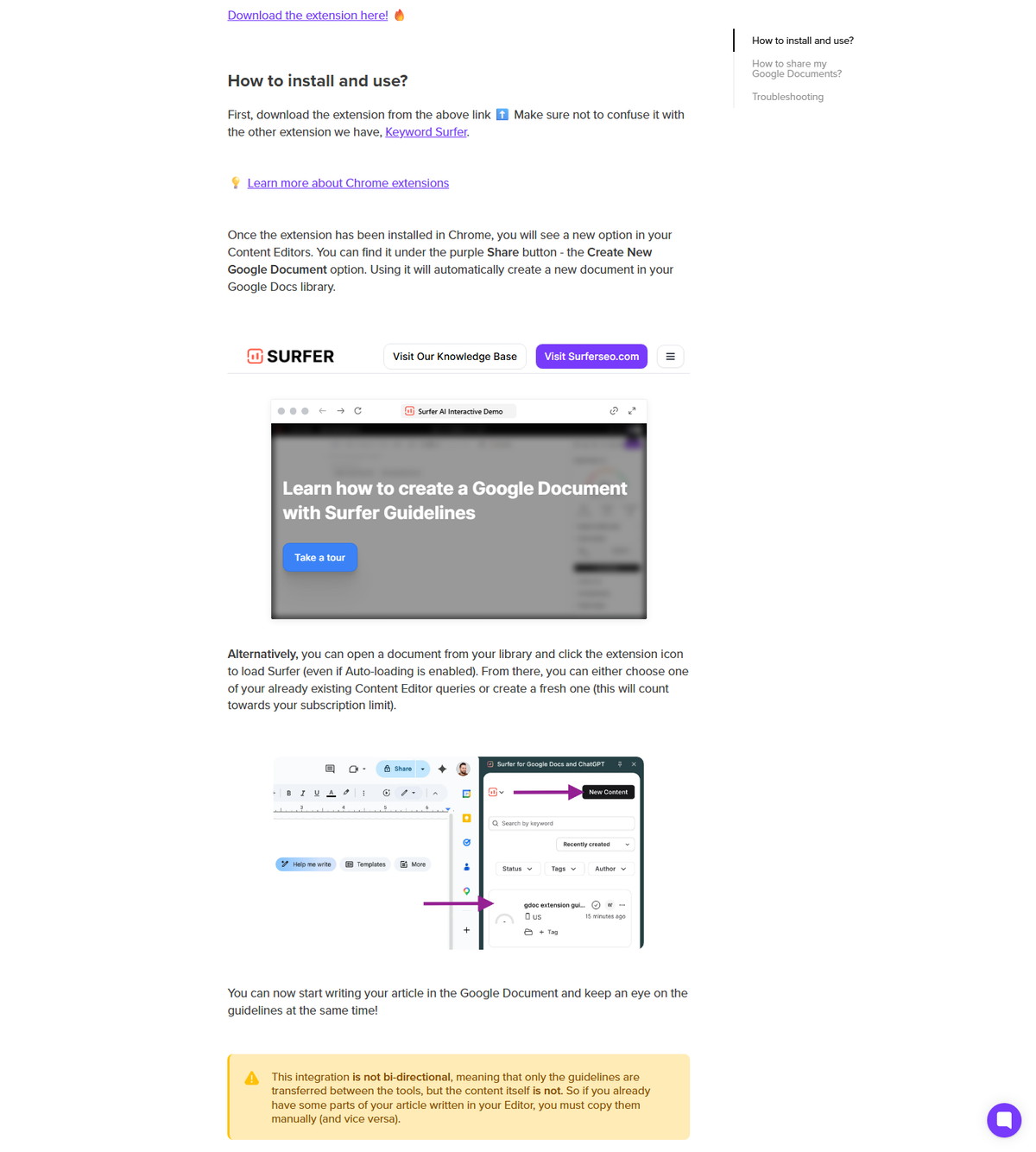
Create or connect a Content Editor, open the Google document, and load the Surfer side panel. The extension brings guidelines into the writing surface while the document remains in Google Drive.
Create a Google Document From Content Editor
Open a Content Editor, select Share, and choose Create New Google Document. Surfer says this creates a document in the connected Google Docs library. Open that document, select the extension icon, and load the Surfer panel.
The writer can then view guidelines while drafting. Content Score and term recommendations remain proprietary Surfer signals, not Google ranking factors.
Connect an Existing Google Document
Open the existing document, select the extension icon, and choose an existing Content Editor or create a fresh one. Surfer says creating a new Content Editor from this route consumes one unit from the applicable subscription limit.
Use an existing query when the brief, target location, and primary query already match. Creating another query for the same content object can fragment ownership and waste capacity.
Share the Document and Disconnect It Deliberately
Share the Google document through normal Drive controls, then require each collaborator who needs visible guidelines to install the extension. Surfer says those collaborators do not need their own Surfer accounts. Google still controls whether each person is a viewer, commenter, or editor.
Connecting the document overrides the normal Surfer shareable link for that draft. To restore the Surfer link, open the Content Editor, select Share, and disconnect it from the Google document.
What Does Not Sync Between Surfer and Google Docs?
The integration transfers guidelines, not article content, so it is not bidirectional. Text already written in Content Editor does not automatically move into Google Docs, and text written in Google Docs does not automatically populate the Content Editor body.
This limitation changes the source-of-truth decision. Pick one writing surface for article text, then use the other for guidance or controlled transfer. If a team writes in Google Docs, document ownership and version history stay in Drive. If a team writes in Content Editor, moving existing text to Docs requires a deliberate copy step.
The connected Google Doc also replaces the Surfer shareable link for that draft until the connection is removed. Include that behavior in handoff checklists so clients and writers do not lose access unexpectedly.
Is the WordPress Plugin Part of the Surfer Extension?
No, Surfer's WordPress integration is a separate plugin with a different installation and publishing workflow. Neither Chrome extension publishes a Google document directly to WordPress.
Surfer's WordPress installation guide says the plugin can export Content Editor work to a new or existing WordPress post or page, create a Content Editor from WordPress, and display guidelines in the WordPress editor. Full use requires an active Surfer subscription.
The export guide says new exports default to Draft, while updates to existing content preserve its status. That is a publishing integration, not a browser-extension feature. Keep Google Docs collaboration, Content Editor optimization, and WordPress release approval as separate stages with named owners.
What Permissions and Site Access Do the Extensions Use?
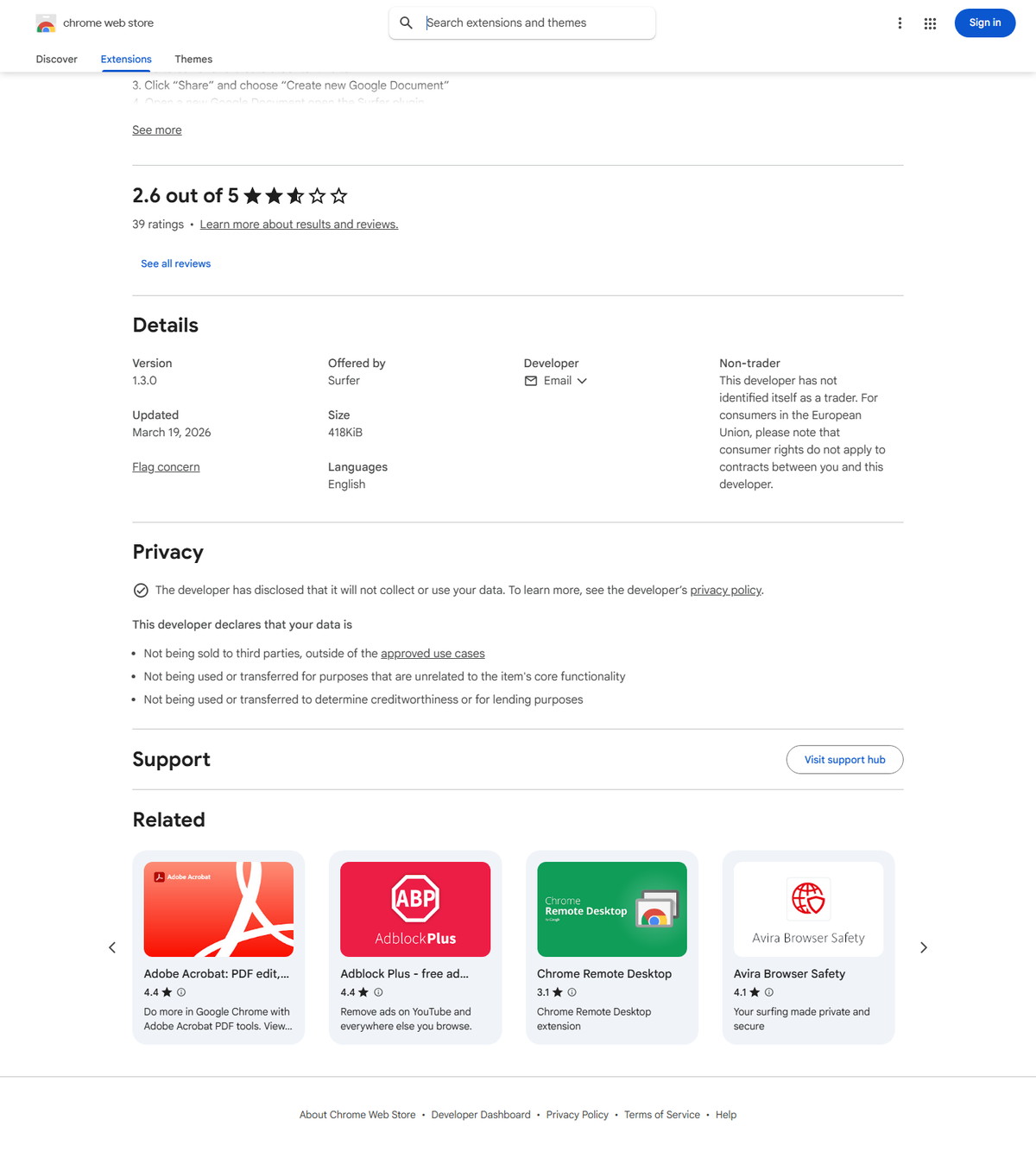
The two public extension packages request different permissions because they operate on different sites and workflows. Permission names describe technical capabilities; they do not, by themselves, prove that the developer collects or stores data.
| Extension | Declared Chrome permissions | Declared host or content-script scope |
|---|---|---|
| Keyword Surfer 6.5.1 | storage, webRequest, scripting, declarativeNetRequest, cookies | Google Search domains, chatgpt.com, and app.surferseo.com |
| Surfer for Google Docs and ChatGPT 1.3.0 | storage, activeTab, declarativeContent, scripting, cookies, declarativeNetRequest, sidePanel | Google Docs edit pages, chatgpt.com, and app.surferseo.com |
These values come from the public CRX manifests distributed through the two Chrome Web Store listings and checked on August 10, 2026. Chrome allows users or administrators to review matching-site access, but restricting a required host can also stop the extension from working.
For enterprise approval, evaluate the exact extension ID and current package version. Do not approve an extension solely because its display name contains “Surfer.”
What Privacy Checks Should Teams Complete?
Review each listing, its linked policy, its host access, and the data classification of the pages where it will run. The public privacy chain is not equally specific for both extensions.
Keyword Surfer's Chrome listing says it handles location, user activity, and website content. Its dedicated privacy policy lists IP address, Usage Data, and an email address if a user contacts support. The policy says Surfer does not collect search traffic or search results, returns numerical page counts, and does not store search results.
The Google Docs extension listing says the developer will not collect or use user data. However, its privacy link currently resolves to the policy that explicitly defines its service as Keyword Surfer. That mismatch does not prove collection by the Docs extension, but it does leave an extension-specific documentation gap.
Before agency or enterprise rollout:
- Ask Surfer for the current extension-specific privacy and processor documentation when confidential content is in scope.
- Confirm which Google Workspace and ChatGPT tenants are approved.
- Review Drive sharing permissions before sending a connected document.
- Avoid opening restricted client, legal, health, financial, or unreleased product content until security approval is complete.
- Recheck the Chrome Store disclosure and manifest after version changes.
How Should Agencies and Enterprise Teams Roll Out the Extension?
Use a controlled pilot with named owners, approved surfaces, and an exit path. Browser convenience should not bypass content governance or release controls.
| Control | Recommended decision | Why it matters |
|---|---|---|
| Extension identity | Allowlist exact Chrome extension IDs | Prevents confusion with similarly named tools |
| Browser policy | Test in a managed Chrome profile | Confirms install, site access, update, and cookie behavior |
| Content ownership | Name Google Docs or Content Editor as the text source of truth | Avoids version drift because Docs sync is not bidirectional |
| Query ownership | Assign one owner per Content Editor query | Controls subscription capacity and duplicate briefs |
| Data classification | Define content that extensions may process | Protects confidential client and enterprise material |
| Sharing | Use least-privilege Drive roles | Separates guideline visibility from document edit rights |
| QA | Require human review of terms, claims, links, and formatting | Surfer guidance cannot verify factual accuracy or policy compliance |
| Release | Keep WordPress publishing as a separate approval stage | Prevents optimization work from becoming an accidental live update |
A practical pilot uses one non-sensitive document, one target query, one writer, and one reviewer. Record the extension version, chosen sites, observed failure modes, and uninstall procedure before expanding access.
How Do You Troubleshoot Surfer SEO Extension Issues?
First identify the extension and page context, then check cookies, data availability, crawl status, and managed-browser policy. The two extensions fail for different reasons.
| Symptom | Likely cause | Documented or safe next step |
|---|---|---|
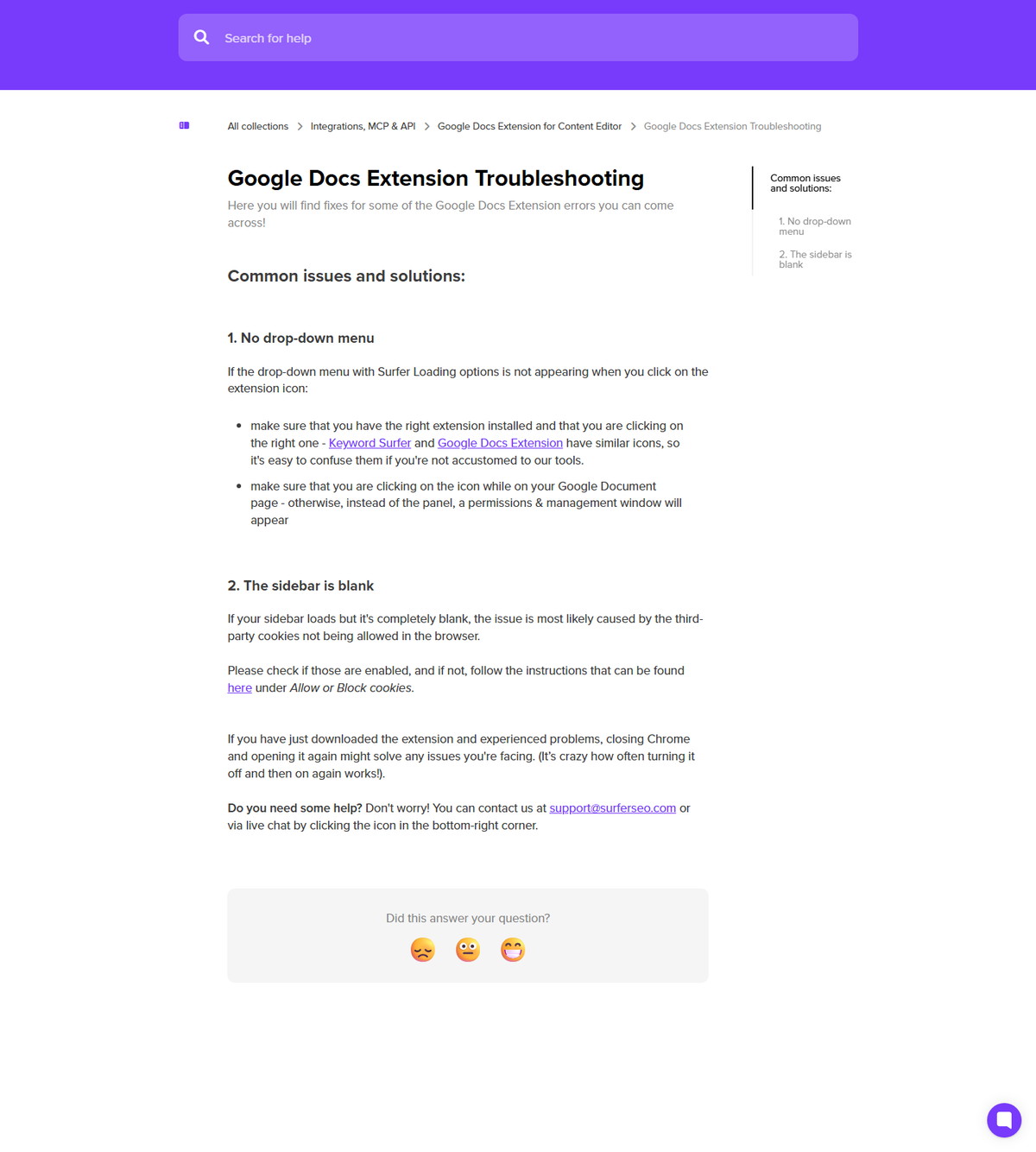
| No Google Docs dropdown | Wrong Surfer extension or icon selected outside a Google Document | Confirm the extension name and click it while the document edit page is open |
| Blank Google Docs sidebar | Third-party cookies blocked | Review cookie policy for the required Surfer workflow, then restart Chrome if newly installed |
| No Keyword Surfer ideas | Typo, low-volume term, fresh term, or missing database entry | Correct the query or test a more established related term |
| Zero traffic estimate | New domain or stale database estimate | Treat the value as unavailable or delayed, not proof of zero traffic |
| N/A word count or exact terms | Page crawl failed or the page blocks Surfer's crawler | Refresh once, then record the metric as unavailable if the block remains |
| Add to Chrome unavailable | Guest, Incognito, or managed-browser restriction | Use an approved normal profile or request administrator review |
| Extension works on one site but not another | Host access restricted or unsupported surface | Review Chrome site access and compare it with the official manifest scope |
The Google Docs Menu Does Not Appear
Confirm that Surfer for Google Docs and ChatGPT is installed and that the active tab is a Google Document edit page. Keyword Surfer has a similar icon but will not load the Content Editor dropdown there.
The Google Docs Sidebar Is Blank
Check whether the browser blocks the third-party cookie behavior Surfer documents as required for the sidebar. Do not weaken an enterprise policy without approval. If the extension was just installed, Surfer also recommends closing and reopening Chrome.
Keyword Ideas or Page Metrics Are Missing
Treat missing values as unavailable data, not as zero demand or zero performance. Surfer says ideas may be absent for typos, new terms, or terms outside its database. Traffic estimates are not real time, and N/A page metrics can result from crawl blocking.
Is the Surfer SEO Extension Worth Using?
The extension is worth evaluating when it removes a specific research or writing handoff without becoming the team's source of truth for outcomes. Keyword Surfer fits lightweight Google-based discovery. The Google Docs extension fits teams that already use Content Editor and want guidelines beside a shared document.
Skip or delay deployment when the team cannot approve the requested host access, needs strict extension-specific privacy documentation, expects automatic two-way text synchronization, or wants direct WordPress publishing from Chrome. The WordPress plugin, not either extension, addresses the CMS workflow.
For teams that can support those boundaries, evaluate Surfer with one controlled content workflow before standardizing it across clients or business units.
FAQ
Is the Surfer SEO extension free?
Keyword Surfer's basic research workflow is free and requires no Surfer account, but some connected features require an active plan. The Google Docs extension installs without a store purchase, yet it depends on Content Editor access and query capacity.
What is the difference between Surfer SEO and Keyword Surfer?
Surfer SEO is the broader platform, while Keyword Surfer is its browser-based research extension. Keyword Surfer adds data to Google Search and currently supports selected ChatGPT workflows; it is not the full Content Editor, Audit, Topical Map, or WordPress integration.
Do I need a Surfer account to use Keyword Surfer?
You do not need a Surfer account for basic Keyword Surfer research. Surfer says an active plan is required for its Humanizer feature inside the extension.
Does the Google Docs extension sync article text with Content Editor?
No, the documented integration sends guidelines but does not synchronize article text in both directions. Existing text must be copied deliberately between Google Docs and Content Editor.
Can a copywriter use Surfer guidelines without a Surfer account?
Yes, Surfer says a collaborator can view guidelines in a shared Google document without a separate Surfer account. The collaborator still needs the extension and the appropriate Google Drive access.
Does Keyword Surfer work in browsers other than Chrome?
Surfer recommends Chrome and says Chromium browsers such as Opera, Brave, or Arc may work, but compatibility is not guaranteed. Managed-browser and site-access policies can also affect behavior.
Is the Surfer SEO extension the same as the WordPress plugin?
No, the Chrome extensions and WordPress plugin are separate products with different installation, access, and publishing workflows. Use the WordPress plugin when you need Content Editor export, import, or guidelines inside the WordPress editor.