Writecream's publicly documented connection paths center on WordPress publishing, a Chrome writing extension, Android and iOS apps, and file-based outreach workflows. These are different integration types. A WordPress export transfers content, the extension works inside supported pages, mobile apps provide another access surface, and CSV upload supplies records for personalization.
| Integration path | Public evidence | What it is best for | Main caveat |
|---|---|---|---|
| WordPress | Lexi page and public setup imagery | Moving a reviewed article to a CMS | Test credential scope and transferred fields before production |
| Chrome extension | Official site, help content, and Chrome Web Store | Writing in Gmail, Google Docs, social and web text fields | Public tutorial content dates to 2023; current compatibility needs retesting |
| Android and iOS | Official app-store listings linked by Writecream | Drafting and generation away from desktop | Store presence does not prove every web feature or workspace sync behavior |
| CSV personalization | Official icebreaker workflows | Supplying profile or website records for bulk generation | Generation is not consent, CRM, suppression, or sending automation |
| Public API, Zapier, webhooks | No current public implementation documentation found | Not confirmed | Do not design production automation around an undocumented connector |
What does Writecream integrate with?
Writecream publicly supports practical handoffs to WordPress, browser-based writing workflows, mobile apps, and CSV-assisted personalization. No current public developer documentation was found for a generally available API, official Zapier app, or webhook framework.
That distinction changes the buying decision:
- Choose WordPress transfer when an editor wants a draft in the CMS.
- Choose the extension when writing should stay inside a browser workflow.
- Choose mobile when access away from desktop matters.
- Choose CSV upload when a controlled list must feed personalization generation.
- Choose another platform or a manual handoff when a production API, event trigger, CRM sync, or governed automation is mandatory.
Writecream's broad marketing references many destinations, but a destination name can mean “write inside this website with the extension,” not a native two-way integration. Verify what data moves, what credentials are required, and whether the connection is current.
Writecream integration map
An integration inventory is clearer when each connection is classified by mechanism.
| Mechanism | Examples | Data flow | Automation level |
|---|---|---|---|
| Native publishing/export | WordPress through Lexi | Article and selected publishing fields move to a connected site | User-initiated transfer |
| Browser extension | Gmail, Google Docs, LinkedIn, WordPress, Blogger, social platforms, and other text fields named in public help | Page context or user input goes to Writecream; generated text returns to the page or clipboard | Interactive assistance |
| Mobile app | Android and iOS | User works through an installed Writecream app | Separate client surface |
| File import | CSV-based icebreaker workflows | Rows supply profile or website inputs; output is generated in bulk | Batch generation, not a full campaign system |
| Copy/export handoff | Clipboard or downloaded text | User moves content into another system | Manual |
| Developer API | Public request page found, no implementation docs found | Not established | Not confirmed |
Do not interpret “integration” as automatic bidirectional sync unless Writecream documents both directions, field mapping, authentication, error handling, and ongoing synchronization.
How does Writecream integrate with WordPress?
Writecream's current Lexi SEO Agent page says users can publish content directly to WordPress with one-click export while maintaining SEO optimizations and media files. The page includes a WordPress Integration section and public setup imagery.

The public imagery shows a WordPress Import/Export dialog with fields for:
- WordPress site URL
- Username
- Application Password
- Content type
- Publication status
- Article title
- Clear saved credentials
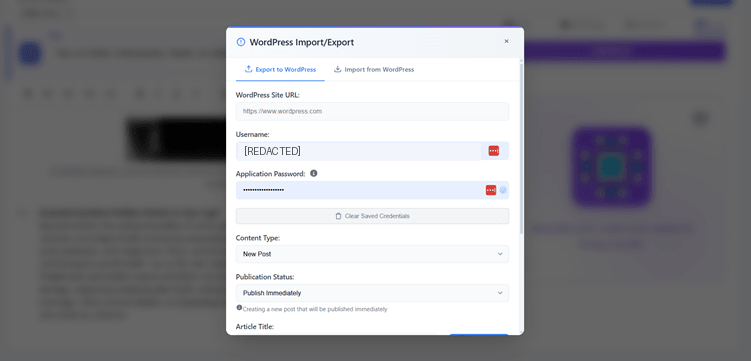
The visible fields support a useful inference about the connection method, but they do not prove current transfer behavior for categories, tags, featured images, SEO-plugin metadata, custom fields, authors, redirects, or reusable blocks. Test those attributes directly.
A safer WordPress setup sequence
#### 1. Create a dedicated WordPress user
Do not reuse the site owner's account. Create an integration user with only the role required for the intended action. If Writecream should create drafts but never publish, do not grant an unrestricted publishing role.
#### 2. Require HTTPS
The site URL should use HTTPS before credentials or content are transferred. Do not connect through an unsecured production endpoint.
#### 3. Create a revocable Application Password
Generate a WordPress Application Password for the dedicated user. Treat it like a credential:
- Enter it only into the official Writecream integration field.
- Do not paste it into a prompt or support screenshot.
- Store it in an approved password manager if retention is necessary.
- Revoke it after testing or when the integration is no longer used.
#### 4. Connect a staging site first
Use a staging or disposable WordPress site with non-sensitive content. Keep a database and media backup.
#### 5. Choose draft status
Select Draft on the first transfer. This creates a human review gate before a page becomes public.
#### 6. Transfer one controlled article
Use a short article with known headings, links, images, lists, and metadata. Do not start with a high-value production article.
#### 7. Verify the rendered result
Check both the WordPress editor and the public preview:
- Title and slug
- Heading hierarchy
- Paragraphs and lists
- Table formatting
- Image files, dimensions, alt text, and captions
- Internal and external links
- Sponsored attributes on affiliate links
- Canonical and robots settings
- Rank Math or other SEO metadata
- Author and category
- Mobile layout
#### 8. Revoke or rotate access
If the test fails, revoke the Application Password immediately. If the test succeeds, document the connection owner, purpose, scope, review interval, and removal procedure.
What does “one-click” not mean?
One-click describes the user's transfer action. It does not guarantee that every editorial, SEO, compliance, or design attribute arrives correctly. A publication workflow still needs:
- Source verification
- Editorial approval
- CMS transfer
- Metadata validation
- Rendered desktop and mobile QA
- Final publication approval
The Writecream tutorial provides a wider source-to-publication checklist.
How does the Writecream Chrome extension work?
Writecream has a current Chrome Web Store listing for an AI-powered writing assistant. Its public extension page and help content describe writing and personalization inside browser destinations.
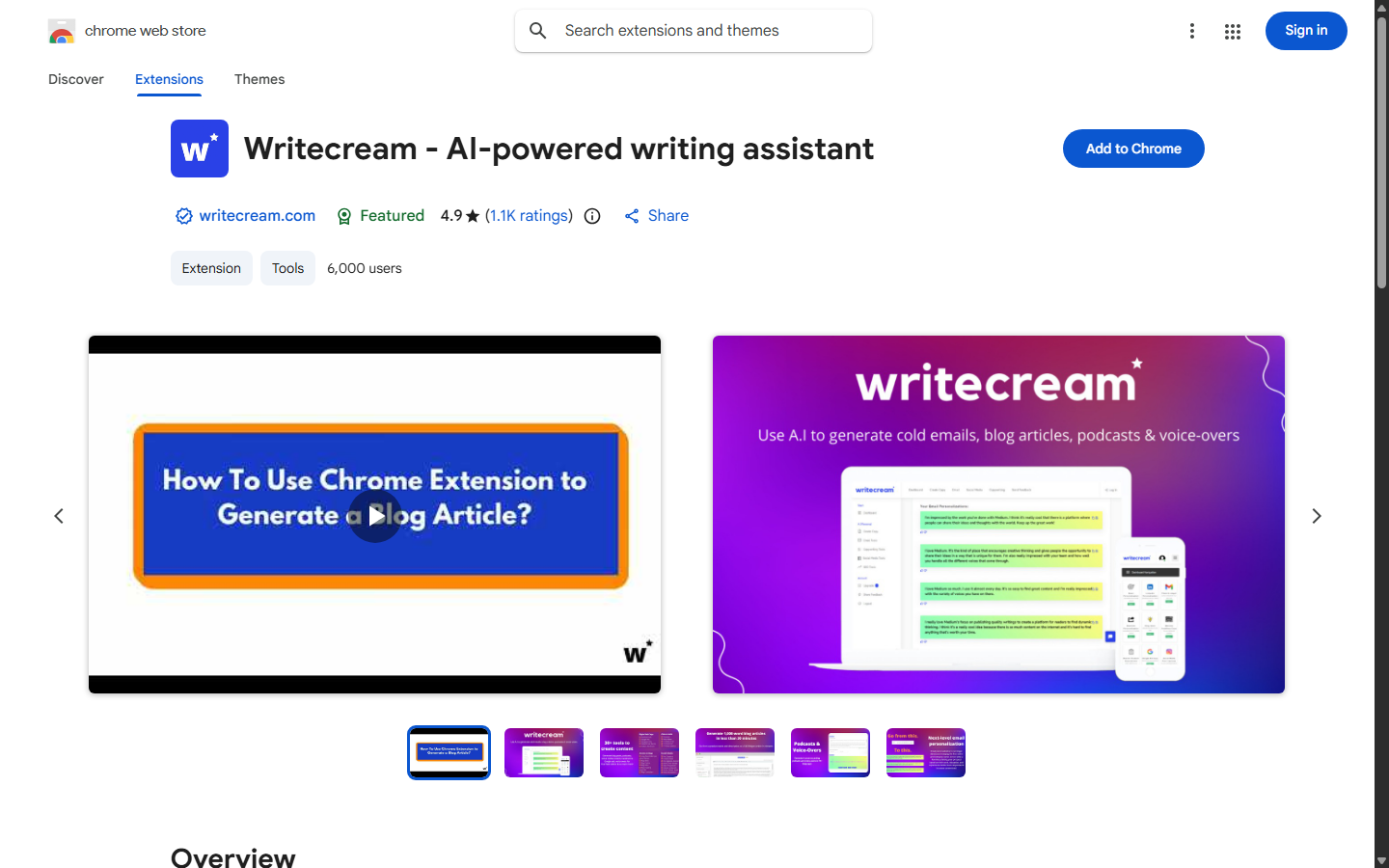
The public tutorial published in 2023 names workflows that include:
- Gmail
- Google Docs
- WordPress
- Blogger
- Twitter, now called X
- Other websites with supported text fields
Because web applications and browser APIs change, this list should be treated as a test matrix rather than a permanent guarantee.
Install and test the extension
- Open the official Chrome Web Store listing.
- Confirm the developer and linked official website.
- Review requested permissions and privacy disclosures.
- Install in a separate or approved browser profile.
- Sign in through the official Writecream flow.
- Open a low-risk destination such as a test Google Doc.
- Generate a small sample.
- Confirm what page text the extension reads and what it sends.
- Remove the extension if the permissions exceed the approved need.
Google Docs workflow
Official public help images show a Writecream panel inside Google Docs where the user can choose a use case, enter product details, select the number of outputs, and generate text.
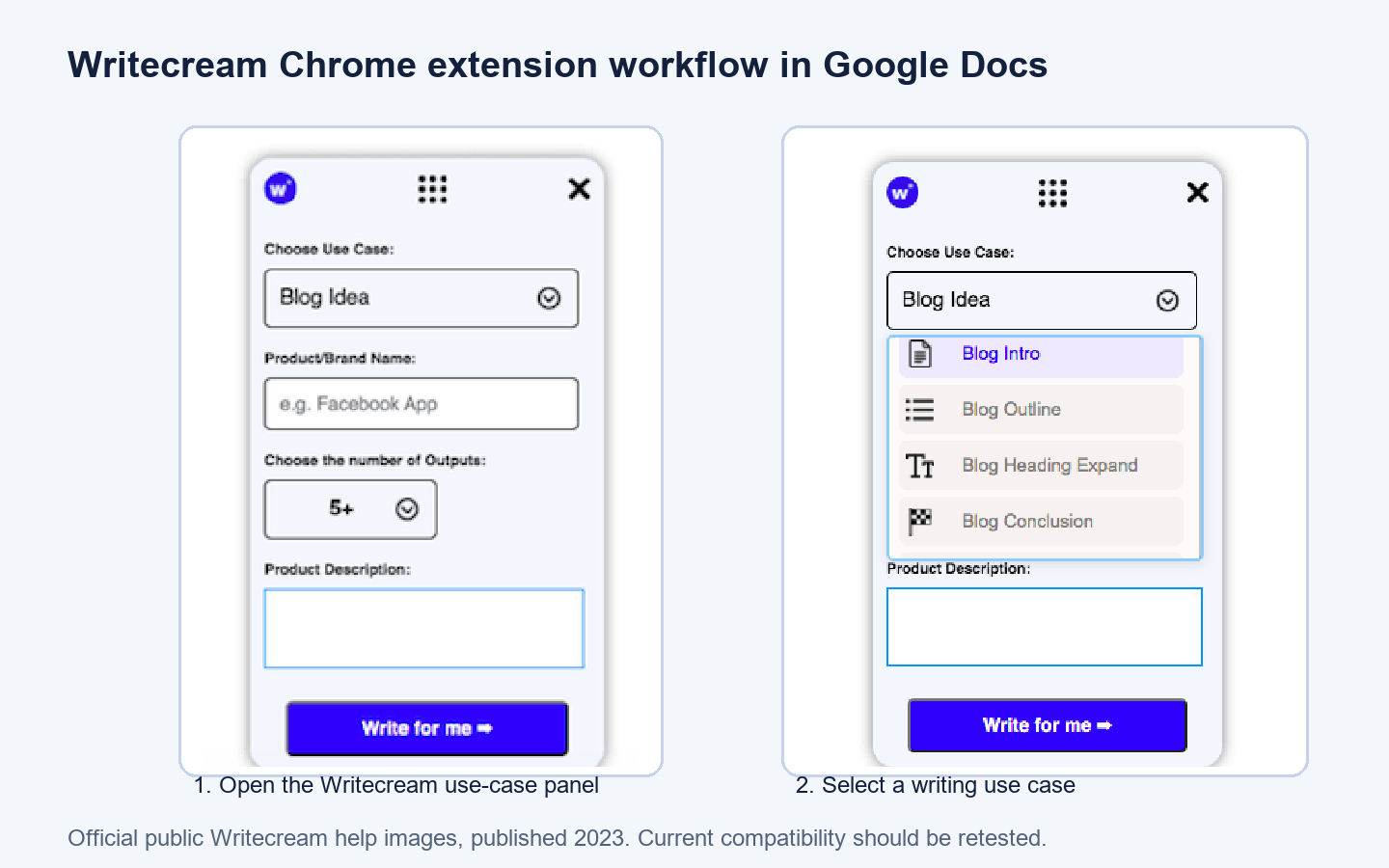
Use Docs as a review buffer rather than assuming the generated text is ready. Turn on version history, keep sources nearby, and use comments for fact and policy review.
Email and outreach personalization
Public Writecream extension imagery shows an Email Personalization result and a Copy Message to Clipboard control.
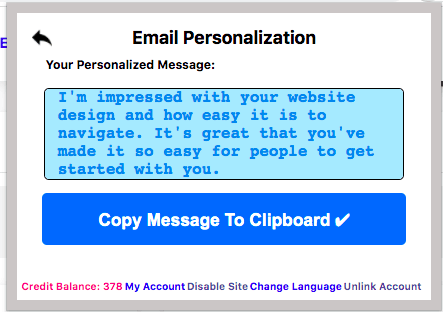
Before using the text:
- Open the source profile or website.
- Verify the person, company, and referenced detail.
- Remove sensitive inference and invented praise.
- Check sender identity and subject line.
- Add required postal and opt-out information.
- Apply suppression lists in the sending system.
- Require human approval.
The extension does not replace a CRM, consent record, email verification service, suppression database, or sending platform.
What permissions and privacy risks does the extension create?
The Chrome Web Store says the extension handles personal communications and website content. An extension may need page access to provide contextual writing help, but that access should be limited to approved workflows.
Use these controls:
- Install only from the official store listing.
- Use a dedicated browser profile for outreach or content work.
- Avoid opening confidential applications in the same profile.
- Review site-access settings and use “on click” or selected-site access when supported.
- Recheck permissions after updates.
- Remove the extension when the project ends.
- Never expose passwords, private keys, customer records, or regulated data.
A feature that works on “any website” is not automatically appropriate on every website.
Does Writecream integrate with Android and iOS?
Writecream links to mobile apps and has current listings in Google Play and Apple's App Store. The Android listing presents Writecream as an AI Content Writer and identifies the same brand across additional apps.

Mobile access can help with:
- Capturing ideas
- Drafting short copy
- Reviewing generated text
- Working away from a desktop
- Moving text through approved copy/export methods
Verify before depending on mobile for production:
- Sign-in and workspace synchronization
- Credit or plan sharing
- File import/export
- Available templates
- Language support
- Deletion and account controls
- Offline behavior
- Device backup exposure
Use device encryption, screen lock, current OS updates, and managed-app controls where appropriate. Do not save production credentials in notes or screenshots.
How does Writecream use CSV files for outreach?
Writecream's public icebreaker workflows describe supplying LinkedIn profile or website information individually or through a CSV for bulk generation. CSV is an import mechanism, not a live CRM integration.
A controlled CSV workflow is:
- Define the minimum fields needed for generation.
- Export only approved records from the source system.
- Remove unnecessary personal and sensitive columns.
- Use a sample of five to ten rows.
- Upload through the official interface.
- Review generated statements against each source.
- Reject hallucinated, stale, or sensitive personalization.
- Export approved copy.
- Import it into the CRM or sending system under existing controls.
- Delete temporary local files according to policy.
Recommended minimum CSV fields
Use fields such as:
- Internal record ID
- First name
- Company
- Public profile or website URL
- Approved public context
Avoid birth dates, personal addresses, private notes, health data, financial information, account credentials, or internal risk scores.
What CSV upload does not provide
CSV generation does not establish:
- Two-way CRM synchronization
- Duplicate prevention
- Consent management
- Email verification
- Suppression handling
- Sending limits
- Deliverability monitoring
- Reply tracking
- Automatic source refresh
Those functions belong in a governed campaign stack.
Does Writecream have an API, Zapier app, or webhooks?
No current public implementation documentation was found for a generally available Writecream API, official Zapier connector, or webhook framework. A public feedback item requests API access, which shows demand but is not developer documentation.
Do not build a production plan around:
- A feedback request
- An old blog mention
- An unofficial automation template
- Browser scripting against private endpoints
- Reverse-engineered network calls
A production API should document authentication, endpoints, schemas, quotas, versioning, errors, data handling, support, and deprecation. Until Writecream publishes or supplies those details contractually, use the documented handoffs or select a tool with the required integration.
Questions to ask Writecream
- Is an API currently available on my plan?
- Is it public, private beta, or custom enterprise access?
- Where is the current documentation?
- What are the authentication and rate limits?
- What input and output data is retained?
- Are webhooks signed and replay-protected?
- What uptime and deprecation commitments apply?
- Is Zapier first-party and supported?
- Can keys be scoped, rotated, and revoked?
Treat a sales answer as provisional until it is reflected in documentation or contract terms.
How should teams design a Writecream workflow?
Content creator workflow
Brief in a source document, draft in Writecream, review in Google Docs, then transfer to WordPress as Draft. Keep citations and final publication approval outside generation.
SEO workflow
Use Lexi or the article workflow for research and draft creation, then verify search intent, entity coverage, citations, internal links, metadata, and rendered tables in WordPress. A transfer does not prove that SEO fields reached the correct plugin.
Digital marketing workflow
Generate channel variants in the browser or web app, maintain approved claim and offer libraries, and route final copy through brand and legal review before scheduling.
Sales workflow
Prepare minimized CSV inputs, generate icebreakers, verify each source, approve copy, and import results into a governed CRM or sender. Keep opt-outs and suppression outside Writecream.
Agency workflow
Separate clients by approved workspace and data policy where available. Use dedicated CMS users, maintain client-specific brand sources, and revoke access at offboarding.
Writecream integration troubleshooting
WordPress authentication fails
Check HTTPS, site URL format, username, Application Password, user role, security-plugin restrictions, firewall rules, REST API availability, and server logs. Revoke credentials after repeated failure.
Content transfers but formatting breaks
Test one block type at a time. Tables, embeds, image captions, and custom HTML require special review. Transfer as Draft and compare the editor with the rendered preview.
Images do not transfer
Confirm public reachability, file type, size, media permissions, and whether the vendor workflow actually promises media transfer for the selected editor. Upload missing images manually rather than publishing broken placeholders.
Rank Math metadata is missing
A generic WordPress export may create the post without writing plugin-specific metadata. Enter and verify title, description, canonical, robots, schema, and social fields in WordPress.
Extension does not appear
Confirm the extension is enabled, signed in, allowed on the current site, and compatible with the page. Web apps can change their editors. Test a currently documented destination and contact official support if the problem persists.
Google Docs panel generates nothing
Check account state, credits, network access, selected use case, required fields, extension permissions, and browser console errors. Preserve the input and avoid repeatedly consuming credits until the failure is understood.
Personalization is wrong
Stop the batch. Verify source URLs, field mapping, stale records, name ambiguity, and whether the input contains enough public context. Do not send a plausible but unverified line.
Mobile and web content do not match
Confirm the same account, workspace, plan, and synchronization behavior. Export critical content rather than assuming every client stores the same objects.
Which Writecream integration is best for you?
| Need | Best documented path | Avoid assuming |
|---|---|---|
| Publish reviewed SEO drafts | WordPress transfer through Lexi | Complete Rank Math, category, author, and schema mapping |
| Draft inside browser tools | Chrome extension | Permanent compatibility with every named website |
| Work away from desktop | Android or iOS app | Full web-feature parity and automatic sync |
| Generate many icebreakers | Minimized CSV import | CRM governance, consent, sending, or reply tracking |
| Automate a governed product workflow | Require documented API or supported connector | That a feedback request equals an available API |
| Move occasional content | Copy/export manually | That manual handoff preserves metadata |
Is Writecream a good integration fit?
Writecream is a reasonable fit when users want practical content handoffs rather than deep, event-driven infrastructure. Its strongest public connection story is a creator or marketer moving between Writecream, browser destinations, mobile access, CSV batches, and WordPress.
It is a weaker fit when the buying requirement includes a documented public API, native CRM synchronization, signed webhooks, enterprise identity controls, guaranteed field mapping, or automated governance. Ask for current proof before purchase instead of treating broad destination names as technical specifications.
For a full product evaluation covering writing, SEO, outreach, multimedia, pricing, and limits, read the complete Writecream review. This is the only Review pillar link in this guide.
Try Writecream with a low-risk integration test
Writecream Integration FAQ
Does Writecream integrate with WordPress?
Writecream's Lexi page says it supports direct WordPress publishing and shows a setup dialog using site URL, username, and Application Password. Test transfer fields on staging and publish as Draft first.
Does Writecream have a Chrome extension?
Yes. A current Chrome Web Store listing exists. Public Writecream help content describes workflows in Gmail, Google Docs, LinkedIn, WordPress, Blogger, social platforms, and other websites, but the tutorial dates to 2023 and compatibility should be retested.
Does Writecream integrate with Google Docs?
Official public help screenshots show the Chrome extension inside Google Docs. Verify current behavior, permissions, and account requirements before standardizing the workflow.
Does Writecream integrate with Gmail and LinkedIn?
Writecream's extension materials describe email and LinkedIn personalization workflows. Teams still need to verify generated facts and maintain consent, suppression, and sending controls outside the copy generator.
Does Writecream have mobile apps?
Yes. Writecream links to Android and iOS apps. Confirm feature parity, plan access, and synchronization for the current versions.
Can Writecream import CSV files?
Public icebreaker workflows describe CSV input for bulk personalization. Minimize fields and treat the output as draft copy, not an approved or deliverable campaign.
Does Writecream integrate with Zapier?
No current official Zapier implementation documentation was found during this review. Ask Writecream for a current supported listing or choose a documented manual handoff.
Does Writecream have an API?
No current public API documentation was found. A public request for API access does not establish availability. Require documentation covering authentication, endpoints, limits, security, and support before building an integration.