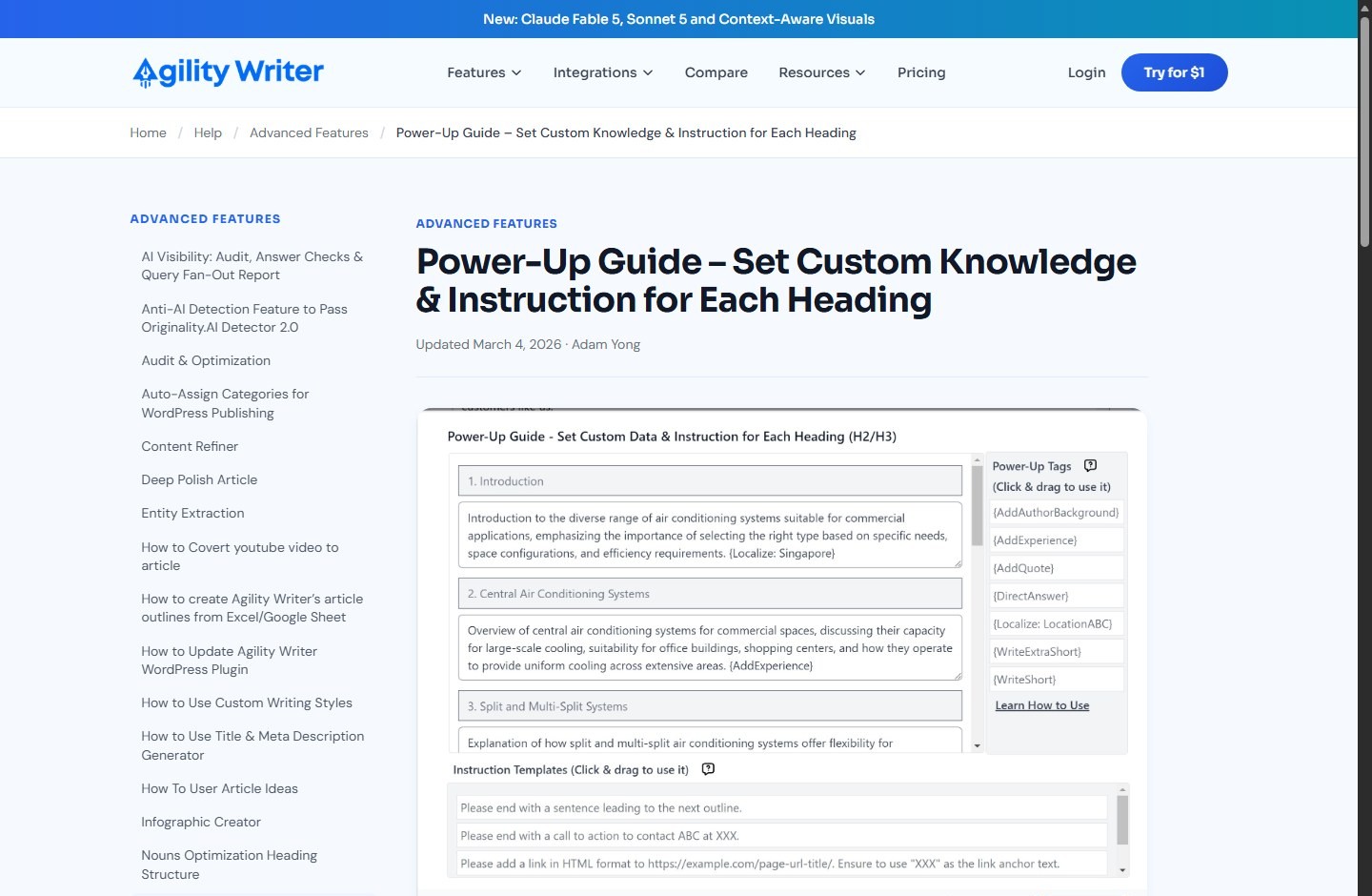
Agility Writer Power-Up tags are predefined controls you attach to individual outline headings. They tell the writing engine to add an author background, first-hand experience, a quote, a direct answer, local context, or a shorter paragraph in that section. The Power-Up Guide also accepts free-form instructions and custom knowledge per heading, so it is best used when one article needs different treatment from section to section, not when one global instruction fits the entire draft.
| At a glance | Practical answer |
|---|---|
| Where to start | Set up the article and outline in a mode that exposes the Power-Up Guide, then open Set up Power-Up Guide below custom instructions |
| Scope | One instruction field per heading, including the introduction and conclusion |
| Official field limit | Up to 600 words per instruction field |
| Key tradeoff | Adding an instruction locks the outline; reset the Power-Up Guide if the structure must change |
| Official tags documented | {AddAuthorBackground}, {AddExperience}, {AddQuote}, {DirectAnswer}, {Localize: LocationABC}, {WriteExtraShort}, and {WriteShort} |
| Best use | Give each section one clear job and supply verified facts or genuine experience where needed |
| Publishing posture | Treat generated copy as a draft; fact-check, source, edit, and review it before publishing |
What Are Agility Writer Power-Up Tags?
Power-Up tags are short, brace-wrapped commands available inside Agility Writer’s Power-Up Guide. You drag a tag into the instruction column for a particular heading. Instead of asking the system to apply the same rule to an entire article, you can make an FAQ answer concise, localize a service section, add a quote to a claim-heavy section, and keep another section short.
The distinction between tags, instructions, and knowledge matters:
- A Power-Up tag invokes a predefined behavior, such as
{DirectAnswer}. - A free-form instruction explains what that heading should do, such as “State the eligibility rule first, then list the exceptions.”
- Custom knowledge supplies the source material the section should use, such as an approved product specification, policy excerpt, expert observation, or local service detail.
- A global writing instruction applies a common rule to every heading. Agility Writer’s Bulk Advanced documentation explicitly directs users to the Power-Up Guide when headings need different instructions or different custom knowledge.
Think of the outline as a production plan. The heading defines the topic; the instruction defines the task; the tag defines a supported output behavior; and the knowledge gives the model something grounded to work from. A tag is not evidence, research, or an accuracy guarantee.
Where Do Power-Up Controls Work?
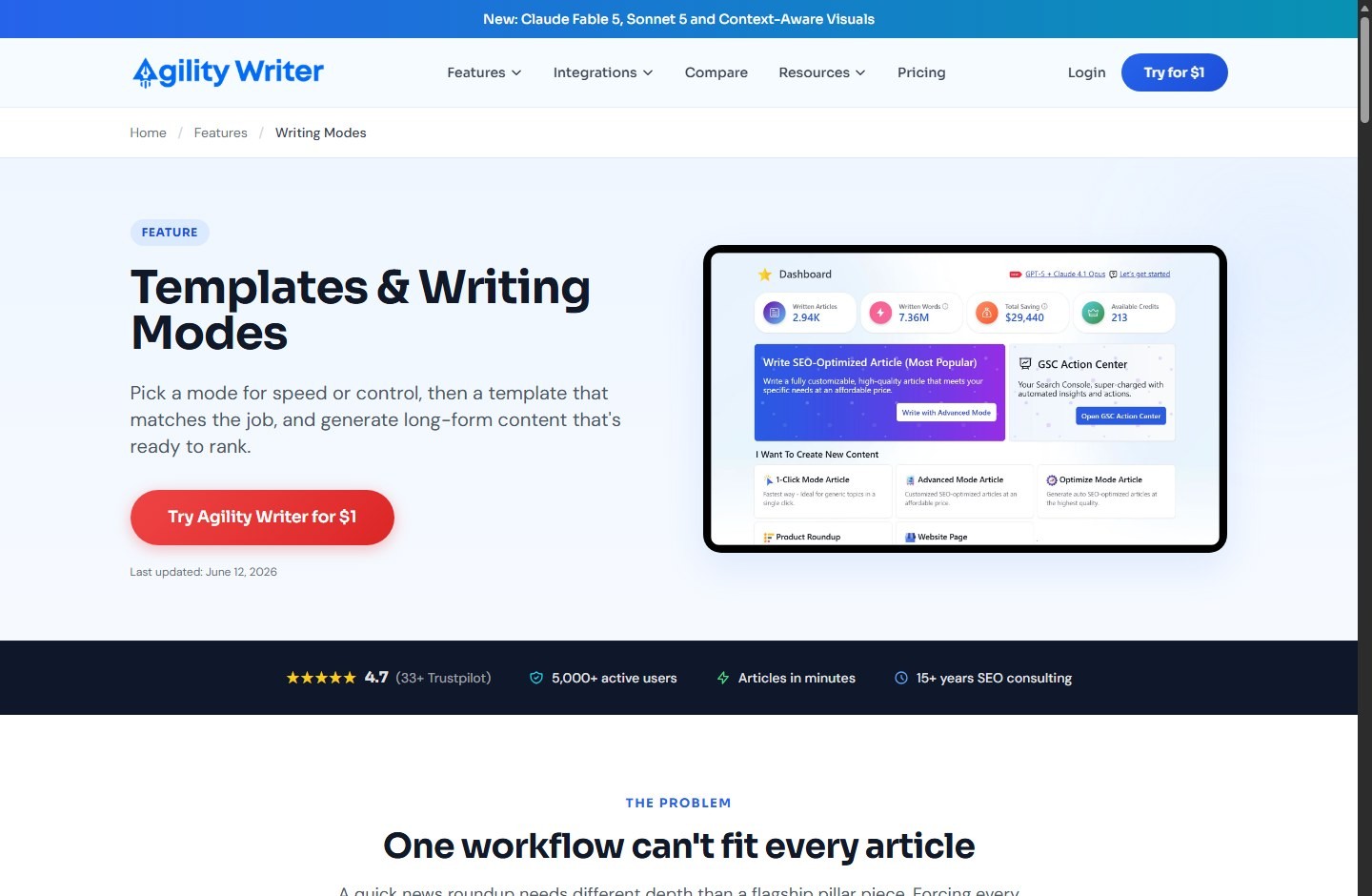
Agility Writer’s public Advanced Mode and Optimize Mode guides both direct users to the Power-Up Guide after an outline is generated. The current Writing Modes page also describes per-section Power-Up tags as part of its controls. The dedicated help page says instructions can be added for every heading from the introduction through the conclusion.
There are important scope differences:
| Control | Scope | Use it when |
|---|---|---|
| Audience, tone, point of view, writing style | Article-wide | The whole draft should share one voice and reader profile |
| Custom Knowledge in core settings | Article-wide | The same fact set or brand context applies throughout |
| Writing instruction for every heading | Article-wide | Every section needs the same rule, such as simple vocabulary |
| Power-Up Guide instruction | Per heading | Individual sections need different formats, facts, perspectives, or lengths |
| Power-Up tag | Per heading | A documented preset matches the section’s job |
The public documentation does not establish that every mode, template, model, or newly released workflow exposes an identical Power-Up interface. Smart Writer, for example, is positioned as a simplified workflow with many settings handled automatically. Confirm the controls shown in the mode you plan to use rather than assuming universal parity.
Power-Up instructions can also be carried into an outline pasted from Excel or Google Sheets. Agility Writer’s March 2026 help article says a table can contain heading type, heading topic, and an optional Power-Up instruction; when pasted into the outline field, the system formats the outline and configures the instruction. That is useful for repeatable agency briefs, but a template still needs editorial review for each topic.
How to Set Per-Heading Instructions
Use this sequence to reduce conflicts and avoid rebuilding an outline after it locks.
Finalize the article-level settings first
Choose the article mode, topic or title, target region, output language, audience, tone, point of view, and writing style before writing granular instructions. Decide whether factual data, citations, entity enrichment, quotes, and other advanced settings are enabled. Article-wide settings become the baseline; per-heading controls should refine that baseline, not fight it.
If the entire article must use US English, second person, short sentences, and a practical tone, set those globally. Do not repeat the same four rules in every section.
Generate and edit the outline
Generate an outline, select the strongest option, and make structural changes before adding Power-Up instructions. Check search intent, heading hierarchy, duplication, and section order. Remove headings that do not help the reader. Add missing decision points, limitations, or troubleshooting sections.
This timing matters because the official Power-Up help page states that once you include a custom instruction, the outline is locked. If you later need to change the outline, the documented remedy is Reset Power-up Guide. Resetting may mean re-entering section work, so preserve your instructions in a brief or spreadsheet first.
Open the Power-Up Guide
Select Set up Power-Up Guide below the custom instructions area. Agility Writer says this opens a ready-to-use instruction template. Each heading receives an instruction field, and the documented maximum is 600 words per field.
A 600-word allowance is a ceiling, not a target. Most strong instructions are 20 to 80 words. Long prompts can contain competing requirements, bury the priority, consume context, and make QA harder.
Give each heading one primary job
Write the desired outcome before adding a tag. A useful instruction names:
- the reader’s question;
- the required facts or evidence;
- the output shape;
- what to avoid; and
- the tag, if one fits.
Example:
{DirectAnswer} Answer whether the plan includes API access in the first sentence. Use only the approved plan table below. Then give two short eligibility conditions. Do not infer limits that are not stated.A weak instruction says, “Make this engaging, authoritative, optimized, detailed, concise, human, and persuasive.” Those goals conflict and provide no factual boundary.
Add verified knowledge to the right section
Put section-specific facts next to the heading that needs them. Label source, date, jurisdiction, unit, and status where relevant. Distinguish a company claim from an independent observation. If a fact can change, including pricing, limits, integrations, business hours, or legal rules, add a checked date and require verification before publication.
Generate, inspect, and revise
Queue the article only after checking every instruction row. When the draft returns, review whether each section followed its instruction, used the supplied facts accurately, and remained consistent with article-wide settings. Rewriting a weak section with a narrower instruction is better than stacking more tags onto it.
Power-Up Tag Reference and Practical Uses
Agility Writer’s dedicated help page documents seven named tags. Its public Writing Modes page gives {DirectAnswer}, {AddQuote}, and {WriteExtraShort} as examples. Use the exact brace syntax displayed in the interface; do not invent near-matches.
| Tag | Documented behavior | Practical use | Main editorial risk |
|---|---|---|---|
{AddAuthorBackground} | Adds author background; the background should be set in project settings | Intro, expert note, or methodology context | Fabricated or irrelevant credentials |
{AddExperience} | Incorporates first-hand experience, anecdotes, case studies, or personal insights | Tested workflow, lesson learned, field observation | Invented experience presented as real |
{AddQuote} | Adds a quote to support or deepen a point | Expert commentary, official statement, definition | Misquotation, weak attribution, quote hallucination |
{DirectAnswer} | Gives a clear, concise answer in an NLP-style format | Question headings, FAQs, quick-answer sections | Overstating a conditional answer |
{Localize: LocationABC} | Tailors content to a city, location, or country | Local landing pages, regional requirements | Stereotypes or false local details |
{WriteExtraShort} | Writes 2–3 sentences; text-paragraph content only | Definitions, service blurbs, quick caveats | Omitting necessary conditions |
{WriteShort} | Writes 3–4 sentences; text-paragraph content only | Brief explanations and transitions | Forcing complex topics into too little space |
Author background without credential theater
Use {AddAuthorBackground} only when the configured author profile is accurate, relevant, and approved. Include the specific experience that helps readers assess the section, such as years managing content operations or responsibility for technical SEO, rather than an ornamental biography.
Do not use the tag to imply that Agility Writer, ScaleWitAI, or an unnamed author personally tested a product. A generated credential is not expertise. Verify the byline, role, dates, qualifications, and disclosures before publication.
First-hand experience without manufactured experience
{AddExperience} can shape a section around experience, but the experience must come from a real person, a documented test, customer-approved material, or a clearly labeled hypothetical. Give the model the actual observation:
{AddExperience} Use this verified editor note: “In our 12-draft review, five intros repeated the title premise, so we removed those lines during editing.” Attribute it to the ScaleWitAI editorial review. Do not add other testing claims.If there is no first-hand evidence, do not ask the system to invent it. Replace the tag with a neutral example, a documented workflow, or a sourced expert perspective. For commercial pages, readers may want comparisons backed by evidence; route that intent to a relevant comparison such as Agility Writer vs Koala, not a synthetic personal story.
Quotes that remain traceable
Use {AddQuote} where a quote genuinely improves understanding. Supply the exact quotation, speaker, role, source URL, and date when possible. Then verify every word against the primary source. If you only have a paraphrase, instruct the model to paraphrase and cite it rather than adding quotation marks.
Quotes should not be decorative. A useful quote establishes an official policy, explains a design decision, or adds a qualified viewpoint. Avoid anonymous “experts say” phrasing. For high-stakes claims, preserve surrounding context and check whether the statement is current.
Direct answers for questions and FAQs
{DirectAnswer} is useful when the heading asks a clear question. Put the answer in the first sentence, then explain conditions or exceptions. Match certainty to evidence:
- “Yes” when the condition is always true within the defined scope.
- “Yes, if…” when prerequisites apply.
- “Not according to the current public documentation” when evidence is absent.
- “It depends…” only when you immediately name the deciding factors.
Do not turn a nuanced safety, legal, medical, pricing, or policy question into an absolute answer for snippet-shaped prose. Concision is a format choice, not permission to discard caveats.
Localization that uses real local facts
Replace LocationABC with the actual place, such as {Localize: Dallas}. Pair the tag with verified local details: service area, office location, climate consideration, terminology, currency, spelling convention, licensing body, or jurisdictional rule. State whether a fact applies to a city, county, state, or country.
Localization is not inserting a city name repeatedly. Avoid invented neighborhoods, fake customer stories, cultural clichés, or claims that a business serves an area without confirmation. For location-page scaling, keep the underlying service facts consistent while adding only material local differences. If your project is moving toward templated production, review the risks and workflow in using Agility Writer for programmatic content. The unusual slug is preserved intentionally.
Short-form tags for section pacing
Use {WriteExtraShort} for two to three sentences and {WriteShort} for three to four. Agility Writer notes that both work only on text-paragraph content. Do not expect them to control a table, list, quote block, or another non-paragraph structure.
These tags are useful for definitions, direct answers, brief service descriptions, and transitions. They are poor choices for safety steps, technical procedures, comparison methodologies, or sections with many conditions. If required facts do not fit, change the structure rather than trimming away substance.
Brand-focus control from the change log
Agility Writer’s August 8, 2024 change-log entry describes a new Power-Up control that excludes competitors’ names and mentions only the user’s brand, and says to use it in “Writing instruction for every heading.” The public entry does not expose the exact tag syntax, so this guide does not guess it. Select the current interface control if available, or write the behavior in plain language.
Use brand-only output for owned service pages where competitor references would distract. Do not use it to erase necessary alternatives from a comparison or to make unsupported superiority claims. Readers evaluating adjacent platforms may be better served by a focused comparison such as Agility Writer vs SEO Writing AI or Agility Writer vs Surfer AI.
How to Use Custom Knowledge Safely
Custom knowledge turns a generic instruction into a grounded brief. Agility Writer’s public help says article-wide Custom Knowledge is used across headings, while the Power-Up Guide is the route for different knowledge by heading.
Use a compact evidence block:
Section goal: Explain cancellation terms.
Approved knowledge:
- Monthly plan renews each month until canceled.
- Cancellation stops the next renewal; it does not reverse the current charge.
Source: Official billing policy, https://example.com/policy
Checked: 2026-08-01
Instruction: State the rule, then the exception. Do not add a refund window.
For better results:
- Prefer primary sources for product, policy, limit, and integration claims.
- Separate facts from requested tone or formatting.
- Include dates for volatile information.
- Keep units and geographic scope explicit.
- Remove secrets, personal data, private customer records, and material you lack permission to process.
- Tell the model what it must not infer.
- Store an evidence trail outside the generator so editors can verify the draft.
Fact Sheets may be a better reusable source of truth when the same approved brand or product facts must support many articles. Per-heading custom knowledge is better for local facts, section-specific evidence, exceptions, or one-off quotes.
A Practical Power-Up Workflow for SEO Teams
A scalable process needs more than a good prompt. Use roles and gates.
Brief the article around reader decisions
Define primary intent, audience, desired action, evidence standard, and what would make the page genuinely useful. Map each heading to one reader question. Mark headings that require original experience, current data, local verification, or legal review.
Build an instruction matrix
Use a spreadsheet with columns for heading level, heading, section purpose, tag, custom instruction, approved knowledge, source, owner, and QA status. Agility Writer supports pasting two- or three-column outline tables from Excel or Google Sheets, including optional Power-Up instructions, but your internal matrix can retain richer evidence fields.
Apply the fewest controls needed
Start with one clear instruction and, when useful, one tag. Multiple tags can compete: a direct answer, quote, experience, and extra-short requirement may not all fit in two or three sentences. If a section has two jobs, split it into two headings.
Run a small calibration batch
Before scaling, test representative article types: a question-led guide, a local page, and a comparison. Measure instruction adherence, factual corrections, edit time, unsupported claims, repeated patterns, and sections that need human input. Do not judge only by word count or an AI-detector score.
Edit for the page, not the prompt
Check whether the final section answers the heading, flows from the previous section, and advances the article. Remove prompt residue, fabricated anecdotes, unsupported quotations, repetitive mini-conclusions, and mechanical keyword use. Add original screenshots, calculations, examples, or editorial analysis where they help.
If the tool’s workflow or output tradeoffs do not fit your team, compare a different operating model in Agility Writer vs Writesonic. A Power-Up workflow is valuable only if it reduces total editorial effort without lowering evidence quality.
Keep publishing separate from generation
Send the result to a staging or draft state. Check formatting, links, media rights, metadata, schema, accessibility, disclosures, and conversion elements in the CMS. Never let a section-level instruction bypass editorial approval.
Quality Checks Before You Publish
Use this checklist for every Power-Up draft.
Instruction and structure QA
- Every heading has one clear reader purpose.
- Global controls and per-heading instructions do not conflict.
- Tags use the exact current syntax.
- Short tags are attached only to paragraph content.
- The draft answers question headings directly.
- The outline still has a logical H2/H3 hierarchy.
- No instruction text or braces leaked into the output.
Evidence and trust QA
- Product and feature claims match current official sources.
- Quotes match the primary source and include attribution.
- First-person statements belong to a real, identified contributor.
- Author credentials are accurate and relevant.
- Local facts match the correct jurisdiction.
- Dates, prices, limits, and policies have a checked date.
- Opinions, vendor claims, calculations, and verified facts are clearly distinguished.
Content and search QA
- The page satisfies the reader without requiring another search for the core answer.
- Original value is visible: analysis, workflow, test evidence, examples, or decision support.
- Keywords read naturally and do not distort the answer.
- Internal links help the next task rather than filling a quota.
- Titles, descriptions, structured data, and image alt text are accurate.
- The page has a clear author, review process, and update date where readers would expect them.
Conversion and compliance QA
- CTAs match the section and do not promise rankings or detector outcomes.
- Affiliate relationships are disclosed according to site policy and applicable rules.
- Sponsored links carry the required relationship attributes.
- Claims do not manufacture scarcity, discounts, exclusivity, or performance.
- Any offer is checked at the destination before release.
A buying CTA could use the approved route only after it is live: <a href="https://scalewitai.com/go/agility-writer" target="_blank" rel="nofollow sponsored noopener">check Agility Writer availability</a>. As of this package’s research date, that route is a 404 and remains a public-release blocker. Keep this article in Draft until the route and offer destination are verified. For legitimate offer research without exposing a code in this guide, use the Agility Writer coupon and deal page.
Limitations to Plan Around
Power-Up controls improve direction, not certainty. The model may partially follow an instruction, overgeneralize supplied knowledge, produce a plausible but false quote, or create first-person language without genuine experience. Complex prompts are especially vulnerable to conflicts.
The official help page recommends GPT-4 for best results with complex instructions and notes that GPT-3.5 may be inconsistent. That recommendation reflects the documentation’s terminology as updated March 4, 2026; model availability can change. Agility Writer’s July 2026 change log lists newer models and workflows, so verify the current selector, credit cost, and mode compatibility in the product before planning production.
Other constraints include:
- The outline locks after a custom instruction is added.
- Resetting the Power-Up Guide is the documented path to changing that outline.
- Each instruction field has a 600-word limit.
{WriteExtraShort}and{WriteShort}apply only to text-paragraph content.- Article-wide settings can conflict with section instructions.
- A localized instruction cannot validate local facts.
- A quote or experience tag cannot prove provenance.
- Public documentation may lag interface changes or omit exact syntax for a newly announced control.
Treat generated length ranges as targets, not guarantees. A two-to-three-sentence section can still be inaccurate, repetitive, or incomplete.
Troubleshooting Power-Up Instructions
| Problem | Likely cause | What to do |
|---|---|---|
| Outline cannot be edited | A custom instruction locked it | Copy your instructions, use Reset Power-up Guide, revise the outline, then reapply controls |
| Tag appears ignored | Wrong syntax, conflicting prompt, unsupported content type, or model variability | Reinsert the current UI tag, remove conflicts, narrow the task, and regenerate only the section if possible |
| Short tag produces the wrong format | Short tags are documented for text paragraphs only | Use a paragraph section or specify a list/table without relying on the short tag |
| Direct answer is too absolute | The instruction omitted conditions | Put the condition in sentence one and supply the exact exception |
| Quote cannot be verified | The model generated or altered it | Remove quotation marks or replace it with a primary-source quotation and attribution |
| First-person story is untrue | No genuine experience was supplied | Delete it; provide verified notes or use a neutral example |
| Localization feels generic | Only a place name was provided | Add verified service-area, terminology, jurisdiction, and audience details |
| Sections contradict each other | Different knowledge blocks or global settings conflict | Create one approved fact sheet and resolve the contradiction before regeneration |
| Complex instructions are inconsistent | Too many goals or a weaker model/workflow | Reduce to one job, use clearer evidence boundaries, and select a model documented for complex instructions |
| Competitor names still appear | Brand-focus control was absent or applied too narrowly | Use the current brand-only UI control or a plain global instruction, then search the draft manually |
When a tag repeatedly fails, stop layering prompts. Rewrite the instruction in plain language, specify the required first sentence, provide the facts, and define the output shape. If that still fails, edit the section manually. The goal is reliable content, not perfect prompt compliance.
Responsible Google and AI-Detector Guidance
Google’s current guidance does not say that all AI-assisted content is disallowed. It says generative AI can help with research and structuring original content, while generating many pages without adding user value may violate the scaled content abuse policy. Google advises focusing on accuracy, quality, relevance, people-first purpose, and useful context about how content was created when readers would reasonably expect it.
That means Power-Up tags should support editorial value, not disguise automation. Use them to organize approved knowledge, make answers clearer, add genuine experience, and tailor useful local information. Do not use {AddExperience} to manufacture E-E-A-T or publish hundreds of lightly changed location pages solely to capture search traffic.
Third-party AI detectors are not a dependable editorial target. Scores can vary by tool, model, niche, passage length, and revision. A “human” score does not prove truth, originality, expertise, or compliance; an “AI” score does not prove misconduct. Agility Writer markets writing styles related to anti-AI detection, but no setting can guarantee a detector result or Google performance.
Use detector output, if your organization requires it, as one noisy signal for stylistic review. Never rewrite accurate copy into awkward prose merely to chase a score. Prioritize sourced claims, real authorship, original contribution, transparent processes, and reader satisfaction. There are no ranking, traffic, citation, conversion, or detector guarantees.
If per-heading controls fit your editorial process, check Agility Writer's current plans and validate the live feature set before paying. This affiliate route returned HTTP 404 during our August 1, 2026 release check, so this guide must remain a Draft until the route works.
FAQ
What is the Agility Writer Power-Up Guide?
The Power-Up Guide is a per-heading control panel for an article outline. It lets you add a different instruction, custom knowledge, or supported Power-Up tag to each heading, including the introduction and conclusion.
What Power-Up tags does Agility Writer officially document?
The March 2026 official help page lists {AddAuthorBackground}, {AddExperience}, {AddQuote}, {DirectAnswer}, {Localize: LocationABC}, {WriteExtraShort}, and {WriteShort}. Check the current interface because available controls can change.
How long can a Power-Up instruction be?
Agility Writer’s official Power-Up help page sets a limit of 600 words per field. In practice, shorter instructions with one purpose, verified facts, and a defined output shape are easier to review.
Why is my Agility Writer outline locked?
Adding a custom instruction locks the outline. The documented way to change it is to select Reset Power-up Guide. Save your instructions externally before resetting so you can reapply them.
Can I use Power-Up instructions from Excel or Google Sheets?
Yes. Agility Writer’s official outline-copy guide says you can paste a two- or three-column table containing heading type, heading topic, and an optional Power-Up instruction. The system formats the outline and configures the instructions.
Do {WriteExtraShort} and {WriteShort} control lists and tables?
The official documentation says these two tags work only on text-paragraph content. Use explicit structural instructions for lists or tables instead of relying on the short-paragraph tags.
Can Power-Up tags create real first-hand experience?
No. {AddExperience} can shape prose around experience, but it cannot verify that an event happened. Supply genuine, attributable notes or remove first-person claims during editing.
Will Power-Up tags help content rank or pass AI detectors?
No result is guaranteed. Power-Up tags can improve section direction, but rankings depend on many factors and third-party detector scores are unstable. Follow Google’s people-first guidance, add original value, verify facts, and publish only after human review.
