Search Atlas can replace several disconnected workflows, but turning everything on at once is the fastest way to lose control. The safer approach is staged: establish a baseline, connect one site, keep approvals enabled, validate changes, and expand only after the platform proves it can save time without creating cleanup work.
This Search Atlas tutorial shows US agencies, SEO professionals, freelancers, and enterprise marketing teams how to roll out the platform across technical SEO, content, paid search, and AI visibility. It is based on Search Atlas's official public product documentation and interface visuals available July 31, 2026. Dashboard labels can change, so treat the operating sequence and QA gates as more durable than any individual button name.
Search Atlas Setup at a Glance
| Phase | Primary action | Human approval gate | Success measure |
|---|---|---|---|
| 1. Scope | Select one site and one commercial goal | Confirm owner, access, and risk level | Baseline documented |
| 2. Connect | Add the project and data sources | Verify correct properties and accounts | Data populates without gaps |
| 3. Install OTTO | Add the Pixel or supported integration | Inspect staging and rendered HTML | Site scan completes safely |
| 4. Prioritize | Review OTTO grade and recommendations | Approve reversible low-risk work first | Issues fixed without regressions |
| 5. Run Agent | Give Atlas Agent a measurable goal | Review workflow, dependencies, and outputs | Useful work ships faster |
| 6. Build content | Research, brief, draft, optimize, publish | Fact, brand, legal, and SEO review | Publish-ready page passes QA |
| 7. Configure ads | Connect Google Ads and define guardrails | Approve campaign, budget, and tracking | Spend remains within limits |
| 8. Track AI search | Define prompts, competitors, and themes | Validate citations and source relevance | Visibility trend becomes actionable |
| 9. Scale | Template the workflow across projects | Audit permissions and exceptions | More output without more defects |
If you are still deciding whether the platform fits your operation, read our complete Search Atlas review first. This guide assumes you have chosen a trial or plan and now need an implementation process, not another feature tour.
Before You Start: Define Ownership and Baselines
Do not begin with “automate SEO.” Begin with a measurable operating problem. Examples include reducing technical implementation time from 15 business days to three, cutting first-draft research time by 40%, or consolidating weekly client reporting without increasing errors.
Record the following before connecting anything:
- Current organic clicks, impressions, conversions, indexed pages, and priority rankings.
- Existing crawl errors, canonical patterns, schema types, redirects, and page templates.
- Published content velocity, revision time, and editorial defect rate.
- Google Ads spend, conversion actions, cost per acquisition, and budget limits.
- Current AI-answer mentions, citations, sentiment, and tracked competitors.
- The person who can approve SEO changes, content claims, ad spend, and rollback.
Take exports or screenshots from Google Search Console, analytics, your crawler, CMS, and ad platform. Search Atlas can report movement, but a clean pre-implementation record helps separate platform impact from seasonality, migrations, campaign changes, and Google updates.
Use one representative site for the pilot. Avoid both extremes: a tiny test site proves little, while your highest-revenue domain creates unnecessary risk. Agencies should choose a cooperative client with documented access and normal technical complexity.
Step 1: Choose the Right Plan and Pilot Scope
Search Atlas publicly lists Starter at $99 per month, Growth at $199, Pro at $399, and Agency at $999 as of July 31, 2026. The plans differ by OTTO projects, sites, seats, quotas, LLM visibility access, authority features, and white-label capacity.
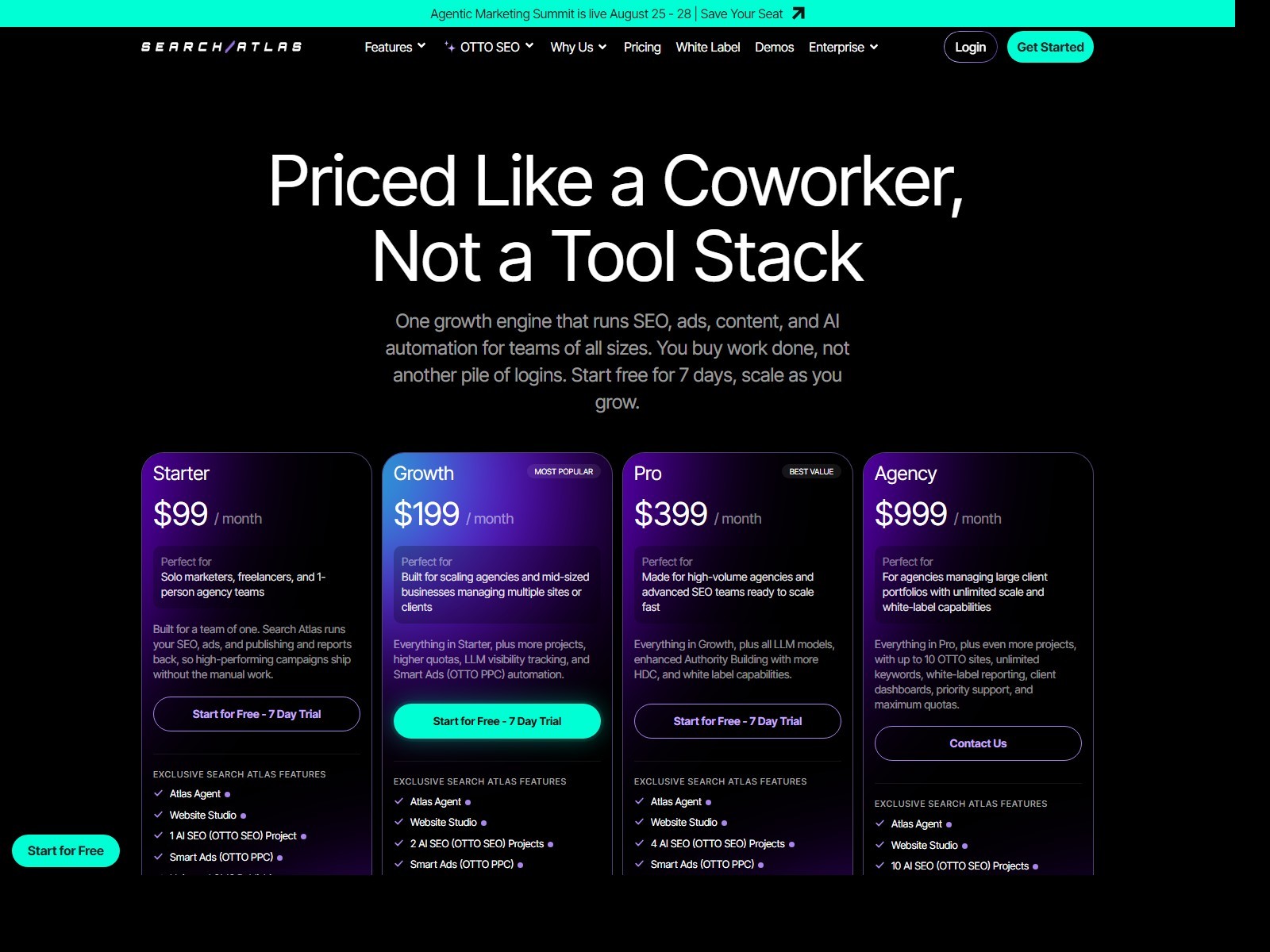
Do not choose by the longest feature list. Model the exact operation:
- Count websites that will actively use OTTO, not every domain your company owns.
- Count users who need platform access versus stakeholders who only receive reports.
- Identify whether LLM visibility, Smart Ads, white labeling, and multiple OTTO projects are required during the pilot.
- Estimate monthly content and automation usage using real production volume.
- Include onboarding, implementation time, QA, and any complementary tools you will retain.
A freelancer may validate one client site on Starter. A growing agency may require Growth for additional projects and LLM visibility. Pro or Agency makes sense only when project volume and agency controls are actually used.
Use the Search Atlas trial to test a defined workflow. Official materials advertise a seven-day trial, limited AI usage, and a 30-minute onboarding session. Search Atlas's own pages are inconsistent about signup: several official pages say no credit card is required, while the current Features page says the trial converts to Pro unless canceled. Treat the registration summary as controlling. Record whether a card is requested, the selected renewal plan, amount, date, and cancellation deadline before completing signup.
Step 2: Create the Project and Connect Trusted Data Sources
Create a project for the pilot domain and confirm the canonical protocol and hostname. Mixing `http`, `https`, `www`, and non-`www` properties can produce incomplete or duplicated data.
Current official setup material places the GSC connection under Site Metrics → All Sites → Connect GSC Account, with another route through Avatar → Settings → Integrations in the newer interface. After authorization, open Manage Sites and enable the imported canonical property if it initially appears disabled. A successful state or green check should appear before you rely on query and page reports.
For GA4, official instructions place the connection inside the GSC Performance workflow. Select Connect Google Analytics 4, authorize the appropriate Google identity, and choose the property whose web-stream URL matches the pilot site. Connecting GA4 does not repair poor event setup, so verify the property ID, conversions, timezone, and traffic before using the data for decisions.
Connect only accounts you are authorized to use. Depending on the workflow, Search Atlas can draw from Google Search Console, Google Analytics, Google Business Profile, Google Ads, supported CMS connections, Cloudflare, and other integrations described in its current documentation.
Use this connection checklist:
- Select the correct Search Console property and verify recent query and page data.
- Select the correct analytics property and conversion events.
- Confirm timezone, currency, and attribution assumptions before comparing reports.
- For local work, connect the intended Business Profile rather than a similarly named location.
- For paid media, verify the Google Ads customer ID and manager-account relationship.
- Apply least-privilege access where the integration supports it.
- Record who owns each credential and how access will be revoked.
After connection, compare a small sample against the source system. Check several pages, queries, dates, and conversions. A dashboard that loads successfully can still be connected to the wrong property.
Enterprise teams should route access through their existing identity, security, and vendor-review process. Do not share one administrator login across departments or client accounts.
Step 3: Install OTTO SEO Safely
OTTO SEO connects to a website through the OTTO Pixel or supported implementation methods. Official Search Atlas materials describe CMS integrations, Cloudflare, and code-based deployment options. Search Atlas says OTTO can run on autopilot by default and also provides an approval mode. For a new site, switch to approval-based operation before deploying recommendations. Use an installation method your technical owner can inspect and remove.
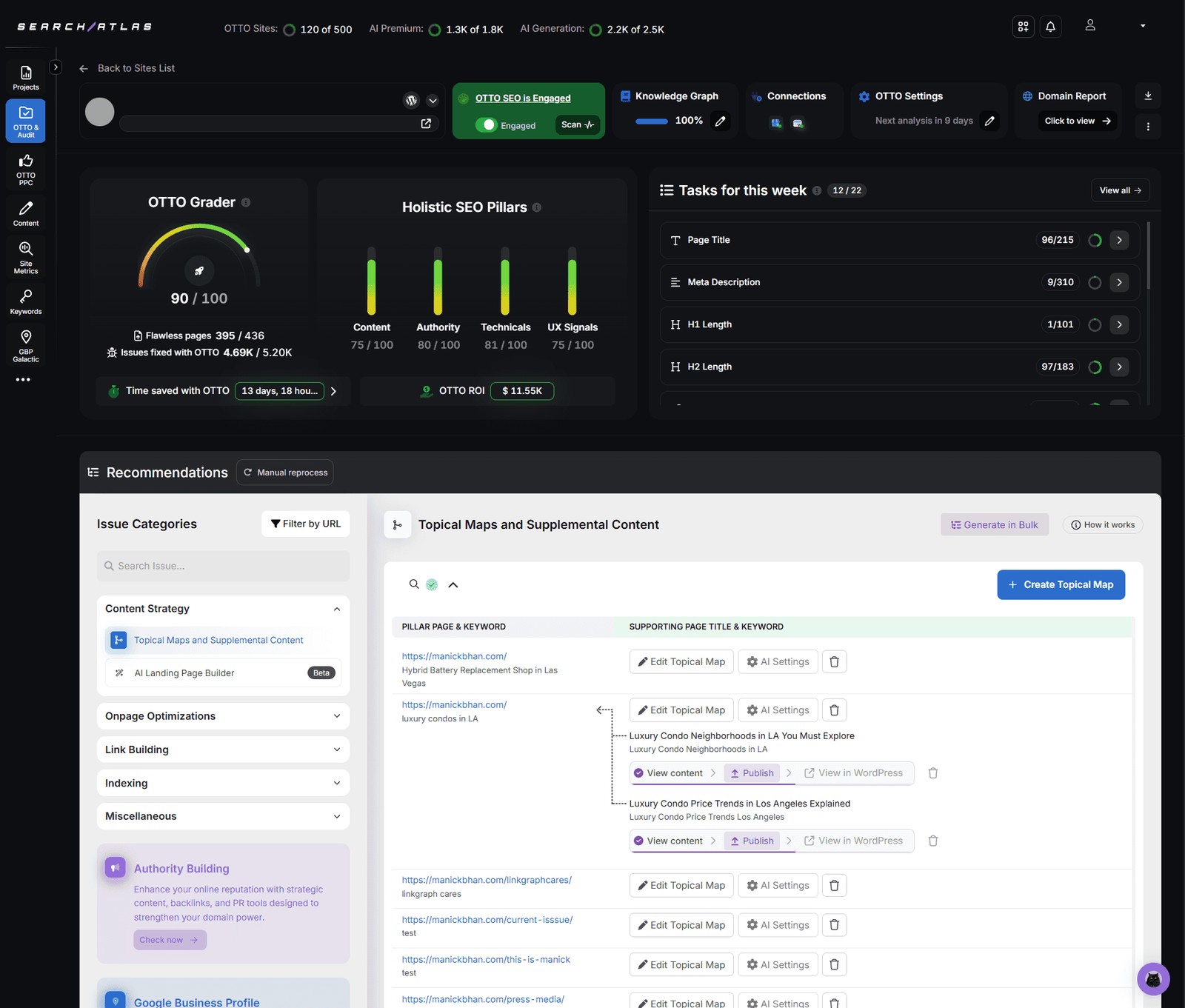
A safe installation sequence is:
- Back up the site and document current caching, CDN, tag-manager, and optimization plugins.
- Install through the supported CMS plugin, Cloudflare workflow, or approved header implementation.
- Clear relevant caches and confirm the integration loads on representative templates.
- Check public pages while logged out and in a clean browser session.
- Inspect rendered titles, canonicals, robots directives, schema, internal links, and analytics tags.
- Run a fresh crawl and compare it with the pre-installation baseline.
- Keep approval controls enabled during the pilot.
Do not approve sitewide changes merely because the recommendation sounds reasonable. A title rule that works on articles can damage product or location templates. A canonical change can alter indexation. Internal-link automation can create repetitive anchors or point users away from conversion pages.
Start with reversible, low-risk actions such as isolated metadata improvements on a small page set. Monitor the affected URLs in Search Console, analytics, and a crawler. Expand only after the output is technically correct and editorially acceptable.
Step 4: Read the OTTO Grade and Build an Approval Queue
The OTTO grader organizes work across technical, content, authority, and user-experience signals. Treat the grade as a prioritization interface, not a business KPI. Raising a score is useful only when the fixes improve crawlability, relevance, user experience, or conversion performance.
Classify recommendations into three queues:
| Risk level | Typical examples | Approval approach |
|---|---|---|
| Low | Missing alt text, isolated metadata cleanup, obvious broken internal link | Sample-check, approve small batch, recrawl |
| Medium | Internal linking, schema changes, heading updates, page rewrites | Template and editorial review before deployment |
| High | Canonicals, robots directives, large redirects, sitewide rules, money-page rewrites | Technical owner approval, staging, rollback plan |
Check dependencies. Fixing a broken link may require a redirect decision. Changing a title may conflict with paid landing-page messaging. Adding schema requires the visible page content to support the markup.
For each approved batch, record:
- Recommendation and affected URLs.
- Approver and deployment timestamp.
- Expected outcome.
- Validation method.
- Rollback trigger.
Then recrawl and inspect live HTML. “Deployed” is not the same as “correctly rendered, indexed, and measured.”
Step 5: Use Atlas Agent for a Measurable Goal
Atlas Agent is the conversational workflow layer inside Search Atlas. Official documentation describes a five-part process: choose a project, state a goal or run a Playbook, review the proposed workflow and outputs, approve execution, and monitor results.
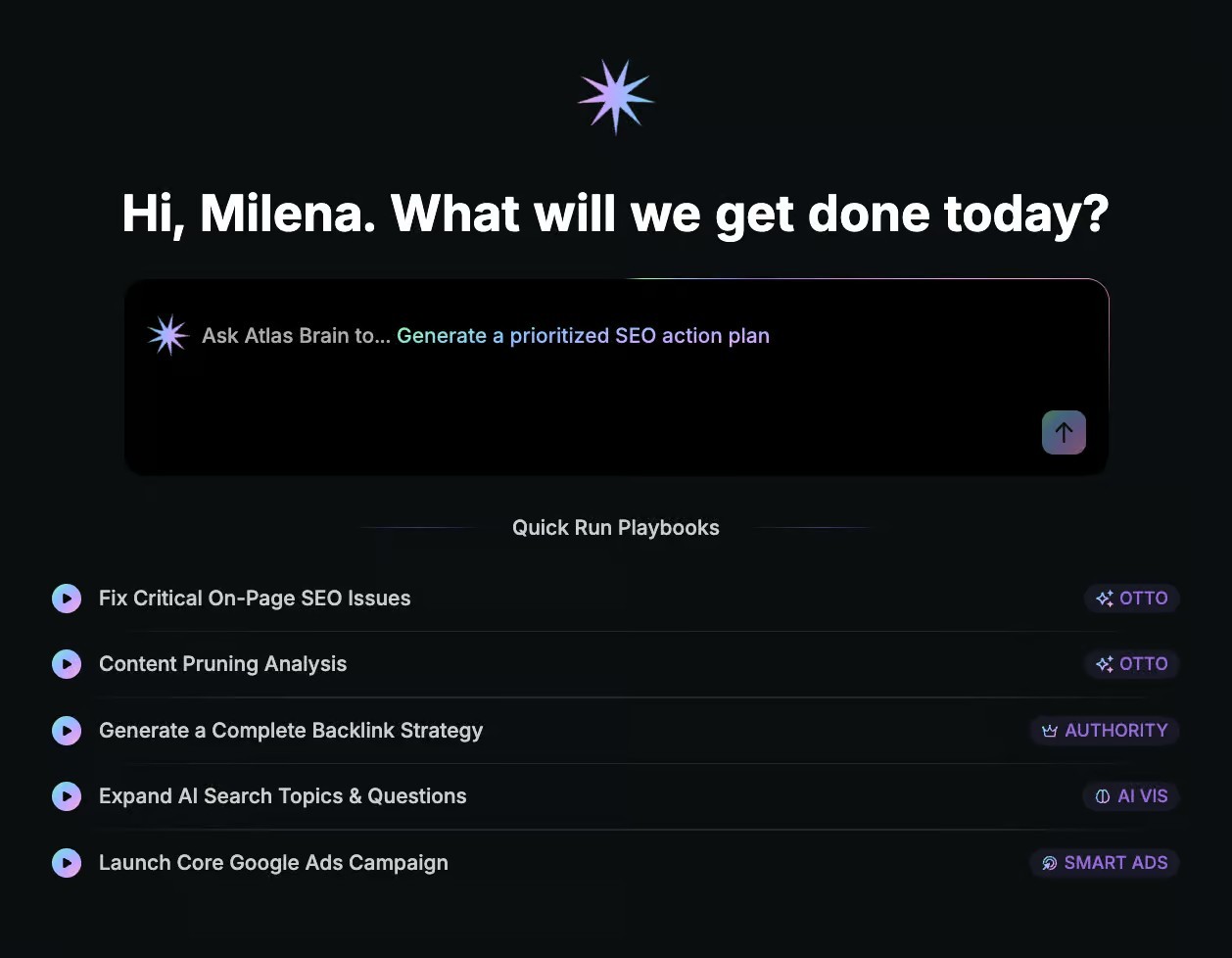
Weak prompt:
> Improve our SEO.
Stronger operating brief:
> For the selected US site, identify the ten nonbrand pages with declining clicks over the last 90 days, separate demand loss from ranking loss, and propose a prioritized refresh plan. Do not publish or change URLs. Show evidence, dependencies, and expected impact for approval.
A useful Atlas Agent request includes:
- The project and market.
- A measurable outcome.
- Time range and data source.
- Included and excluded page types.
- Constraints on brand, legal claims, budgets, and publishing.
- Required evidence and output format.
- Whether the agent may draft, deploy, or only recommend.
Review the plan before execution. Check whether the agent has selected the right pages, interpreted seasonality correctly, preserved conversion intent, and identified technical dependencies. For high-impact actions, require explicit approval even after smaller workflows prove reliable.
Convert successful workflows into repeatable Playbooks only after they have passed QA more than once. A bad workflow becomes a larger problem when standardized across clients.
Step 6: Build and Publish Content With Content Genius
Content Genius combines SERP research, briefing, drafting, optimization, and CMS publishing. The efficient workflow is not “generate and publish.” It is “research, specify, draft, verify, improve, and then publish.”
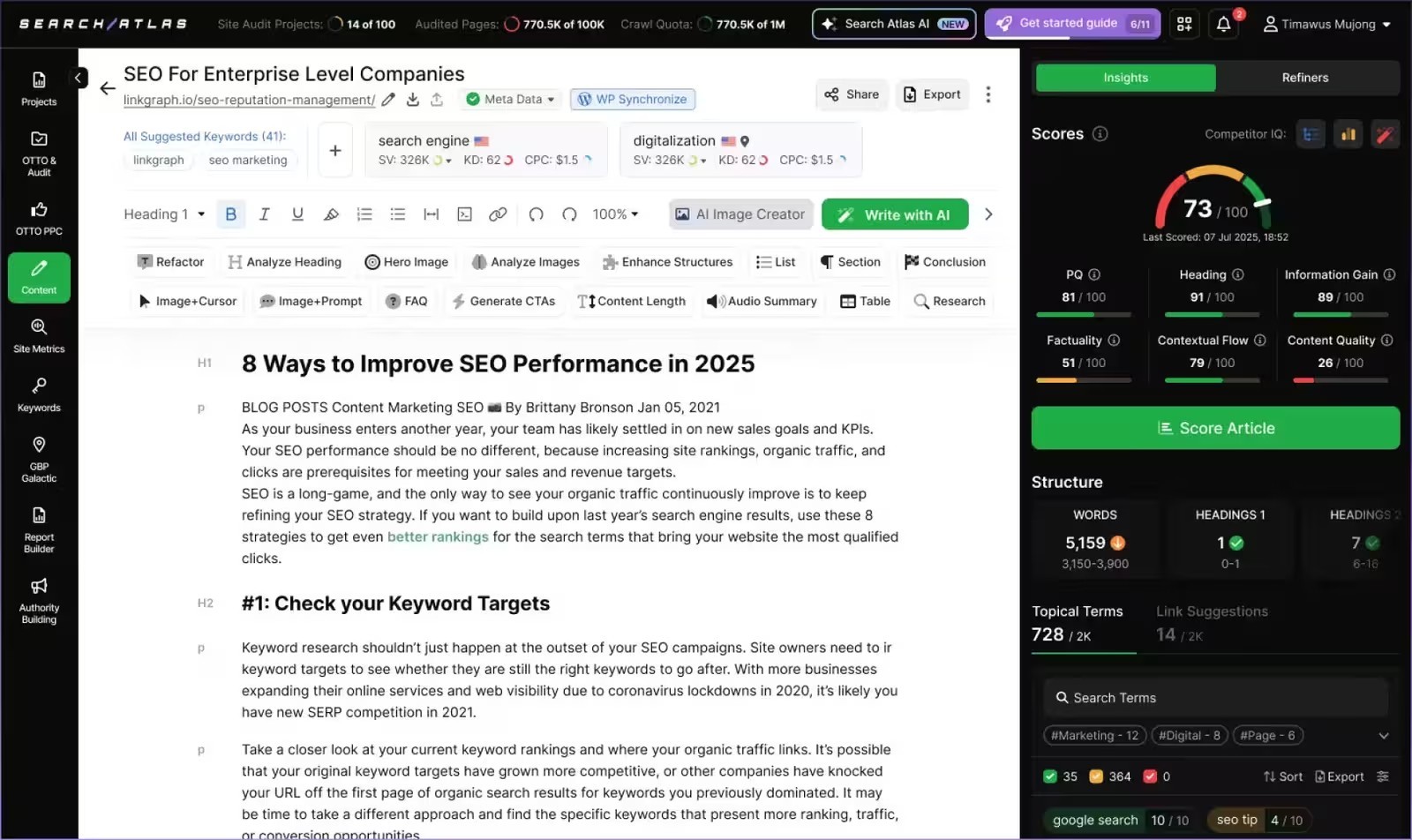
Use this process:
- Choose a query tied to a business job. Confirm country, language, intent, audience, and conversion action.
- Review the live SERP. Identify page types, entities, subtopics, evidence patterns, and content formats. Do not copy competitor structure mechanically.
- Build the brief. Specify the central entity, attributes, questions, first-party evidence, screenshots, internal links, and claims requiring sources.
- Set brand context. Define tone, prohibited claims, product terminology, and audience sophistication.
- Generate or import a draft. Treat AI output as working material, not evidence.
- Run editorial and semantic review. Remove repetition, unsupported claims, generic advice, and sections that do not advance the search task.
- Verify facts and links. Use official sources for pricing, policies, features, and technical instructions.
- Optimize without chasing a score. Improve missing concepts and structure while preserving clarity and originality.
- Preview in the CMS. Check H1/H2 hierarchy, tables, images, ALT text, mobile layout, links, metadata, schema, and disclosure behavior.
- Publish under human ownership. Record author, reviewer, update date, and monitoring plan.
For money pages, require an editor to validate comparison claims and affiliate links. For regulated topics, add legal or compliance review. For enterprise content, confirm that confidential data did not enter prompts or drafts.
Content automation saves the most time when the brief is explicit and the review checklist is non-negotiable.
Step 7: Configure Smart Ads Without Giving Up Budget Control
Smart Ads is Search Atlas's paid-search workflow. Official product materials describe campaign creation, audits, negative-keyword work, budget and bid adjustments, pacing, and retargeting. Those capabilities can accelerate PPC operations, but the account still spends real money.
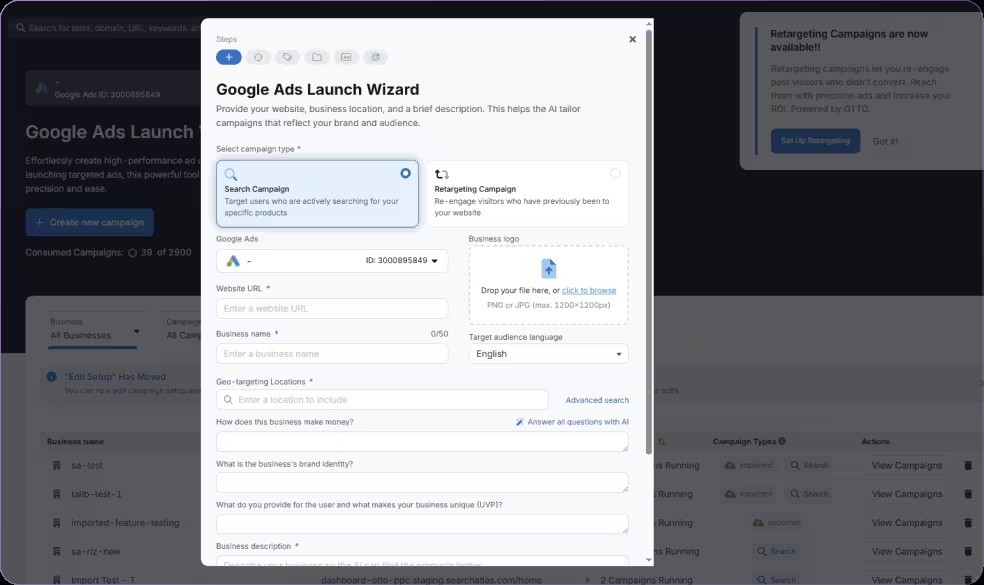
Before connecting the account, document:
- Monthly and daily budget ceilings.
- Approved markets, languages, networks, and devices.
- Conversion actions and their business values.
- Brand, competitor, legal, and trademark restrictions.
- Negative-keyword rules.
- Landing pages that may receive traffic.
- Target CPA or ROAS and the minimum data needed before optimization.
When using the launch wizard, verify campaign type, location targeting, schedule, bidding strategy, ads, keywords, assets, URLs, and tracking. Preview every landing page on desktop and mobile. Confirm that UTMs and conversion events do not duplicate existing tracking.
Start with conservative budgets and explicit approval. Do not let an automated system reallocate large amounts based on a few days of noisy data. Use a change log and compare performance against a suitable baseline, accounting for seasonality and promotions.
Smart Ads can reduce repetitive account work, but strategy remains human: offer quality, unit economics, creative positioning, and acceptable acquisition cost are business decisions.
Step 8: Set Up LLM Visibility as a Decision System
LLM Visibility tracks how a brand appears in AI-generated answers. Useful monitoring requires representative prompts, consistent competitors, and a link between visibility findings and actions.
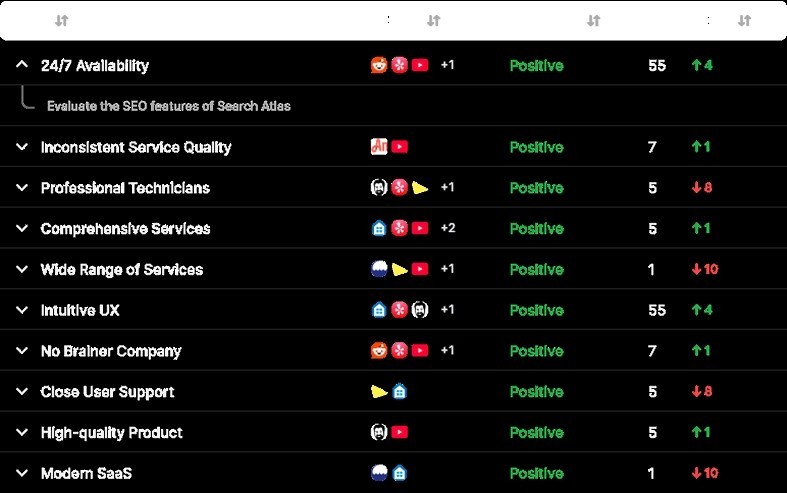
Build the prompt set from real customer journeys:
- Category discovery: “best AI SEO tools for agencies.”
- Problem diagnosis: “how to automate technical SEO across client sites.”
- Comparison: “Search Atlas vs Semrush for an SEO agency.”
- Use case: “SEO platform with content and Google Ads automation.”
- Trust and risk: “is autonomous SEO deployment safe.”
- Purchase validation: “Search Atlas pricing and alternatives.”
Group prompts by funnel stage, product, audience, and market. Track a stable core set so changes remain comparable, then maintain an experimental set for emerging terminology.
Review more than mention count. Inspect citation sources, sentiment, factual accuracy, competitor inclusion, answer themes, and whether the cited page is the page you want represented. A visibility increase from an irrelevant or inaccurate citation is not a win.
Turn findings into controlled work: strengthen entity clarity, publish missing comparison evidence, improve first-party research, correct inconsistent facts, and earn citations from trusted sources. Avoid producing many thin pages for individual prompts.
Step 9: Establish a Weekly Operating Cadence
Automation becomes manageable when review happens on a fixed schedule. A practical weekly cadence is:
Monday: performance and anomalies Review organic, paid, local, content, and AI visibility changes. Separate meaningful movement from normal variance.
Tuesday: approvals Triage OTTO and Atlas Agent recommendations by impact and risk. Assign technical, editorial, PPC, and legal owners.
Wednesday: production Run approved content, technical, and campaign workflows. Keep high-risk changes in staging or small batches.
Thursday: validation Crawl affected URLs, inspect rendered output, verify analytics and ads, review published copy, and test rollback where relevant.
Friday: reporting and learning Document work shipped, outcomes, defects, hours saved, and Playbook improvements. Client reports should separate completed actions from recommendations.
Track operational metrics alongside marketing outcomes:
| Operational metric | Why it matters |
|---|---|
| Approval-to-deployment time | Shows whether automation removes the implementation queue |
| Percentage of recommendations approved | Exposes low-quality or poorly scoped automation |
| Rollback and defect rate | Measures execution safety |
| Editor revision time | Tests whether content automation truly saves labor |
| Cost per active project | Reveals plan utilization |
| Hours saved by workflow | Supports ROI without relying on vendor estimates |
Step 10: Scale Across Clients or Business Units
Scale only after the pilot has a stable baseline, documented approval model, and acceptable defect rate. Copying an unproven configuration across 30 sites multiplies uncertainty.
For agencies:
- Create a separate project and access model for each client.
- Document whether the agency may recommend, draft, or deploy changes.
- Keep client-specific brand, legal, and conversion rules.
- Use white-label reporting only when the data and actions are clearly explained.
- Price implementation and QA labor, not only software access.
For enterprise teams:
- Separate administrator, strategist, editor, analyst, and approver roles.
- Integrate Search Atlas changes with existing release and incident processes.
- Define prohibited data and prompt content.
- Audit vendor access, integrations, retention, and offboarding.
- Require evidence for material performance claims.
For freelancers, protect margin by standardizing the repeatable parts while keeping strategy specific. A reusable checklist is valuable; a generic client strategy is not.
If the pilot shows that you need deeper research, stricter enterprise governance, a specialist content editor, or focused local reporting, compare the products in our Search Atlas alternatives guide. Before renewal, check our Search Atlas coupon guide for verifiable trial and savings information rather than unconfirmed codes.
Billing, Refund, and Cancellation Checks
Search Atlas describes its refund posture as generally no-refund, with narrow exceptions. The official refund policy says a monthly request must be submitted through live chat within 48 hours after billing and the account must remain below 10% usage in every tool. Exceeding 10% in any one tool can disqualify the request. Promotional subscriptions, discounts, add-ons, upgrades, and additional purchases are generally excluded.
For annual billing, the policy says to contact live chat within 72 hours. Only a 50% refund may be granted, subject to the same usage condition. These are eligibility conditions, not a guarantee of approval. Verify the current Search Atlas refund policy before purchasing because vendor terms can change.
If you cancel:
- Export reports, content, recommendations, and change logs first.
- Record which OTTO changes are live and which must be undeployed or retained.
- Check the subscription view for the plan, renewal date, and payment method.
- Contact the assigned representative or support through live chat.
- Request written confirmation that auto-renewal is disabled.
- Save the confirmation and a screenshot of billing status.
- Revoke Google, advertising, CMS, and infrastructure permissions after exports and rollback are complete.
Do not assume that deleting a project cancels billing. Search Atlas's Terms of Use also warn that cancellation can restrict platform access, so complete offboarding before the effective cancellation time.
Common Search Atlas Mistakes to Avoid
Turning on broad automation before validating one template
Start small. Titles, schema, internal links, and canonicals can behave differently across articles, products, locations, and faceted pages.
Treating the OTTO grade as the business objective
A higher tool score does not guarantee more qualified traffic or revenue. Connect fixes to crawlability, relevance, experience, and conversion goals.
Publishing AI drafts without source verification
The platform can accelerate production but cannot make unsupported pricing, policy, or product claims reliable. Verify primary facts and add first-party experience.
Allowing ad optimization without spend guardrails
Automated changes need budgets, conversion definitions, observation windows, and rollback thresholds.
Tracking vanity AI prompts
Use prompts that represent actual customer decisions. Monitor citations and accuracy, not only mentions.
Ignoring offboarding
Know how to export data, preserve approved content, remove integrations, revoke access, and handle deployed changes before the subscription ends.
When your access, baselines, and approval model are ready, start Search Atlas on the controlled pilot rather than connecting every client or business unit on day one.
Frequently Asked Questions
How do I start using Search Atlas?
Create one pilot project, connect the correct data sources, document baselines, install OTTO through a supported method, and keep approvals enabled. Validate low-risk changes before expanding automation.
How do I install OTTO SEO?
Search Atlas officially supports the OTTO Pixel and integration paths involving CMS platforms, Cloudflare, and code. Use the method your technical owner can inspect, clear caches, check rendered HTML, and run a before-and-after crawl.
Should I use OTTO SEO on autopilot immediately?
No. Begin in approval mode on a noncritical but representative site. Approve reversible changes in small batches, inspect the live output, monitor performance, and expand only after the defect and rollback rates are acceptable.
What should I ask Atlas Agent first?
Ask for a scoped diagnostic or plan rather than unrestricted deployment. Specify the project, market, pages, time range, desired outcome, constraints, evidence, and actions that require approval.
Can Search Atlas publish content automatically?
Content Genius and connected workflows support content creation, optimization, and CMS publishing. A human should still verify sources, brand voice, originality, legal claims, links, metadata, images, and final rendering before publication.
Can Search Atlas manage Google Ads?
Smart Ads supports Google Ads campaign and optimization workflows described by Search Atlas. Connect the correct account, preserve budget ceilings, verify conversion tracking, and require approval for campaign launches and material spend changes.
How do I measure Search Atlas ROI?
Track hours saved, approval-to-deployment time, content revision time, defects, rollbacks, active-project cost, organic conversions, paid acquisition efficiency, and client reporting time. Compare against a documented pre-pilot baseline.
What is the safest Search Atlas workflow for agencies?
Use separate client projects, written deployment authority, least-privilege access, approval queues, small change batches, client-specific brand rules, and reports that distinguish recommendations from completed work.
How often should I review Search Atlas automations?
Review anomalies and recommendations at least weekly during a pilot. High-spend advertising and high-risk technical deployments may require daily monitoring. Reduce review frequency only after the workflow demonstrates stable output.
What happens if Search Atlas is not the right fit?
Stop new automation, export needed reports and content, document live changes, remove or disable integrations according to official instructions, revoke access, verify the site and tracking, and replace only the workflow that failed rather than rebuilding the entire stack blindly.