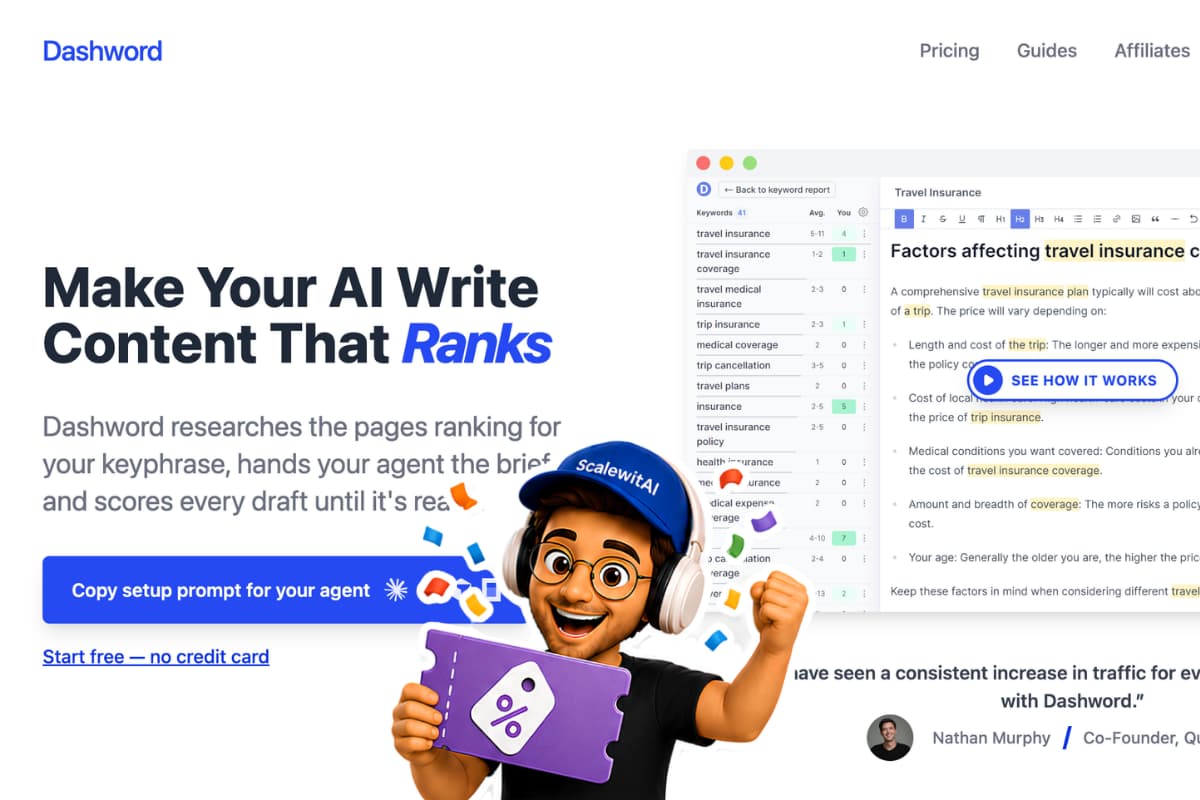
Dashword turns a target query and country into a competitive report, content brief, and live optimization workspace. The workflow is useful when an SEO team already knows what it wants to target but needs to shorten SERP research, give writers clearer instructions, and apply consistent quality checks before publication.
| At a glance | Details |
|---|---|
| Tool | Dashword |
| Core workflow | Report → brief → draft → optimize → share → monitor |
| Free access | One report; no credit card required |
| Startup plan | $99/month, 30 reports, five seats, briefs, and 100,000 AI-written words |
| Best for | SEO professionals, content marketers, agencies, and site owners |
| Main limitation | It starts after keyword selection and is not a full keyword-research suite |
This tutorial explains the current public workflow while distinguishing it from older interface screenshots in Dashword's official documentation. Exact labels can change, but the durable process remains the same: choose the right query and market, inspect the SERP rather than blindly following averages, build a useful brief, optimize for topic coverage and readability, then complete human editorial and publishing checks outside the score.
Quick Answer: How Do You Use Dashword?
Use Dashword in seven steps: create a report for one target query and country, study the benchmark and ranking pages, turn competitor outlines and questions into a brief, create or import the draft, improve topic coverage in the content editor, share the workspace with a writer or editor, and monitor the published URL when monitoring is available in your plan or workspace.
Dashword's value is focus. It does not replace your keyword strategy, subject-matter expertise, source verification, internal-link planning, or final CMS quality assurance. For a buyer-level explanation of plans, limits, and fit, read our Dashword review before committing a team workflow to the platform.
What You Need Before Starting
Prepare the following inputs before generating a report. A clean setup prevents you from spending a report allowance on the wrong query or market.
| Requirement | What to prepare | Why it matters |
|---|---|---|
| Target query | One primary query with a defined search intent | Dashword analyzes one competitive SERP at a time |
| Country | The market whose results you want analyzed | SERP composition and competitors vary by country |
| Page goal | New article, update, product page, or guide | The correct format should match dominant intent |
| Audience | Role, knowledge level, and decision stage | Readability and depth depend on the reader |
| Evidence | First-party sources, data, examples, and expert input | A content score does not create trustworthy evidence |
| Publishing checklist | Title, metadata, links, images, schema, and QA owner | Dashword is an optimization layer, not the complete CMS process |
The current pricing page gives every new account one free report without a credit card. Startup lists 30 reports and five seats for $99 per month. Business starts at $349 per month and adds higher limits, bulk report creation, API access, and SSO. Confirm checkout terms before purchase because pricing and allowances can change.
If you are new to SEO content optimization, the AI writing and optimization tools hub provides the broader context for where tools like Dashword fit.
How to Use Dashword Step by Step
Step 1: Create an Account and Protect Your Free Report
Open Dashword through the approved affiliate link and create an account. The public pricing page describes the free offer as one report with no credit card required; it is not presented as a time-limited free trial.
Before using that report, confirm your target query, country, page type, and search intent. Avoid using a broad seed topic such as “SEO” when the intended page targets a specific task such as “how to build a content brief.” A report can summarize the SERP you request, but it cannot repair a vague targeting decision.
Also decide who owns the report. Dashword's Startup plan includes five seats. A public report link lets guests view the report and its associated articles without an account, so it should not be treated as access to one confidential document. Use named team accounts for people who need ongoing workspace access and make a report public only when exposing all related article content is acceptable.
Step 2: Generate a Report for the Correct Query and Country
Enter the primary keyphrase in the Reports area, select the target country, and generate the report. Dashword's API documentation currently lists Australia, Canada, the United Kingdom, Ireland, New Zealand, Singapore, and the United States as supported country codes for API reports. The normal web interface presents country selection without requiring you to know those codes.
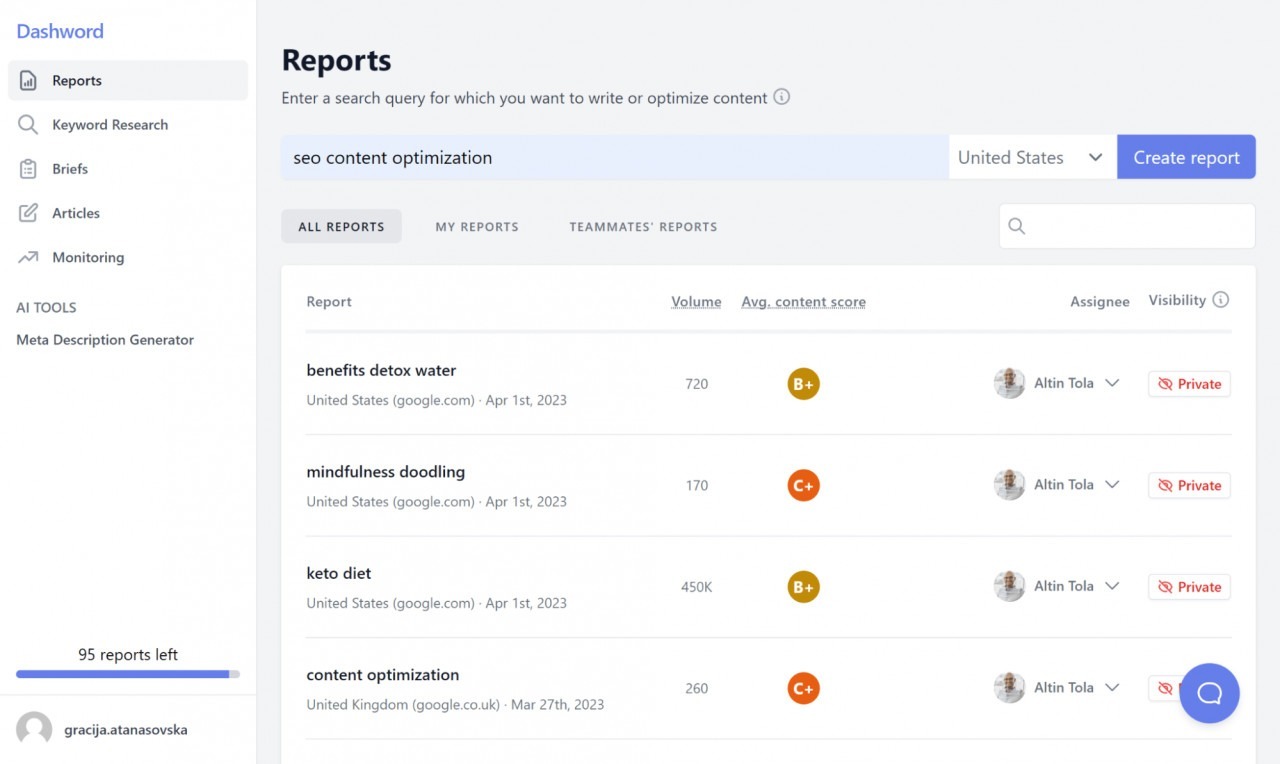
The official how-to guide says Dashword analyzes the top results, identifies important terms, calculates their importance, and grades the competing content. Report generation is asynchronous, so wait for completion rather than repeatedly creating the same report.
For US content, verify that United States is selected. A UK or Australian SERP may surface different vendors, terminology, regulations, and search intent. The country is part of the research input, not a cosmetic setting.
Step 3: Read the Benchmark and Audit the Competitive SERP
Open the completed report and review the top-three and top-ten benchmarks. Dashword's official guides describe benchmarks for content quality or grade, readability, and average word count. Treat these as orientation signals—not targets you must copy exactly.
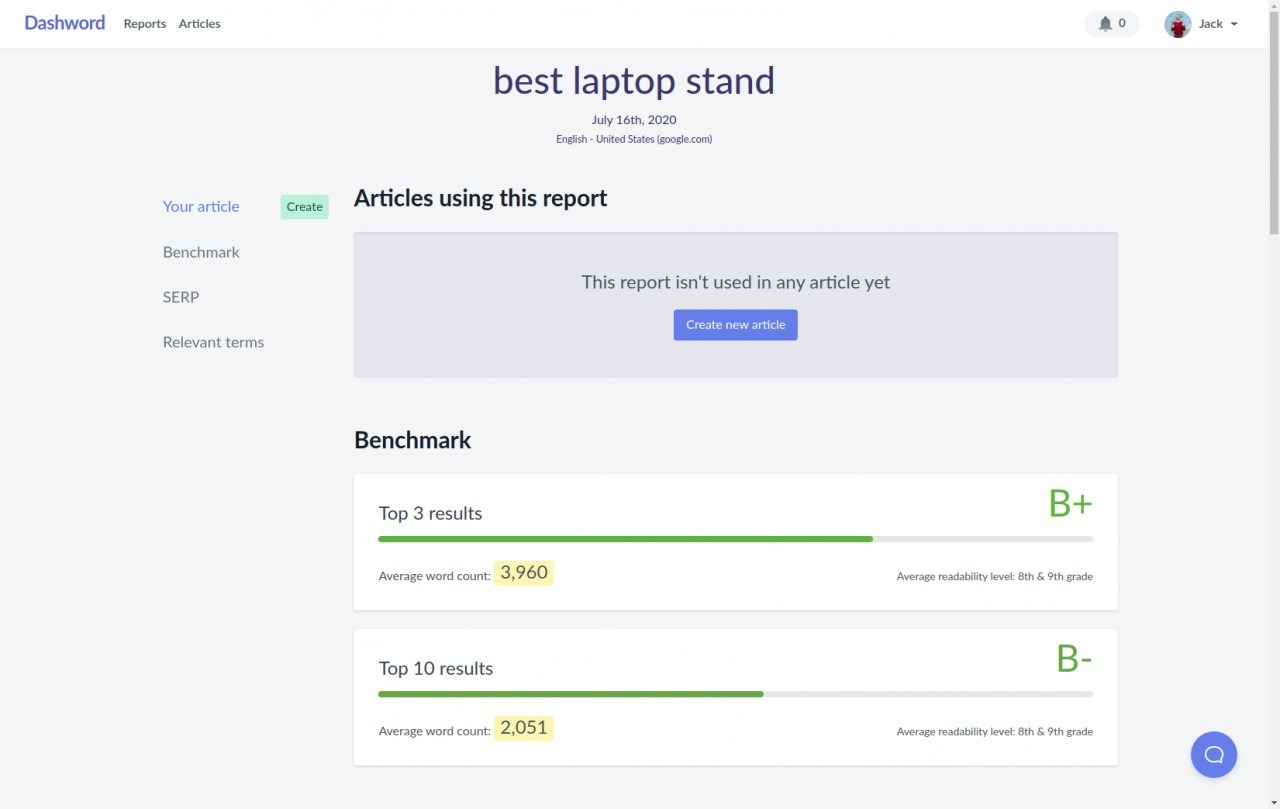
Next, inspect the ranking URLs, titles, scores, and word counts. Ask:
- Are the top results guides, listicles, landing pages, videos, or mixed formats?
- Do authoritative brands dominate the SERP?
- Which pages directly satisfy the target intent?
- Are any results irrelevant, thin, outdated, or structurally different from your planned page?
- What information, evidence, or user experience could your page add?
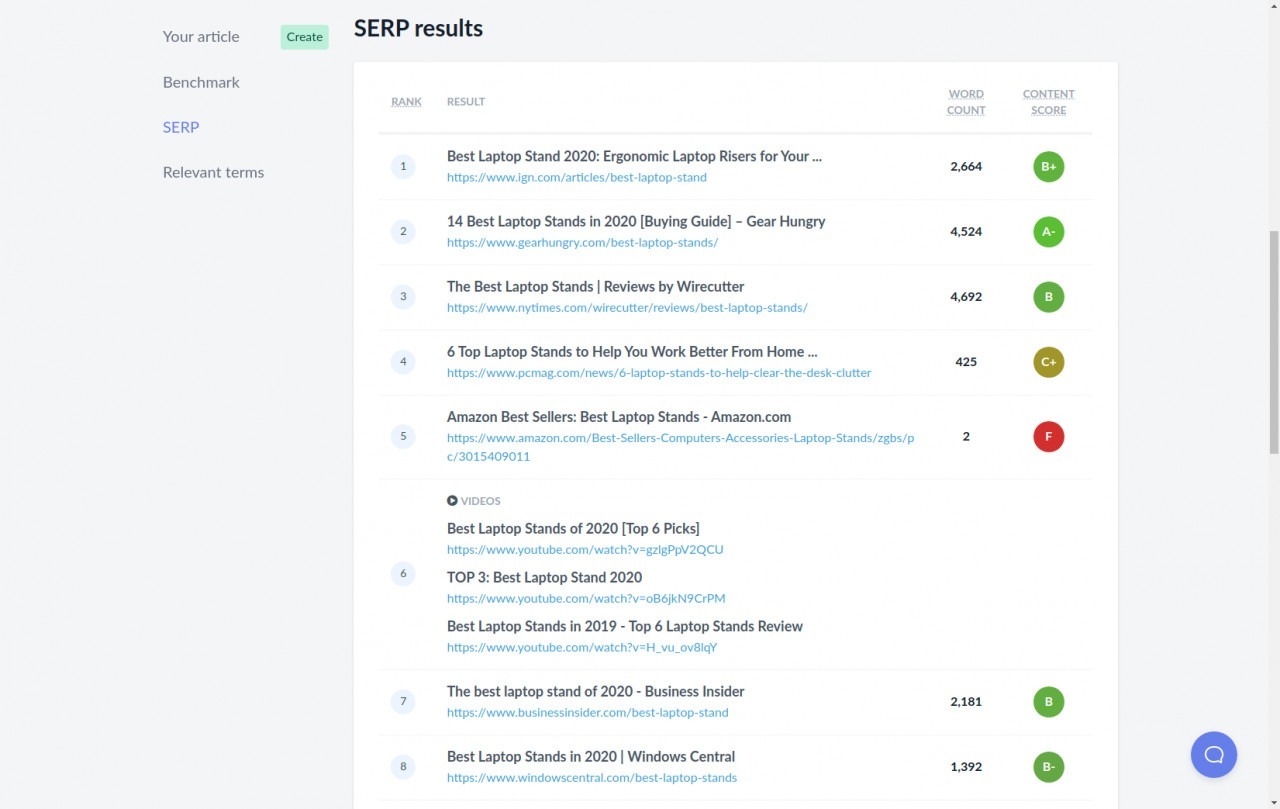
Do not set your article length by averaging every visible result. A calculator, category page, or short product page may belong in the SERP but be a poor comparator for a long tutorial. Use the benchmark as a range, then choose a length that fully answers the reader's task without repetition.
Step 4: Build a Brief from Outlines, Terms, and Questions
Open the brief builder from the report. Dashword's current homepage says its builder brings competitor outlines into one place, lets editors organize the brief interactively, and supports one-click sharing with writers.
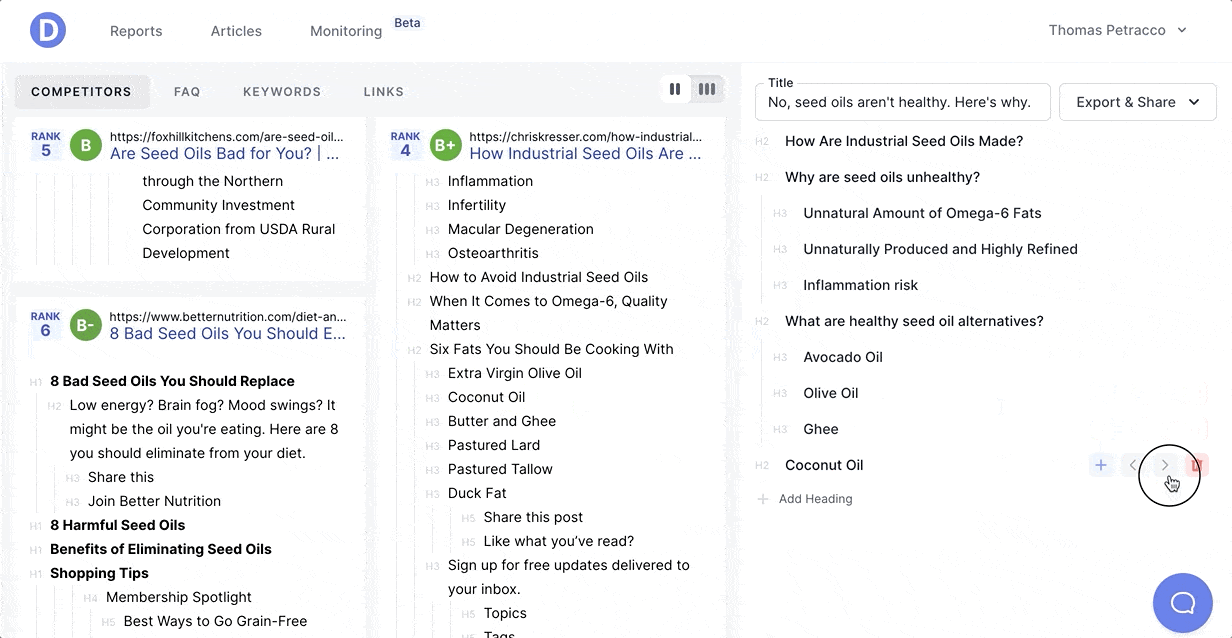
Build the brief around the user's decision sequence rather than merging every competitor heading. A practical brief should include:
- the primary query and country;
- search intent and page format;
- target audience and reading level;
- a proposed H2/H3 outline;
- required questions and concepts;
- evidence or first-party sources the writer must use;
- examples, screenshots, tables, or demonstrations;
- internal-link targets and CTA rules;
- claims the writer must avoid;
- editorial acceptance criteria.
The April 2023 official workflow opens the brief through Edit brief. Its sidebar contains competitor outlines and tabs for FAQs, relevant keywords, and frequently cited links. You can add, delete, reorder, and change the type of sections. Use competitor headings as research prompts rather than copying one page's structure wholesale. When the outline is ready, Export & Share can copy the brief, create a public brief link, or export the outline into a Dashword Article. Exact labels may change in the live interface.
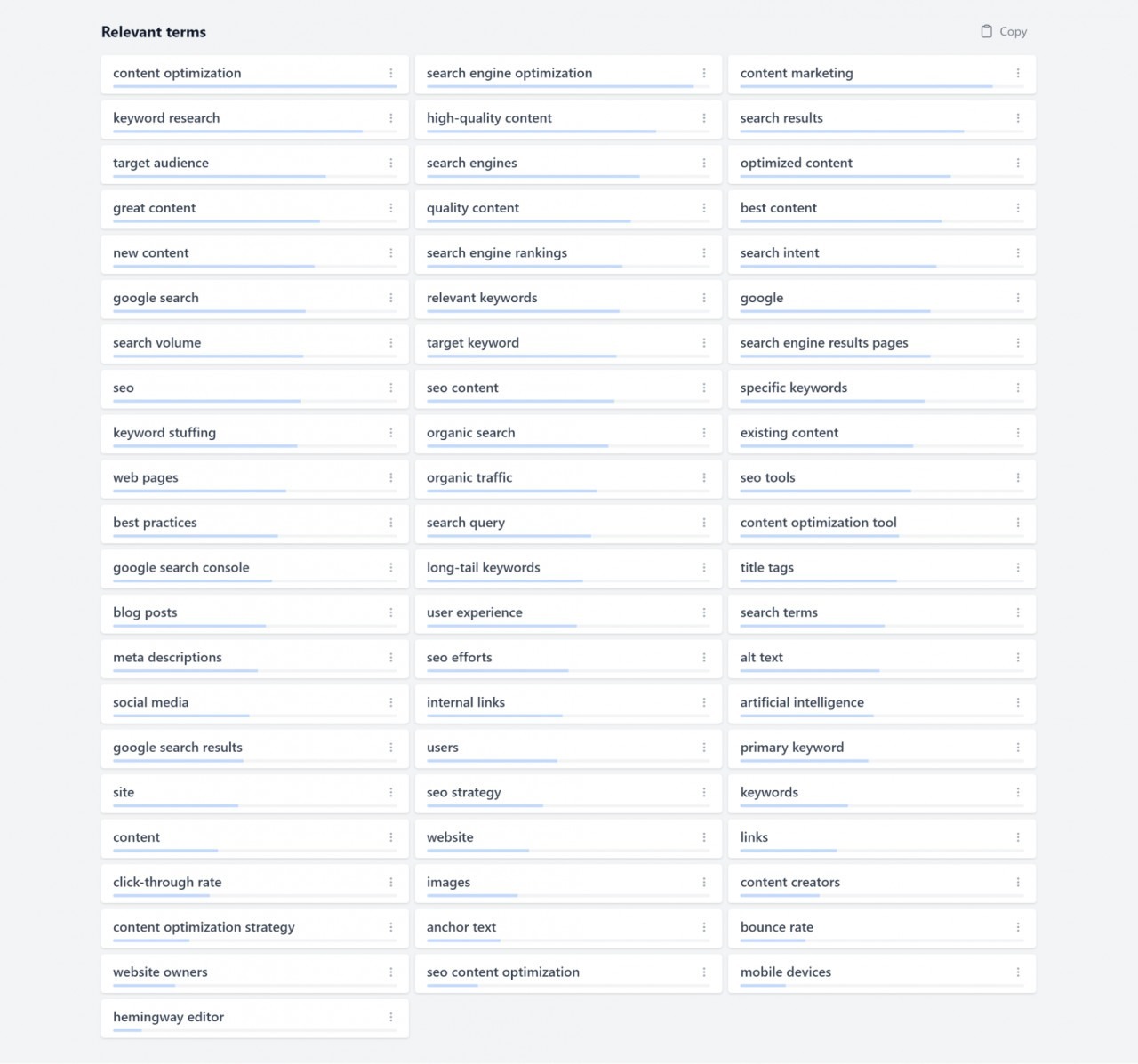
Review Dashword's relevant terms and questions for missing subtopics. Terms are prompts for coverage, not a list to insert mechanically. Questions are useful only when they match the page's audience and intent.
Add information gain that competitors do not provide: a tested process, clearer decision criteria, screenshots, calculations, original examples, expert commentary, or a better troubleshooting path. Reproducing the consensus outline without additional value may improve topical completeness while leaving the page interchangeable.
Step 5: Create the Article or Import a Draft
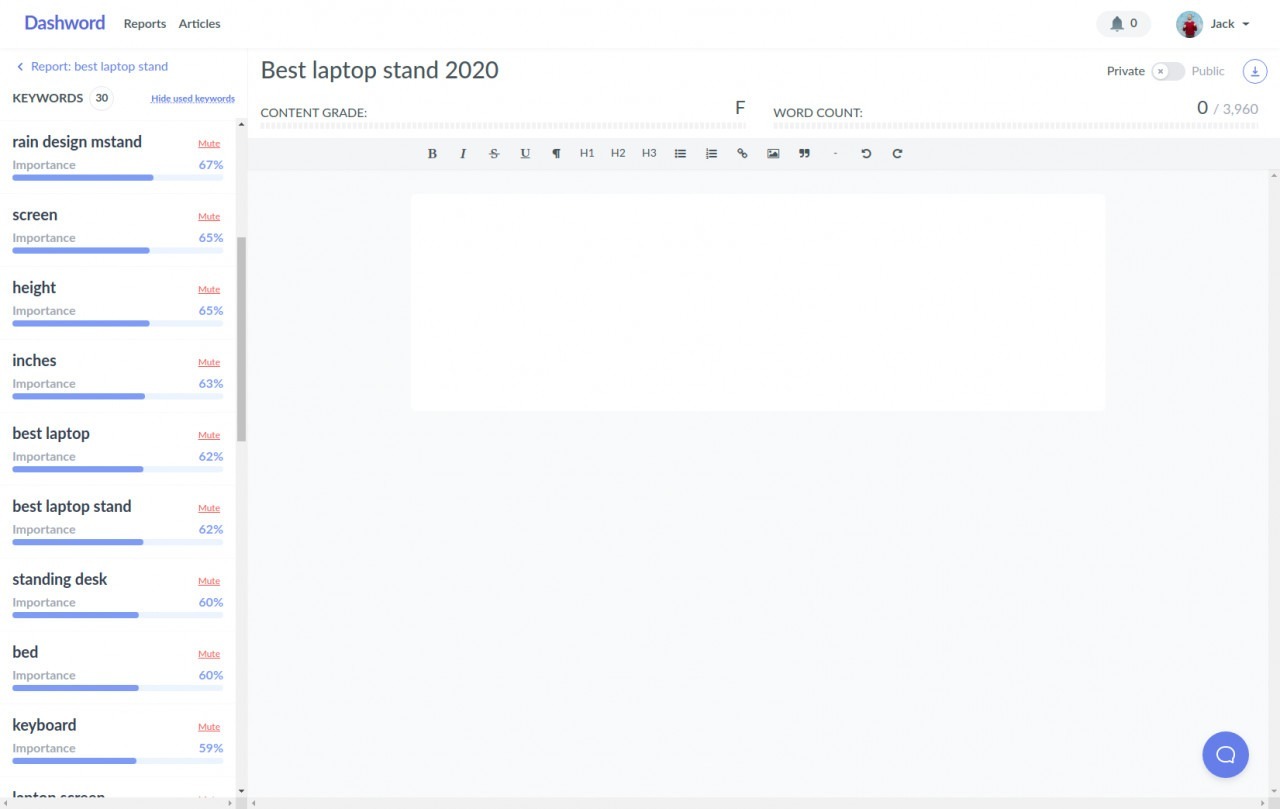
Create a new article from the report, or paste an existing draft into the content editor. The editor connects the draft to the report's competitive recommendations, so confirm that the article is attached to the correct keyphrase and country before editing.
If you use Dashword's AI Writer, treat the output as a starting draft. Startup currently lists a 100,000-word AI allowance; the Business pricing card confirms AI Writer access without publishing a word allowance. AI-generated text still needs source verification, subject-matter review, originality, brand editing, and legal or compliance review where applicable.
For an existing article, preserve useful sections and evidence before optimizing. Do not rewrite a high-performing passage merely because a suggested term is absent. First ask whether the term represents a missing concept, a synonym already covered, or irrelevant noise.
Step 6: Improve Topic Coverage, Readability, and Content Grade
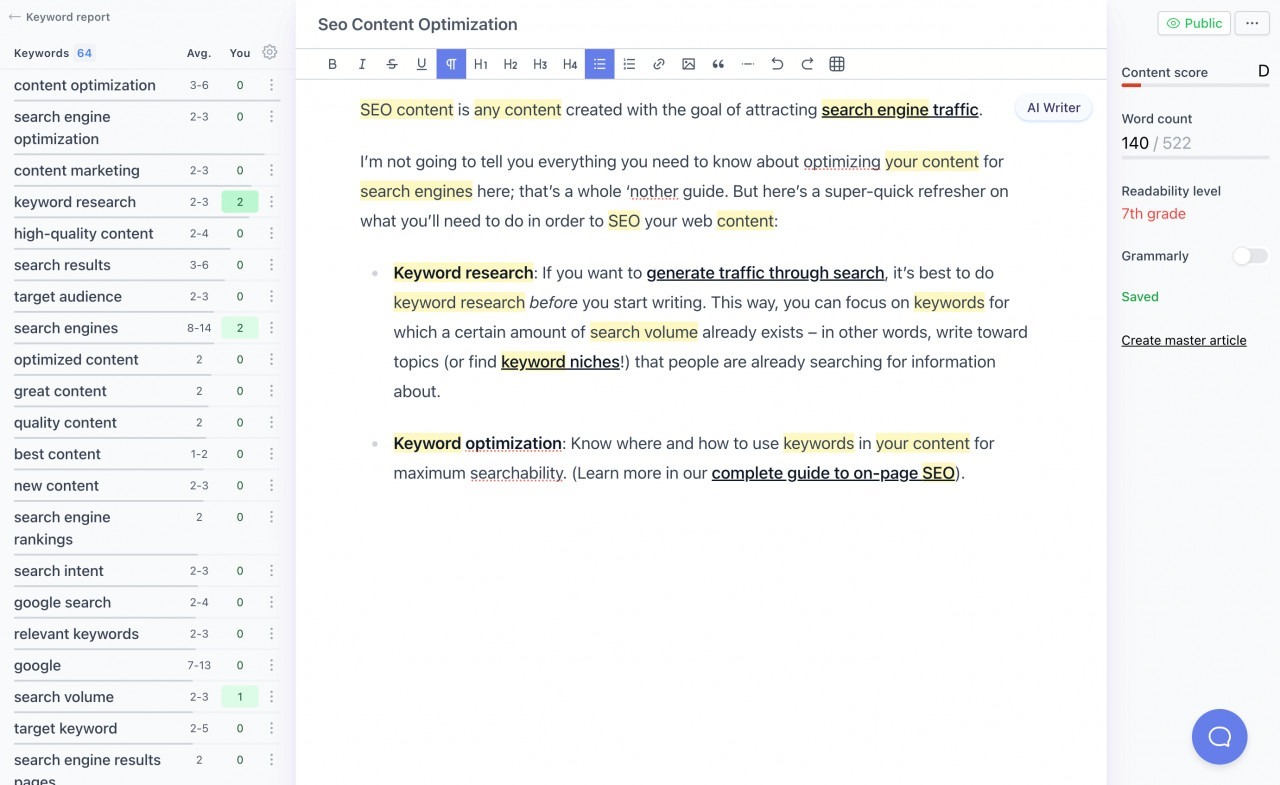
Use the term sidebar to see recommended phrases, relative importance, suggested usage, and occurrences in your draft. Dashword's official guide says used terms can be hidden and irrelevant suggestions can be muted. The editor updates recommendations, grade, word count, and readability as the content changes.
Optimize in this order:
- Intent completeness: confirm the page answers the main task.
- Missing concepts: add genuinely useful topics represented by high-value terms.
- Structure: place concepts under descriptive headings and logical steps.
- Evidence: support claims with reliable sources, examples, or firsthand data.
- Readability: shorten dense sentences and explain necessary jargon.
- Term usage: remove forced repetition and mute irrelevant recommendations.
- Grade: use the score as a diagnostic summary, not the editorial objective.
Dashword's older official guide suggests aiming for an A grade, but a higher grade does not guarantee rankings. A page can score well and still fail because it targets the wrong intent, lacks authority, repeats competitors, has weak links, loads slowly, or makes unsupported claims.
| Signal | Useful interpretation | Wrong interpretation |
|---|---|---|
| Content grade | A summary of coverage against the report | A ranking guarantee |
| Relevant terms | Concepts worth reviewing for inclusion | Keywords that must all be repeated |
| Word count | Competitive context for expected depth | A mandatory minimum |
| Readability | A check against audience complexity | A universal grade-level target |
| Questions | Potential subtopics and FAQ opportunities | A requirement to answer every query |
Step 7: Share, Review, and Publish with a Separate QA Checklist
Use the brief's Export & Share controls when a freelance writer needs a copied brief or public brief link. Report-level sharing is broader: Dashword's current Knowledge Base says changing a report to Public lets anyone with the URL view the report and its associated articles without an account. It documents guest viewing—not anonymous editing. Do not expose confidential research or client drafts unless that scope is acceptable.
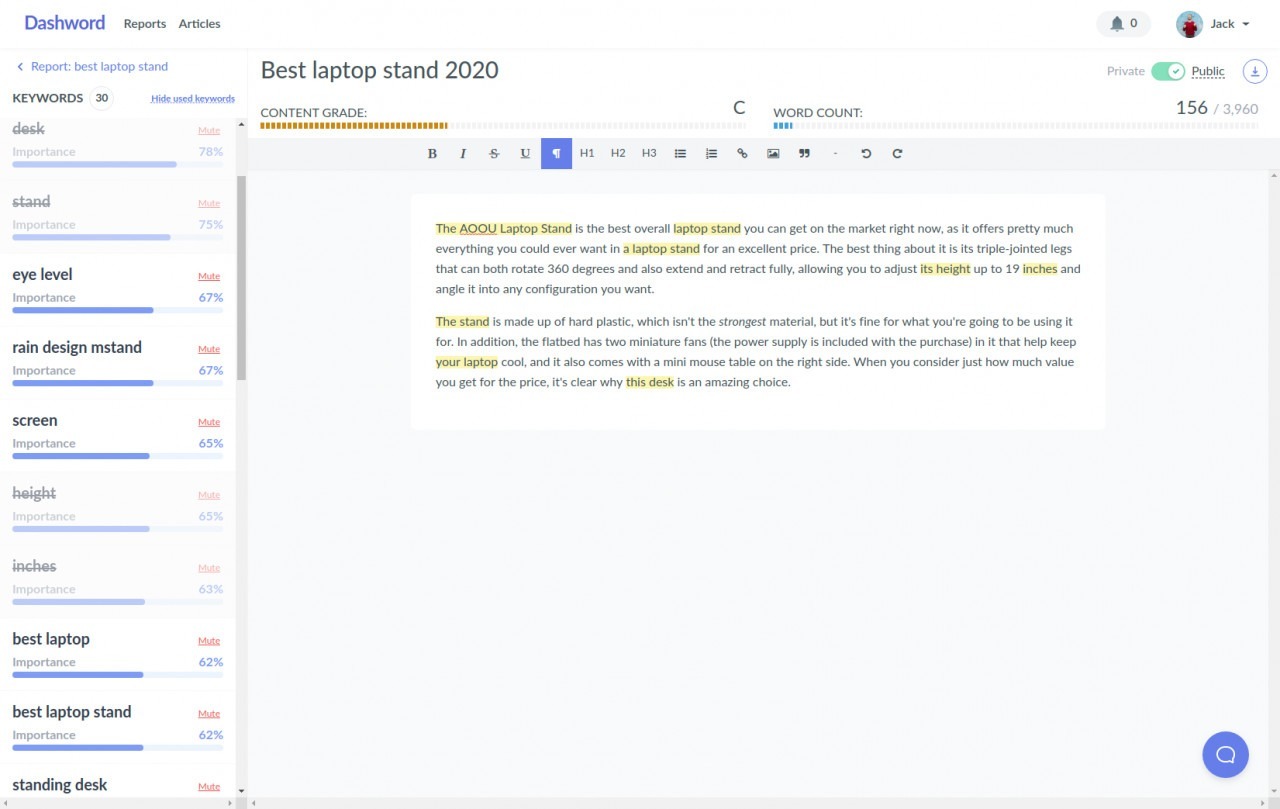
For article export, Dashword currently documents two paths: copy and paste into Microsoft Word with formatting preserved, or open the top-right three-dot menu and choose Copy as Markdown. It does not publicly document a native WordPress publishing workflow, DOCX/PDF download, or HTML export.
Before publication, complete checks that a content score cannot replace:
- verify every factual claim and volatile number;
- confirm the page satisfies the intended query and market;
- add original screenshots, examples, and author expertise;
- write the title tag and meta description;
- add contextual internal links and review outbound citations;
- optimize image filenames, alt text, dimensions, and compression;
- check heading hierarchy, tables, lists, and mobile formatting;
- add or validate structured data where appropriate;
- test affiliate attributes and disclosures handled by the site;
- preview the final CMS page on desktop and mobile.
If this workflow matches your production process, try Dashword with one free report before choosing a paid plan.
How to Use Dashword in Google Docs
Dashword has an official Google Workspace Marketplace add-on named “SEO Content Optimization by Dashword.” The listing says it works with Google Docs and provides topic recommendations and real-time feedback. It also discloses permissions to manage documents where the add-on is installed, connect to an external service, see the primary Google Account email address, and view basic personal information.
A cautious Google Docs workflow is:
- install the add-on from its official Marketplace listing;
- review requested permissions with your Google Workspace administrator;
- make the relevant Dashword report public only if its report and associated articles are safe to expose to link holders;
- copy the public report URL;
- open the document connected to your content assignment;
- launch Dashword from the current Google Docs Extensions/add-on interface;
- choose Load Report, paste the public report URL, and load its recommendations;
- use the sidebar while drafting without forcing every phrase;
- return to your CMS for links, images, metadata, schema, and final formatting.
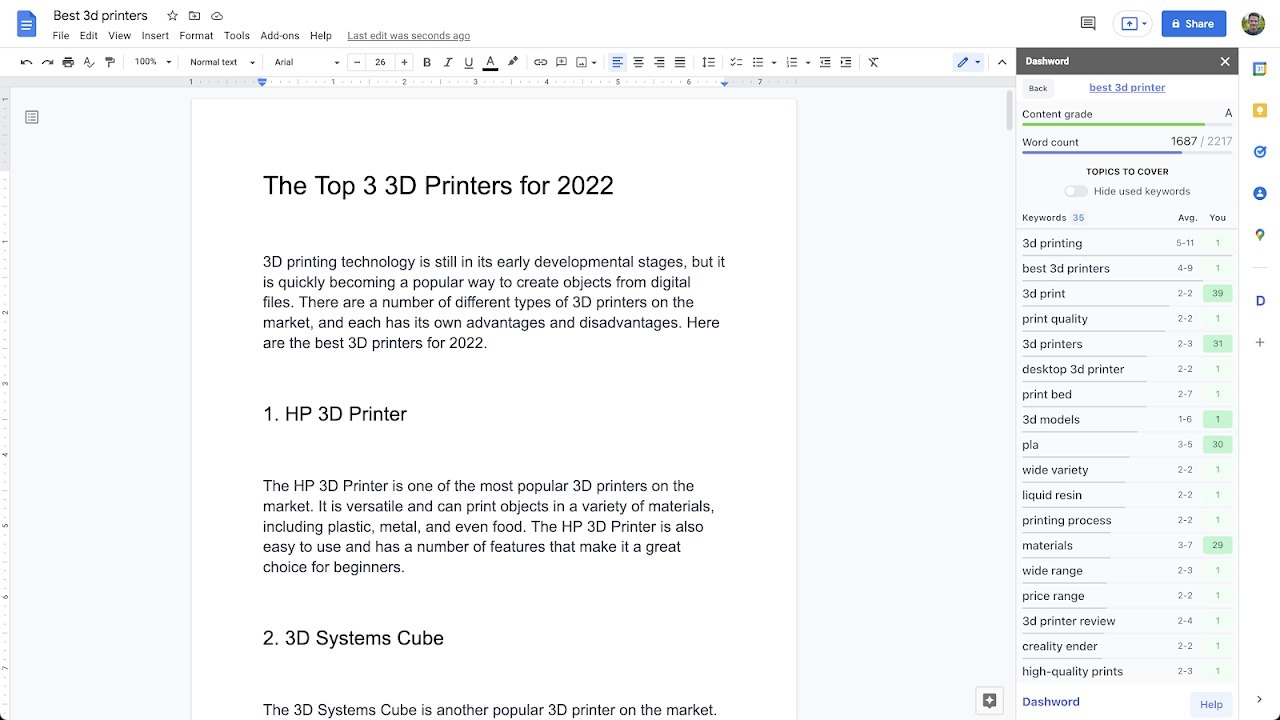
The Marketplace listing was updated in February 2022, so test the add-on with a non-sensitive document before standardizing it across an organization. Availability in the Marketplace confirms the integration exists; it does not prove that every account tier or workspace policy will permit installation.
How to Monitor Published Content
Dashword's homepage describes content monitoring that tracks traffic trends, rankings, and pages that lose traffic or receive none. It also says new keyword reports are generated weekly and that a crawler can import pages automatically.
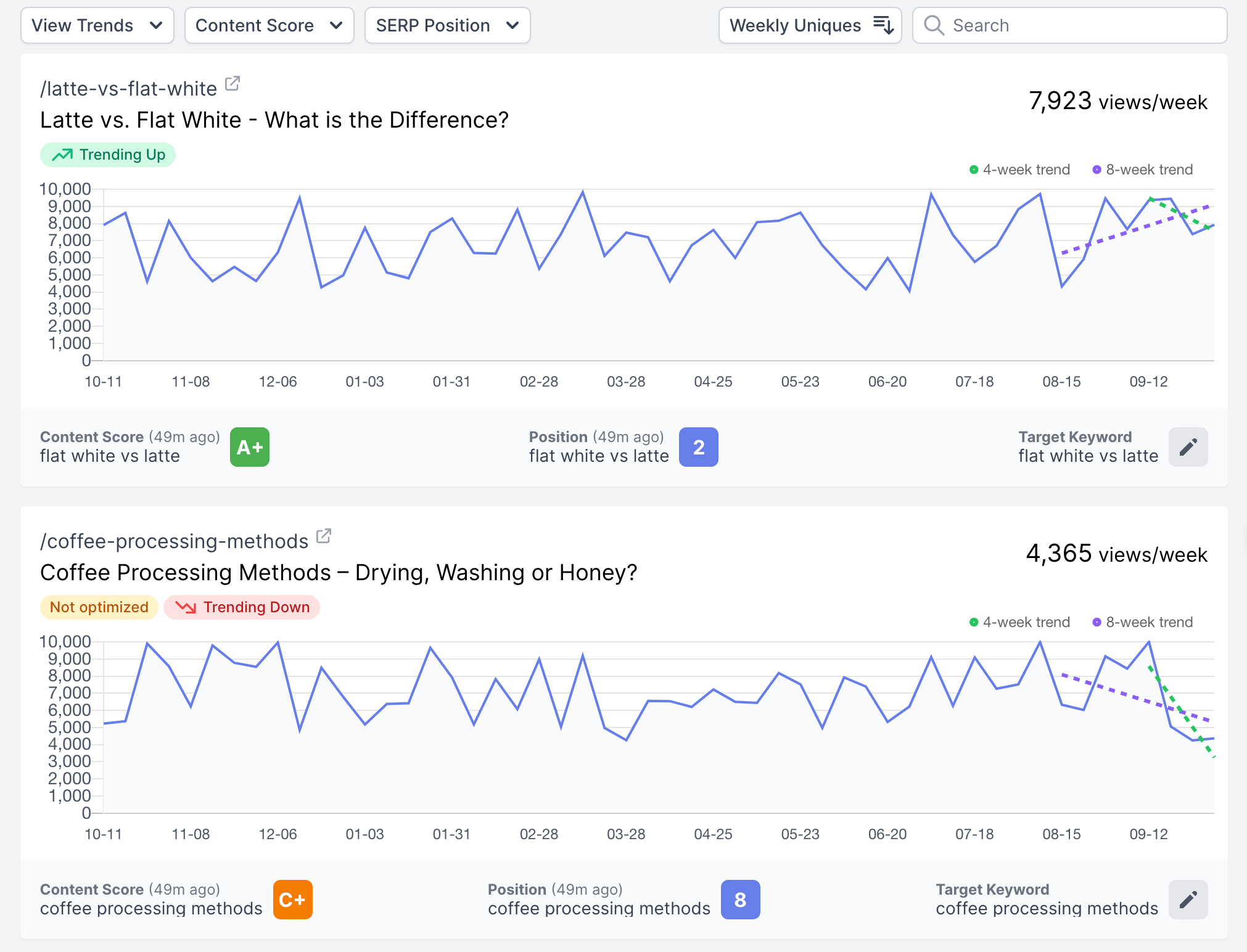
Dashword's Knowledge Base distinguishes Content pages from Traffic pages. A Content page is appropriate when you need content score, keyword ranking, weekly organic traffic, and traffic trends. A Traffic page tracks weekly organic traffic and trends without the content score and ranking layer.
Use monitoring as a triage system:
- investigate a sustained traffic decline rather than reacting to one daily fluctuation;
- compare ranking movement with seasonality and Search Console data;
- rerun or review the report when the SERP changes materially;
- update facts, examples, screenshots, and internal links before adding words;
- record the refresh date and what changed;
- avoid deleting sections solely because a recommendation set changed.
The current pricing page highlights monitoring as a core capability but does not publish exact monitoring limits on the plan cards. Confirm availability and page allowances inside the account or with Dashword before making monitoring part of an agency contract. If an article attached to an automated report is read-only, that may be intentional: Dashword says automated-report articles preserve a historical version for score tracking. Create a new article from that report instead of assuming a permission failure.
How to Automate Reports and Scoring with the API
Dashword's REST API is listed on the Business plan. Its current documentation uses the base URL https://app.dashword.com/api/v1, requires HTTPS and Bearer authentication, and returns JSON.
The API supports three useful workflow patterns:
- create a report with a keyphrase and country;
- retrieve or list reports after processing;
- score Markdown or plain text against an existing report.
An optional callback URL can receive a POST when a report finishes. Your endpoint should return HTTP 200, authenticate or verify incoming requests using controls appropriate to your system, avoid logging secrets, and handle retries idempotently. Store API keys in a secrets manager or environment variable—never inside article drafts, source control, or client-visible automation.
The scoring endpoint returns grade, word count, readability, and keyword usage details. Use those results to flag drafts for human review, not to auto-publish content solely because it reaches a threshold.
Best Practices for Reliable Dashword Results
- One intent per report: avoid combining informational and commercial goals unless the SERP clearly supports both.
- Inspect the actual ranking pages: averages can hide mixed page types.
- Brief for information gain: specify evidence and examples, not only headings and terms.
- Mute noise deliberately: document why a recommended term is irrelevant.
- Optimize concepts before counts: cover the subject naturally, then review occurrences.
- Separate content QA from SEO scoring: facts, citations, originality, UX, and technical SEO need their own checks.
- Keep a refresh log: record the query, country, report date, score changes, and editorial changes.
- Protect shared access: use the narrowest permissions suitable for freelancers and clients.
- Validate volatile features: plan limits, AI allowances, monitoring, and integrations may change.
Common Dashword Problems and How to Fix Them
| Problem | Likely cause | Recommended fix |
|---|---|---|
| Report reflects the wrong competitors | Wrong country, ambiguous query, or mixed intent | Confirm query and country; inspect page types before rebuilding |
| Suggested terms feel irrelevant | SERP noise, entity ambiguity, or off-intent competitors | Verify the concept manually and mute only clearly irrelevant terms |
| Grade rises but copy gets worse | Terms were inserted mechanically | Rewrite for meaning and reader value; treat grade as diagnostic |
| Word-count target looks inflated | Long or irrelevant pages distort the benchmark | Compare only pages that satisfy the same intent |
| Writer cannot access the article | Link permissions or account access are incorrect | Regenerate/check the public link and test in a private browser window |
| Google Docs add-on is unavailable | Workspace admin restrictions or account mismatch | Verify Marketplace access and ask the administrator to review permissions |
| Monitoring data is missing | Page import, plan access, or data connection is incomplete | Confirm the URL, workspace settings, and current plan entitlement |
| API returns 401 | Missing, malformed, or invalid Bearer token | Send HTTPS requests with the correct Authorization header |
| API returns 422 when scoring | Neither markdown nor text was supplied | Send one supported content field with the report ID |
| Content does not rank after optimization | Intent, authority, evidence, links, UX, or technical issues remain | Diagnose the full SEO system rather than repeatedly increasing the score |
When Dashword May Not Be the Right Workflow
Dashword is strongest when the target query is already chosen and a team wants a focused path from SERP research to brief and optimized draft. It may be less suitable when the primary requirement is site-wide opportunity modeling, low-cost solo publishing, native CMS automation, highly technical on-page analysis, or a broader AI production suite.
Our comparison of Dashword alternatives maps those needs to eight close products by workflow and entry price. Compare operating process—not feature count—before migrating. A tool with more modules can create more work if the team only needs fast briefs and clear guidance.
Frequently Asked Questions
Is Dashword easy for beginners?
The core sequence is approachable: enter a query and country, generate a report, review competitors and terms, create a brief or article, and optimize in the editor. Beginners still need guidance on search intent, evidence, and editorial QA because the score does not make those decisions.
Does Dashword include keyword research?
Dashword analyzes a target keyphrase and its SERP, but it is not positioned as a broad keyword-discovery suite. Choose and validate the primary query before creating the report.
Can I use Dashword for free?
The current pricing page offers one free report without a credit card. This is a report allowance, not a time-based trial. Check the live offer before signing up.
What content grade should I target?
Dashword's official older guide suggests aiming for an A grade. Use that as a diagnostic target only after the content satisfies intent, evidence, readability, originality, and user value. A grade is not a ranking guarantee.
Can freelance writers use Dashword without seeing the whole account?
Dashword's official workflow supports a public link for a specific report or article. Shared users can work in that context without access to unrelated workspace content. Test permissions before sending client-sensitive material.
Does Dashword work with Google Docs?
Yes. An official Google Workspace Marketplace add-on is available for Google Docs. Review its permissions and test it with your Workspace policies before team-wide deployment.
Does Dashword publish directly to WordPress?
Dashword's current public pages confirm a Google Docs add-on and Business API, but they do not clearly advertise a native WordPress publishing integration. Plan to finalize formatting and publish through WordPress unless your account exposes a verified workflow.
Can Dashword update existing content?
Yes. You can paste or score existing content against a report, review missing concepts, and use monitoring signals to prioritize refreshes. Preserve useful evidence and structure rather than rewriting solely to change the grade.