Dashword is a focused SEO content optimization platform that turns page-one research into editable briefs, writing guidance, and post-publication monitoring. Its strongest value is workflow simplicity, not an all-in-one SEO stack, so it can reduce research and revision time but cannot replace technical SEO, expert judgment, or original reporting.
| At-a-glance | Details |
|---|---|
| Homepage | Try Dashword ↗ |
| ScaleWitAI rating | 4.2/5 |
| Starting price | $99/month for Startup |
| Free access | First content report free, no credit card required |
| Core workflow | SERP report, content brief, editor, AI assistance, monitoring |
| Integrations | Google Docs add-on; API on Business |
| Best for | SEO teams, content marketers, agencies, and publishers producing search-led articles |
The buying decision comes down to whether faster briefs, standardized editorial handoffs, and a clean optimizer justify a $99 monthly entry price. This review examines Dashword’s current plans, practical workflow, limitations, and close alternatives so you can decide whether focused simplicity beats a broader or lower-cost platform.
Quick Verdict: Should You Use Dashword?
Use Dashword if your team repeatedly moves from a target keyword to competitor research, a writer brief, a draft, and a final optimization pass. It brings those stages into one uncluttered workflow and gives editors a repeatable quality-control layer without forcing writers through a sprawling SEO suite.
Skip it if you publish only a few articles, need technical site audits or backlink data, or want deep keyword discovery and portfolio strategy in the same subscription. The first report is free and requires no credit card, so test Dashword with a real upcoming brief before comparing the $99 plan with your current research and editing costs.
| Choose Dashword when... | Consider another tool when... |
|---|---|
| Brief creation is a recurring bottleneck | You need a complete SEO suite |
| Writers need shared optimization guidance | Your monthly content volume is very low |
| Editors want consistent SERP-based checks | You need a native WordPress plugin |
| A simple research-to-editor flow matters | You require advanced topic inventory or technical audits |
What Is Dashword?
Dashword is a browser-based content research, briefing, optimization, and monitoring tool for search-focused publishing. A user starts with a keyphrase and target country, generates a content report from competing search results, builds an outline, and writes or imports copy into an editor that evaluates topical coverage, word count, readability, and related terms.
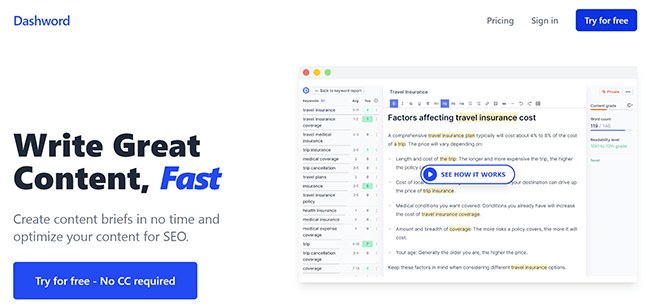
Its category boundary matters. Dashword is closer to Surfer SEO, Clearscope, Frase, and MarketMuse’s content workflow than to broad platforms such as Semrush or Ahrefs. It helps answer “What should this page cover, and is the draft sufficiently complete?” It does not replace crawling, link analysis, technical remediation, or the editorial work required to add first-hand experience and defensible claims.
The company’s official site emphasizes three connected jobs: creating briefs, optimizing before publication, and monitoring after publication. That makes Dashword more useful as a repeatable production system than as a one-off keyword checker.
Who Is Dashword Best For?
Dashword is best for teams with enough search-led output to reuse the same workflow every month.
SEO professionals managing repeatable content operations
An SEO lead can turn page-one patterns into a consistent brief instead of handing writers a keyword list and hoping they infer search intent. Reports expose competing URLs, suggested terms, common questions, and benchmark ranges, while public or shared briefs make the requirements easier to review.
Content marketers coordinating writers and editors
The combination of five Startup seats, editable briefs, and a shared scoring framework can reduce interpretation gaps between strategist, writer, and editor. The benefit is not automatic rankings. It is fewer avoidable rounds of “add this topic,” “expand that section,” and “match the original brief.”
Website owners with a meaningful publishing cadence
A publisher planning roughly 20 to 30 optimized pieces or refreshes per month can make better use of the Startup allowance than a solo owner publishing twice monthly. Low-volume buyers should calculate the effective cost per report before subscribing.
Agencies and larger in-house teams
Business adds 100 reports, 10 seats, bulk report creation, API access, and SSO. Those attributes suit teams that need throughput and controlled access, although a starting price of $349 per month deserves comparison with broader enterprise content platforms.
What Are Dashword’s Key Features?
SERP reports and country-specific competitor research
A Dashword report starts with a keyphrase and country. Official API documentation lists the United States plus Australia, Canada, the United Kingdom, Ireland, New Zealand, and Singapore as supported report countries. The resulting report can include ranking URLs, word counts, readability levels, content grades, suggested terms with importance and usage ranges, and related questions.
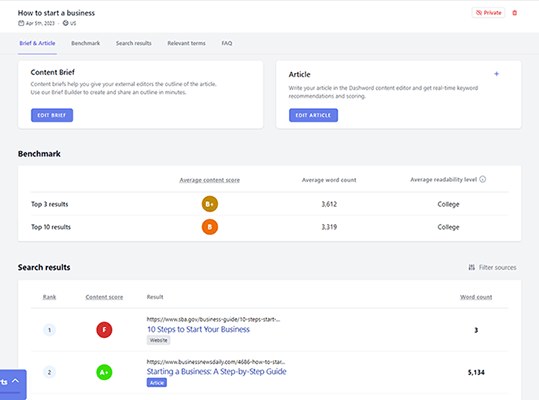
This compresses the first research pass. The buyer should still inspect which results truly match the intended page type. A software homepage, listicle, forum thread, and tutorial can rank for the same query but should not automatically become equal models for one article.
Content Brief Builder and editorial handoffs
Dashword collects competitor outlines in one place and lets an editor add, reorder, or rewrite headings in an interactive builder. A useful brief can then include the intended angle, target word-count range, questions to answer, internal links, sources, and notes for the writer.
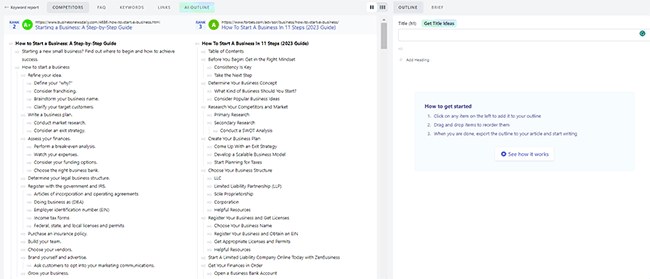
The practical value is standardization. Research becomes an editable decision document rather than a dump of headings. Teams should remove redundant competitor sections and add information-gain requirements, because copying the average SERP structure can produce a complete but interchangeable article.
Content editor, topical terms, and live scoring
The editor grades the draft while surfacing relevant terms, target length, and readability guidance. This is useful for finding omissions and controlling baseline coverage across multiple writers.
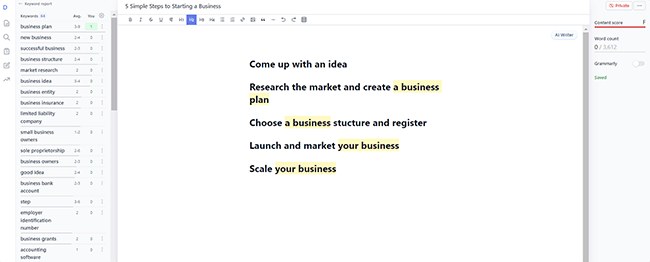
Treat the score as a diagnostic, not a ranking promise. Search performance also depends on intent satisfaction, authority, internal links, freshness, page experience, and the value that competitors did not already provide. A lower score with concise expert evidence can be better than a padded draft that reaches an arbitrary grade.
AI Writer for first-pass drafting and revision
Startup includes up to 100,000 AI Writer words per month, while the current Business pricing page lists AI Writer without stating the same cap. The editor’s AI assistance can help generate an introduction, continue a section, fix grammar, or rephrase copy.
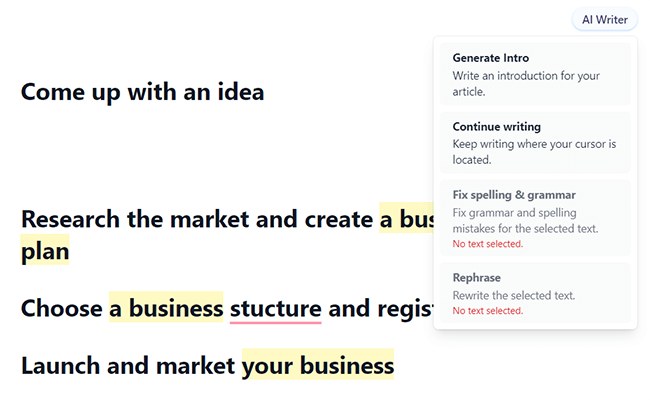
This is most useful for overcoming blank-page friction and creating material for an editor to reshape. It should not be trusted to supply product facts, first-hand experience, legal claims, or unique examples without verification.
Content monitoring and refresh signals
Dashword’s official homepage says monitoring tracks traffic trends, flags pages that lose or fail to receive traffic, generates weekly keyword reports, tracks rankings, and can automatically import pages through a crawler. This extends the workflow past publication and helps teams prioritize refreshes.
Monitoring is a decision aid, not a diagnosis by itself. A traffic decline can result from intent shifts, seasonality, SERP features, technical problems, competitors, or site-wide authority changes. Confirm the cause in Google Search Console, analytics, and technical tools before rewriting a page.
Google Docs add-on and Business API
The Google Workspace Marketplace lists an official Dashword add-on that brings content optimization guidance into Google Docs. It requests permission to work with documents where it is installed, connect to an external service, and view basic account information, so workspace administrators should review permissions before rollout.
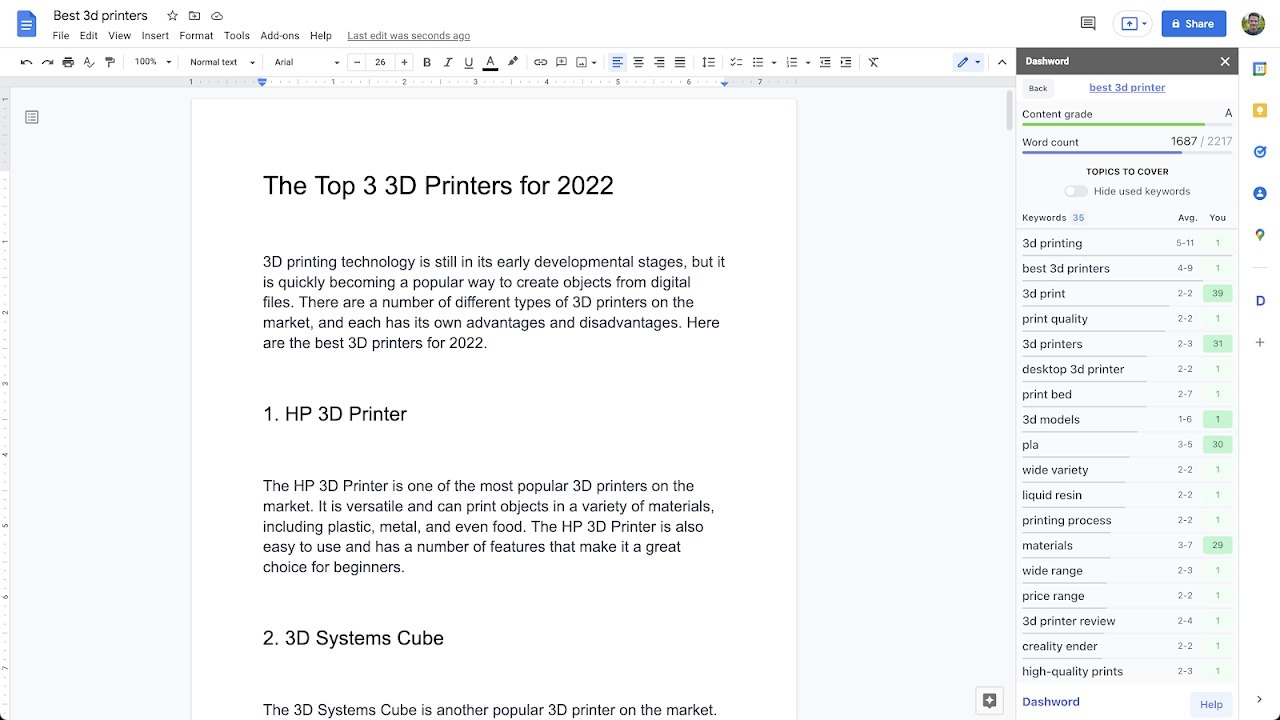
Business includes API access. Official documentation exposes endpoints for creating and retrieving reports and for scoring Markdown or plain text against a report. That can support a custom CMS or editorial pipeline, but buyers should confirm rate limits, support, and implementation needs directly with Dashword.
How Does Dashword Work?
The core workflow has six steps:
- Create a report. Enter the target query and choose the US or another supported country.
- Validate the SERP set. Exclude irrelevant page types and note the dominant intent.
- Build the brief. Select useful competitor headings, add questions, sources, internal links, and an information-gain requirement.
- Draft in Dashword or Google Docs. Use the outline as a constraint, not a substitute for expertise.
- Optimize selectively. Review missing terms, readability, structure, and length, but stop when additions no longer help the reader.
- Publish and monitor. Move approved content into the CMS, then use monitoring alongside Search Console and analytics to identify refresh candidates.
For a complete walkthrough, the Dashword tutorial for building and optimizing an article covers the sequence step by step. Teams evaluating the wider category can also use our AI SEO writing tools hub to understand where a focused optimizer fits in the broader workflow.
What Is Dashword Like in Real Use?
Dashword’s public workflow appears deliberately linear: report, brief, article, optimization, and monitoring. That reduces setup friction compared with platforms that begin with projects, inventories, campaigns, and multiple research modules. The browser interface also means there is no desktop installation, while the Google Docs add-on lets writers stay in a familiar environment.
The most important setup decision is competitor selection. If the report contains mismatched results, every downstream suggestion becomes noisier. An experienced SEO will classify intent first, choose representative pages, and treat recommended terms as evidence to interpret. A beginner is more likely to drag every common heading into the outline or add every term until the score improves.
The strongest team benefit is a shared definition of baseline completeness. Writers know the required questions and topical areas; editors can distinguish a missing subject from a stylistic preference. The weakness is that a shared score can become a target in itself. Teams need an editorial rule that relevance, factual support, and originality outrank term frequency.
Dashword also does not remove the CMS handoff. The Google Docs add-on helps with drafting, and Business API access can support custom automation, but buyers should not assume a native WordPress publishing plugin. Confirm how formatted content, images, metadata, internal links, and schema move into your production system.
How Much Does Dashword Cost?
Dashword currently offers two paid plans and one free first-report experience.
| Plan | Price | Reports and seats | Notable inclusions |
|---|---|---|---|
| Free first report | $0 | 1 report | No credit card required; test the core workflow |
| Startup | $99/month | 30 reports; 5 seats | Content Briefs; AI Writer up to 100,000 words |
| Business | From $349/month | 100 reports; 10 seats | Briefs; AI Writer; bulk report creation; API; SSO |
The official pricing FAQ says annual billing receives a 20% discount, subscriptions can be canceled at any time with no minimum contract, and canceled users retain access to existing data but cannot generate new reports. Dashword’s terms state that paid subscription fees are non-refundable except where required by law.
The value test should use workflow economics rather than the headline fee alone. At full use, Startup’s 30-report allowance is about $3.30 per report before accounting for seats, briefs, and AI words. At five reports per month, the effective cost is $19.80 per report. Teams should compare those numbers with time spent manually reviewing SERPs and revising incomplete briefs.
Try Dashword’s free first report with a keyword already scheduled for production. Measure research time, brief-editing time, writer questions, and revision rounds before deciding whether the monthly plan pays for itself.
What Are the Pros and Cons of Dashword?
| Pros | Cons |
|---|---|
| Clear report-to-brief-to-editor workflow | $99 entry price is high for low-volume users |
| Five seats included on Startup | Monthly report limits remain on paid plans |
| Real-time topical and readability guidance | A high content score does not guarantee rankings |
| First report is free without a credit card | Not a replacement for technical SEO or backlink tools |
| Google Docs add-on supports existing writing habits | No native WordPress publishing integration is clearly advertised |
| Monitoring extends optimization beyond publication | SERP-derived guidance can encourage look-alike content |
| Business API supports custom workflows | API, bulk creation, and SSO require Business |
What Are the Best Dashword Alternatives?
The right alternative depends on the capability that matters more than Dashword’s simplicity.
| Alternative | Better fit when... | Main trade-off to check |
|---|---|---|
| Surfer SEO | You want a mature optimizer with a broad ecosystem and additional workflow products | Feature breadth, credit rules, and total subscription cost |
| Clearscope | Editorial quality, term discovery, and a polished writer experience matter more than a low price | Premium pricing and report allowances |
| Frase | You want research, briefs, optimization, and AI drafting with more plan flexibility | Add-ons, usage limits, and workflow complexity |
| MarketMuse | You need content inventory analysis, topic planning, and authority strategy across many pages | Learning curve and enterprise-level cost |
Dashword is the simplicity-first choice in this group. Surfer and Frase may suit buyers wanting more creation features, Clearscope remains a premium editorial benchmark, and MarketMuse goes deeper into portfolio planning. Our Dashword alternatives comparison breaks down these choices by research depth, scoring, workflow, and price fit.
Where Does Dashword Fall Short?
The entry price is the clearest constraint. A solo website owner can access one report free, but ongoing use starts at $99 per month. The economics improve with multiple writers and a reliable publishing schedule, not with occasional optimization.
Report limits may shape behavior. Startup includes 30 reports and Business 100. Teams that run reports for every update, location page, or keyword variant should estimate real monthly demand rather than mapping one report to one final article.
Optimization can converge toward the SERP average. Competitor headings, common terms, and target lengths help establish minimum coverage. They do not create a distinct point of view, proprietary data, first-hand product evidence, or expert synthesis.
It is focused rather than comprehensive. Dashword does not replace crawling, site architecture analysis, backlink research, digital PR, or complete keyword portfolio management. Most professional teams will use it alongside Search Console, analytics, a technical crawler, and an SEO research platform.
Publishing automation needs validation. Google Docs and API access cover important handoffs, but buyers needing one-click WordPress publishing, granular workflow permissions, or custom governance should confirm the exact process before committing.
Which Dashword Attributes Should Buyers Check?
Before subscribing, score Dashword against your actual operation:
- Monthly report demand: Count new briefs and refreshes, including abandoned keyword tests.
- Number of active collaborators: Startup includes five seats; Business includes ten.
- Brief complexity: Decide whether you need simple SERP evidence or deeper brand, product, compliance, and SME fields.
- Editor location: Test the native editor and Google Docs add-on with the writers who will use them.
- Content refresh process: Confirm who reviews monitoring alerts and how changes are prioritized.
- Integration needs: Business API access is valuable only if someone will implement and maintain the workflow.
- Originality safeguards: Require sources, examples, first-hand inputs, and a reason for the page to exist beyond matching competitors.
- Measurement: Track production time, revision rounds, organic clicks, and successful refreshes rather than content scores alone.
Is Dashword Worth It?
Dashword is worth considering when briefing and editorial consistency cost more than the subscription. Its focused interface, five-seat Startup plan, free first report, content scoring, Google Docs option, and monitoring form a coherent system for search-led teams.
It is harder to justify for low-volume publishers or buyers expecting an all-in-one SEO suite. The $99 starting price and report caps mean value depends on regular use. The safest decision is to process one real article through the free report, document the time saved and problems caught, and compare that evidence with close alternatives.
If Dashword removes a recurring research and revision bottleneck, start with Dashword’s free report. If the workflow feels too narrow or expensive, compare alternatives before moving production into a paid plan.
FAQ
Does Dashword offer a free trial?
Dashword offers the first content report free without requiring a credit card. The official pricing page describes this as a free report rather than a time-limited multi-day trial.
How much does Dashword cost?
Startup costs $99 per month and includes 30 reports, five seats, Content Briefs, and up to 100,000 AI Writer words. Business starts at $349 per month with 100 reports, 10 seats, bulk report creation, API access, and SSO. Annual billing receives a 20% discount according to the official FAQ.
Can Dashword replace an SEO writer?
No. It can accelerate SERP research, outline creation, first-pass drafting, and coverage checks. A human still needs to verify facts, add expertise, match brand voice, make original judgments, and decide when optimization advice would reduce clarity.
Does Dashword work with Google Docs?
Yes. Dashword has an official Google Workspace Marketplace add-on that brings content optimization guidance into Google Docs. Workspace administrators should review the requested document, external-service, and account permissions before installation.
Does Dashword integrate with WordPress?
Dashword does not prominently advertise a native WordPress plugin on its current product and pricing pages. Content can be moved from its editor or Google Docs into a CMS, and Business API access may support a custom integration. Validate the exact handoff your team needs.
Is Dashword good for agencies?
It can be, especially when standardized briefs and shared optimization rules reduce revision cycles. Startup includes five seats, while Business includes ten seats, bulk report creation, API access, and SSO. Agencies should compare report volume, client separation, permissions, and total cost with other platforms.