NeuronWriter is an AI SEO content optimization tool for SERP analysis, NLP terms, content scoring, and AI-assisted writing. It is worth testing if your team needs a lower-cost way to plan, write, and refresh search-focused content, but it does not replace technical SEO, backlinks, brand authority, or human editing.
| At-a-glance | Details |
|---|---|
| Homepage | neuronwriter.com ↗ |
| Overall rating | 4.5/5 |
| Starting price | From $23/month |
| Free trial | Yes, 7 days under Gold plan terms |
| Integrations | WordPress, Google Search Console, Chrome Extension, Zapier, API, Boost.space |
| Best for | SEO specialists, marketers, copywriters, content creators, agencies, SMBs, and website owners |
This NeuronWriter review focuses on buyer intent: who it fits, how its NLP scoring and SERP workflow work, where pricing makes sense, when the lifetime deal is worth considering, and how it compares with Surfer SEO, Frase, Clearscope, and MarketMuse. The goal is to help content teams decide whether NeuronWriter belongs in their monthly SEO production workflow.
Quick Verdict: Should You Use NeuronWriter?
NeuronWriter is best for value-focused SEO teams that need SERP-guided content optimization without enterprise pricing. Its strongest use case is turning a target keyword into a clearer content brief, optimized draft, and repeatable review process.
Use NeuronWriter if you publish or refresh SEO content every month. Skip it if your main bottleneck is technical crawling, backlinks, full-site strategy, or autonomous publishing.
| Decision point | Recommendation |
|---|---|
| Best fit | SEO specialists, marketers, copywriters, agencies, SMBs, affiliate publishers |
| Main use case | Plan, write, and optimize content using SERP and NLP recommendations |
| Strongest attribute | Affordable content optimization workflow |
| Weakest attribute | Not a full SEO suite or link-building system |
| Best buying path | Test the subscription workflow first, then consider lifetime access if usage is recurring |
If this workflow matches your publishing process, start with the NeuronWriter subscription trial. If you already publish or refresh SEO content every month, compare the NeuronWriter lifetime deal.
What Is NeuronWriter?
NeuronWriter is a content optimization and AI visibility platform that helps writers and SEO teams analyze search competitors, identify NLP terms, structure content, improve content score, and prepare drafts for publishing.
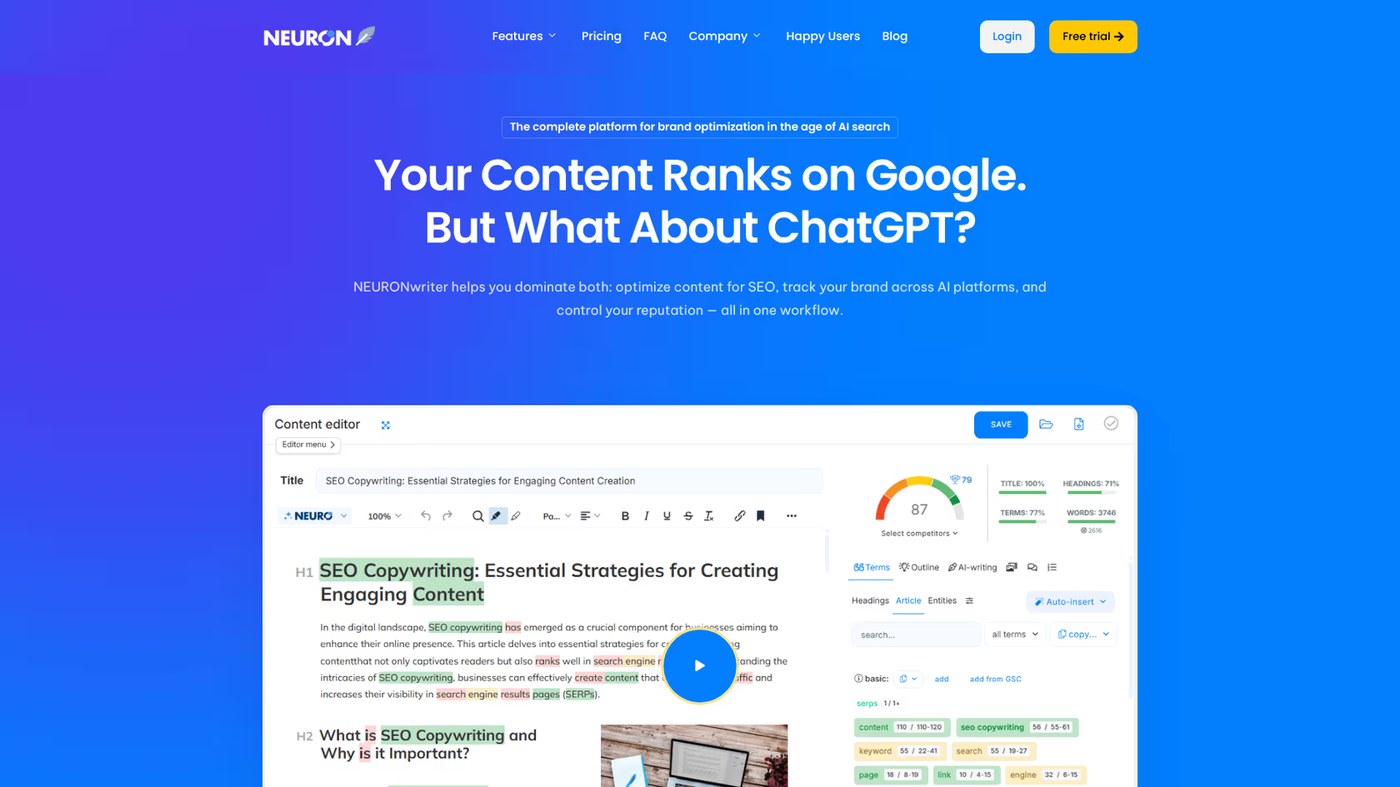
It fits inside a broader AI SEO writing workflow where keyword research, SERP interpretation, content engineering, editing, internal links, and publishing QA all need to work together. NeuronWriter is not the entire operating system, but it can become the optimization layer in the middle of that workflow.
The tool starts with a target keyword. It analyzes top-ranking pages, surfaces related terms and entities, and gives the writer a content editor where structure, recommended terms, questions, and scoring can be reviewed. If you need step-by-step usage help after reading this review, use the NeuronWriter tutorial workflow.
The important distinction is this: a general AI writer creates text, while NeuronWriter helps decide what the text should cover to compete. That makes it more useful for SEO content teams than a blank AI chat box.
Who Is NeuronWriter Best For?
NeuronWriter is best for content teams that already know their target keyword and need help turning SERP data into a better article. It is especially useful for SEO specialists, marketers, copywriters, agencies, SMB website owners, and affiliate publishers.
For SEO specialists, NeuronWriter reduces manual competitor review. Instead of opening ten ranking pages and copying headings, questions, and repeated phrases into a spreadsheet, you can review the SERP inside a structured workspace.
For copywriters, the tool gives direction before and after drafting. Writers can see what the page should cover, write the draft, then use NLP terms and content score as a quality check.
For agencies and content teams, NeuronWriter helps standardize production. A team can use the same process for briefs, draft review, content refresh, and final optimization across multiple projects.
For SMBs and site owners, the appeal is value. NeuronWriter is commonly considered a lower-cost alternative to enterprise-grade optimization tools, especially when the business needs practical SEO content guidance rather than a large platform stack.
What Are NeuronWriter’s Key Features?
The most important NeuronWriter features fall into 5 entity groups: SERP analysis, NLP scoring, AI writing, publishing workflow, and AI visibility support. Grouping the features this way is more useful than listing software buttons because each group maps to a real content job.
| Entity group | Feature entities | Practical role |
|---|---|---|
| SERP research | Competitor analysis, keyword intent, page structure | Understand what ranking pages cover before writing |
| Semantic optimization | NLP terms, entities, content score, questions | Improve topical coverage and content completeness |
| AI writing | AI Writer, Content Designer, article generation | Speed up drafts while preserving editorial control |
| Publishing workflow | WordPress, Google Search Console, Chrome Extension, Zapier, API | Connect optimization with publishing and data workflows |
| AI search visibility | AI Overviews, answer engines, AI Monitoring addon | Prepare content for search and AI-assisted discovery |
SERP analysis and competitor structure
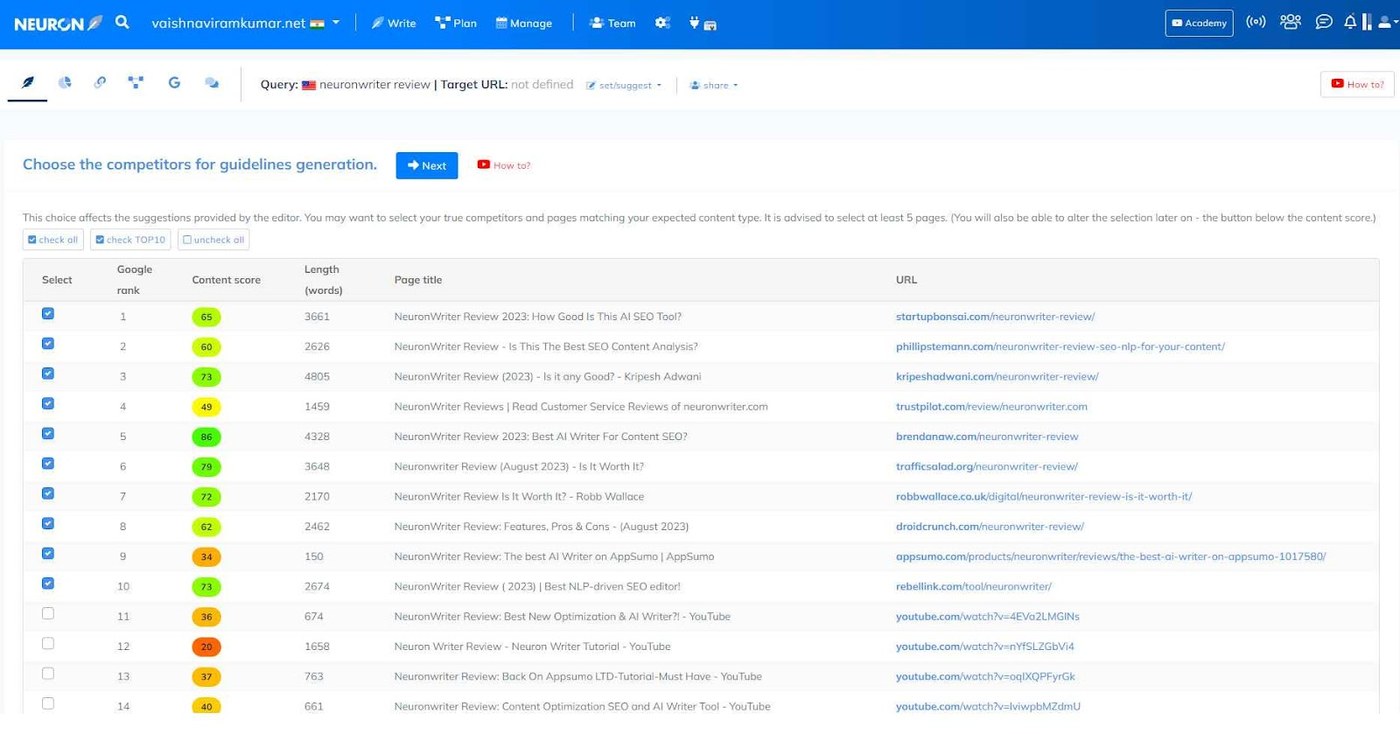
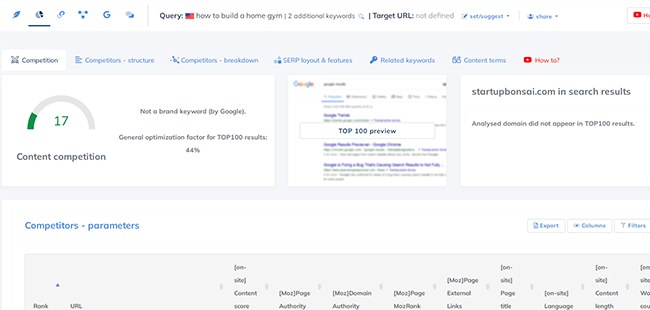
NeuronWriter analyzes competitor pages for a target query and helps you see repeated headings, terms, and content patterns. This is useful because SEO writing begins with understanding what the search engine currently rewards for the query.
The value is not copying competitors. The value is identifying the expected coverage and then adding better structure, examples, comparisons, and decision support.
NLP terms, entities, and content score
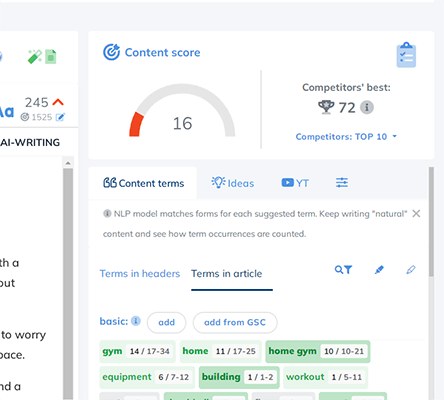
NeuronWriter’s NLP terms show words and phrases that appear across top-ranking competitors. The entity feature helps identify important concepts that may improve search engine interpretation of the page.
The content score is useful as a diagnostic signal, but it should not become the goal. A stronger article uses NLP terms naturally, explains entity relationships, and avoids stuffing terms just to raise a number.
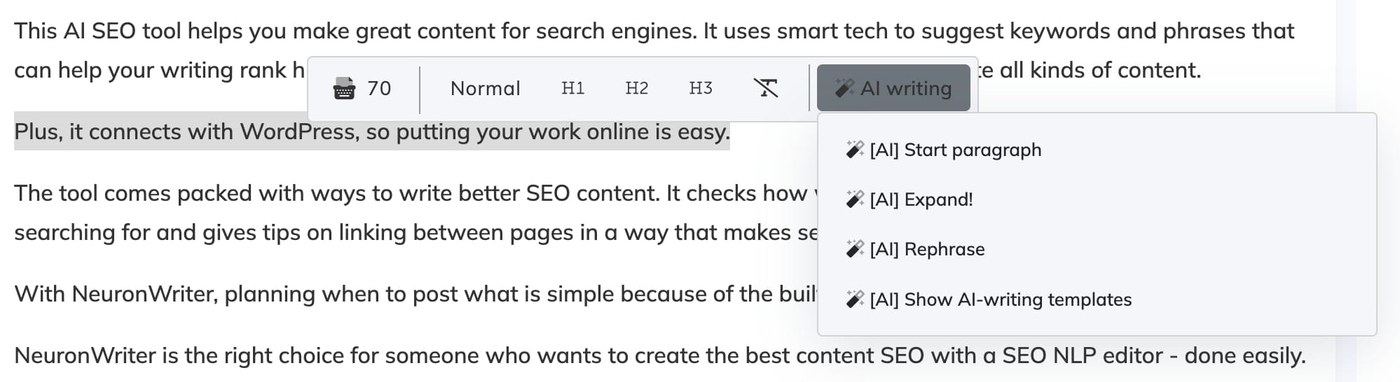
AI writing and Content Designer
NeuronWriter includes AI writing features and Content Designer support for generating structured content faster. This can help with first drafts, section expansion, examples, and rewriting.
The limitation is that AI output still needs human editing. The best workflow is to use AI for speed, then use editorial judgment to add examples, remove generic phrasing, and check facts.
WordPress, Google Search Console, and workflow integrations
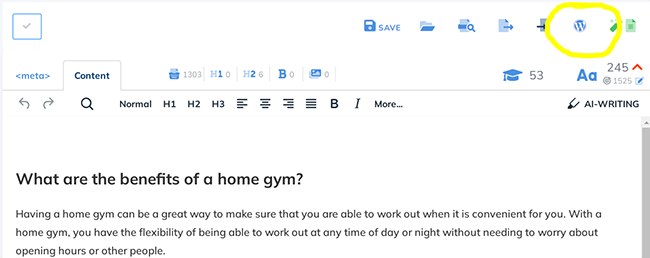
NeuronWriter supports WordPress import/export, Google Search Console, Chrome Extension, Zapier, API, and Boost.space workflows. The WordPress integration is available for Gold plan subscribers and higher according to the official integrations page.
If your publishing process ends in WordPress, read the dedicated NeuronWriter WordPress integration workflow before moving optimized drafts into the CMS. That guide covers the CMS handoff, formatting review, and metadata checks that a review article cannot explain in full.
AI visibility and answer engine positioning
NeuronWriter now positions itself around Google rankings, AI Overviews, and answer engines. This matters because SEO content is no longer only about classic blue-link rankings. Teams also need content that is structured enough to be understood, summarized, and cited by AI-assisted search systems.
How Does NeuronWriter Work?
NeuronWriter works by turning a keyword into an optimization workspace. The typical workflow is query creation, competitor review, outline planning, draft writing, NLP/entity optimization, content score review, and CMS handoff.
| Workflow stage | What happens | What to check |
|---|---|---|
| Query setup | Choose keyword, country, language, and search engine | Match the real target market |
| Competitor review | Analyze ranking pages and repeated subtopics | Remove irrelevant intent mentally |
| Outline planning | Build sections from intent and entity coverage | Avoid copying competitor structure mechanically |
| Drafting | Write manually or use AI support | Keep original examples and buyer logic |
| Optimization | Add useful NLP terms and entities | Do not keyword-stuff |
| Publishing QA | Move to WordPress or CMS | Check formatting, links, metadata, tables, and images |
The workflow is simple, but the quality depends on the user’s judgment. NeuronWriter can show gaps. It cannot decide your brand position, original angle, or final editorial standards by itself.
What Is NeuronWriter Like in Real Use?
In real use, NeuronWriter feels strongest when the writer already has a keyword and needs a structured way to turn that keyword into a complete content brief. The tool is less useful when the user expects it to decide the entire SEO strategy.
The first practical advantage is speed. SERP review, repeated terms, headings, questions, and optimization signals are easier to collect in one place than manually across many browser tabs.
The second advantage is consistency. Agencies and teams can use NeuronWriter as a shared quality layer. A draft can be reviewed against the same scoring, NLP terms, and competitor expectations before it reaches WordPress.
The main risk is over-optimization. Beginners may try to force every suggested term into the article. That can make the content sound unnatural. Experienced users treat the recommendations as prompts for coverage, not mandatory keywords.
How Much Does NeuronWriter Cost?
NeuronWriter pricing depends on the plan and buying route. The official FAQ lists 5 pricing plans: Bronze, Silver, Gold, Platinum, and Diamond. The official pricing page also confirms a 7-day free trial under Gold plan terms and a 30-day refund policy for the first plan purchased on an account.
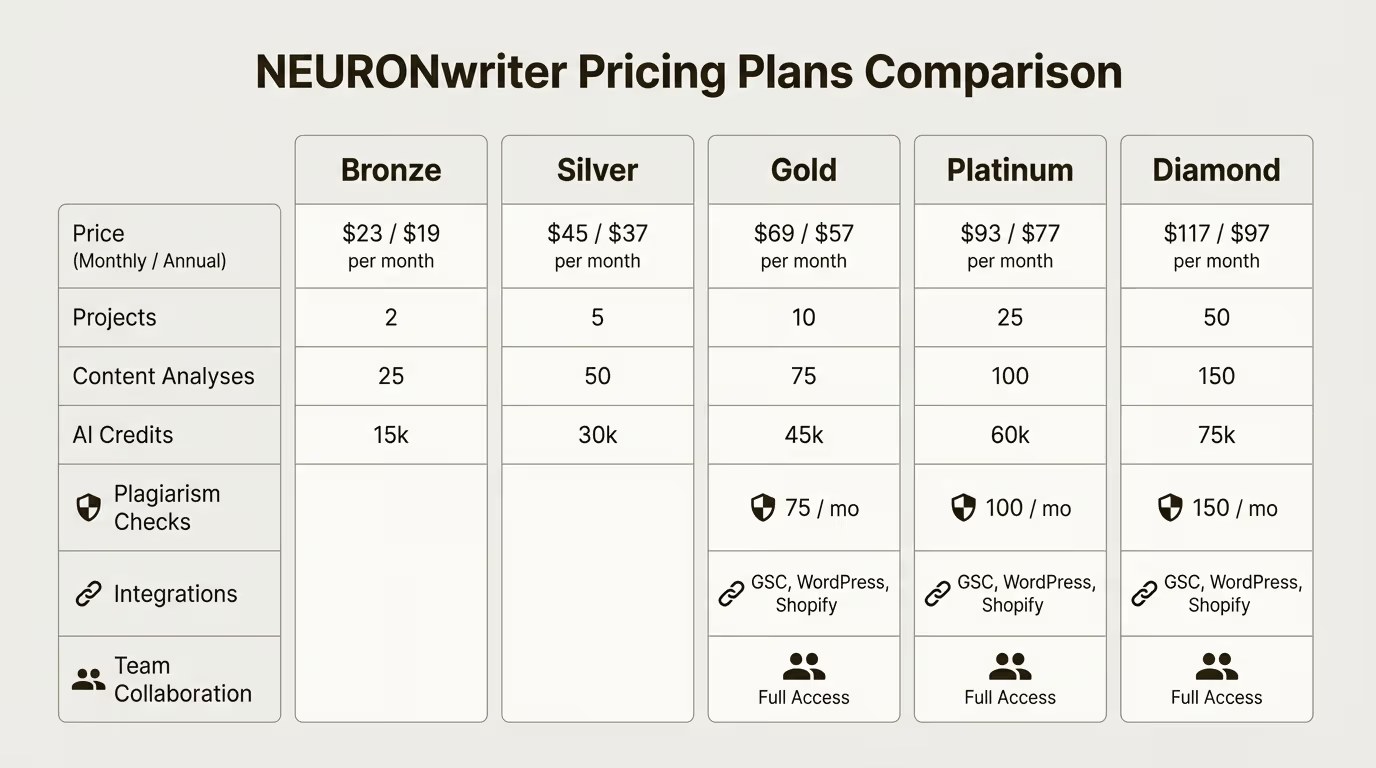
The article’s buyer-facing summary uses plans from $23/month and separates the subscription route from the lifetime deal route. Because pricing can change, users should confirm live plan details before purchase.
| Pricing attribute | Value noted for this review | Buyer meaning |
|---|---|---|
| Free trial | 7 days under Gold plan terms | Useful for testing workflow fit before committing |
| Pricing plans | Bronze, Silver, Gold, Platinum, Diamond | Plan choice depends on content volume and team needs |
| Starting price | From $23/month | Lower entry point than many premium SEO content tools |
| Refund policy | 30 days for first plan purchased | Reduces first-purchase risk |
| Lifetime option | Available through affiliate lifetime route | Better for recurring content teams after fit is proven |
| Best plan logic | Subscription first, lifetime after workflow fit | Avoid buying lifetime access before testing real usage |
If price is your main decision point, compare the NeuronWriter subscription and lifetime deal options before choosing a plan. That page is the better place to evaluate trial, subscription, and lifetime deal tradeoffs.
What Are the Pros and Cons of NeuronWriter?
NeuronWriter’s strengths are practical: it is affordable, structured, and focused on SEO content optimization. Its weaknesses are also clear: it is not a full SEO suite, not a link-building platform, and not a replacement for human strategy.
| Pros | Cons |
|---|---|
| Lower-cost SEO content optimization workflow | Not a full technical SEO or backlink platform |
| SERP competitor analysis helps structure briefs | Recommendations can be misused as keyword stuffing |
| NLP terms and entities support semantic coverage | Content score is only a guide, not a quality guarantee |
| AI writing speeds up drafting and rewriting | Human editing is still required |
| WordPress and GSC integrations improve workflow | Some integrations depend on plan level |
| Useful for agencies and recurring content production | Not ideal for one-off casual writing |
The simplest way to decide is to ask: do you regularly create or refresh SEO content? If yes, NeuronWriter can create process leverage. If no, it may be more tool than you need.
What Are the Best NeuronWriter Alternatives?
The main NeuronWriter alternatives are Surfer SEO, Frase, Clearscope, MarketMuse, and other AI SEO writing tools. The best choice depends on whether you value price, content scoring depth, brief generation, enterprise workflow, or AI writing features.
| Alternative | Best for | Compared with NeuronWriter |
|---|---|---|
| Surfer SEO | Advanced content optimization and SERP workflows | More polished ecosystem, often higher cost |
| Frase | Brief creation and question-based content planning | Strong for outlines and answer-focused research |
| Clearscope | Premium content optimization and editorial teams | Strong reputation, usually more expensive |
| MarketMuse | Enterprise content strategy and topical planning | Broader strategic platform, higher complexity |
| AIKTP or similar AI SEO writers | Fast AI-assisted drafting | May lack the same SERP/NLP scoring depth |
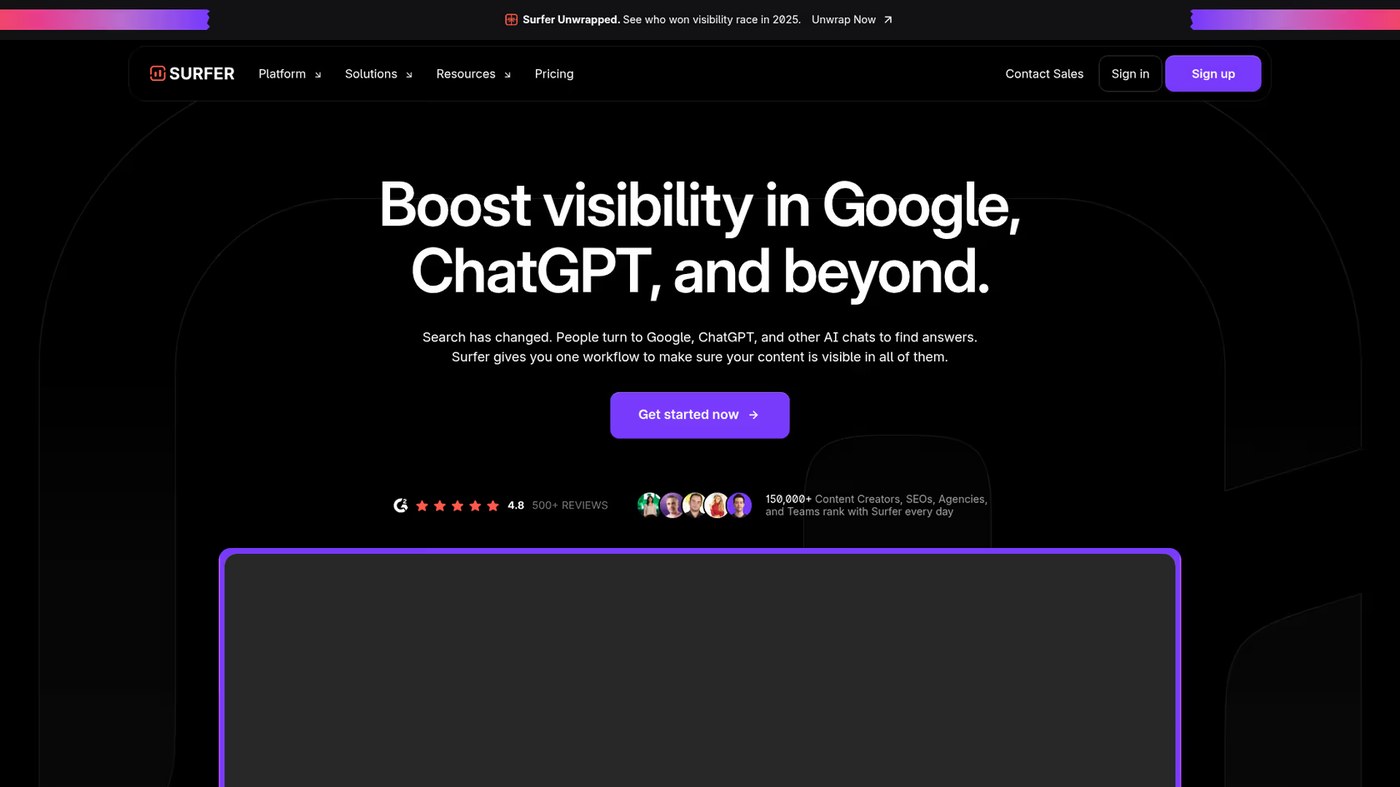
If you are not sure NeuronWriter fits your team, compare the dedicated NeuronWriter alternatives before buying. That comparison should be used when the decision is about tool fit rather than just price.
Where Does NeuronWriter Fall Short?
NeuronWriter falls short when buyers expect it to replace the rest of SEO. It does not solve technical crawl issues, domain authority gaps, backlink acquisition, brand trust, or full editorial strategy.
It can also mislead users who treat score optimization as the whole job. A high content score can still produce mediocre content if the article lacks originality, practical examples, product understanding, or clear decision support.
Another limitation is that integrations and workflow features may depend on plan level. For example, WordPress and Google Search Console integrations are listed as Gold plan and higher features on the official integrations page.
Finally, NeuronWriter is strongest once you already have a target keyword or content refresh task. If you need a full strategic roadmap from scratch, you may need keyword research, topical mapping, analytics, and editorial planning around it.
Which NeuronWriter Attributes Should Buyers Check?
Before choosing NeuronWriter, evaluate the attributes that affect real workflow fit. This is more useful than asking whether the tool is generally good.
| Attribute | Question to ask | Why it matters |
|---|---|---|
| Query volume | How many content pieces do you optimize each month? | Determines whether the subscription or lifetime route makes sense |
| Workflow fit | Do writers actually use SERP/NLP feedback? | Tools fail when teams ignore the process |
| CMS process | Do you publish in WordPress or another CMS? | Affects whether integrations save time |
| Editorial standards | Who checks facts, examples, tone, and originality? | Prevents AI-assisted content from becoming generic |
| Alternatives | Do you need enterprise content strategy or just optimization? | Helps compare NeuronWriter with Surfer, Frase, Clearscope, or MarketMuse |
| Budget horizon | Are you testing or committing long term? | Guides subscription vs lifetime decision |
A buyer who publishes weekly has different needs from a site owner who updates content once a quarter. Match the tool to the operating cadence.
Is NeuronWriter Worth It?
NeuronWriter is worth it for SEO teams, copywriters, agencies, and SMBs that publish or refresh search-focused content every month. It provides useful SERP analysis, NLP scoring, content editing, AI writing support, and workflow integrations at a value-focused price point.
It is not worth it if you only need occasional copywriting, if your main SEO issue is technical, or if you expect automated rankings from a content score alone.
The best buying path is practical: test the workflow first, run one or two real content projects through it, then decide whether recurring use justifies subscription or lifetime access. If you already know you will use the tool monthly, check the NeuronWriter lifetime deal. If you are still validating workflow fit, start with the NeuronWriter subscription trial.
FAQ
Is NeuronWriter good for SEO content?
Yes. NeuronWriter is good for SEO content when you need SERP analysis, NLP terms, entities, content scoring, and AI writing support. It is strongest when used as part of a broader editorial and publishing workflow.
Does NeuronWriter have a free trial?
Yes. The official pricing page states that users can test the tool free for 7 days under Gold plan terms after creating an account.
How much does NeuronWriter cost?
NeuronWriter lists five plan tiers: Bronze, Silver, Gold, Platinum, and Diamond. This review uses plans from $23/month as the buyer-facing starting point, but pricing can change, so confirm current plan details before buying.
Does NeuronWriter integrate with WordPress?
Yes. NeuronWriter lists WordPress import/export as an integration available for Gold plan subscribers and higher. The WordPress button is located in the editor menu on the left side according to the official integrations page.
Is NeuronWriter better than Surfer SEO?
NeuronWriter is usually better for buyers who want a value-focused optimization workflow. Surfer SEO may be better for users who want a more polished ecosystem and are comfortable with higher pricing.
What is NeuronWriter best used for?
NeuronWriter is best used for planning, writing, optimizing, and refreshing SEO content. It helps turn a target keyword into a structured content brief and improved draft.
Should I buy the NeuronWriter lifetime deal?
Consider the lifetime deal only after testing whether NeuronWriter fits your workflow. If you publish or refresh content every month, lifetime access may offer better long-term value than a subscription.
What are the best NeuronWriter alternatives?
Common alternatives include Surfer SEO, Frase, Clearscope, MarketMuse, and AI SEO writing tools with content scoring. The right choice depends on budget, workflow, content volume, and team needs.